


Every business, regardless of size or industry, runs into technology problems. A printer stops working right before an important meeting. An employee gets locked out of their account on a Monday morning. The company VPN refuses to connect for half the remote team. These are not rare scenarios. They happen constantly, and when they do, work stops.
That is exactly what IT helpdesk services exist to solve. Not just to fix problems when they happen, but to make sure those problems get resolved quickly, consistently, and without pulling your internal team off their actual work.
This guide walks you through everything you need to know about IT helpdesk services, including what they are, how they work, what is included, and why more businesses are choosing to outsource them rather than trying to build everything in-house.
What Are IT Helpdesk Services?
IT helpdesk services are a structured form of technical support that helps employees and end users resolve technology-related issues. This can include anything from password resets and software crashes to network connectivity problems, hardware failures, and software installation requests.
The term “helpdesk” refers to the centralized team or system that handles incoming support requests. When someone in your organization runs into a technology problem, they contact the helpdesk. From there, a trained technician diagnoses the issue, applies a fix, and documents what happened so the same problem can be resolved even faster next time.
Modern IT helpdesk services go far beyond just answering tickets. They involve proactive monitoring, structured escalation processes, defined service level agreements, and often 24/7 availability. For many businesses, a well-run helpdesk is the difference between minor disruptions and major productivity losses.
It is important to understand that helpdesk services are not the same thing as general IT consulting or managed IT services, though there is some overlap. A helpdesk is specifically focused on end-user support and issue resolution. Managed IT services tend to cover a broader scope that includes infrastructure management, strategic planning, and long-term technology roadmaps.
How IT Helpdesk Services Work
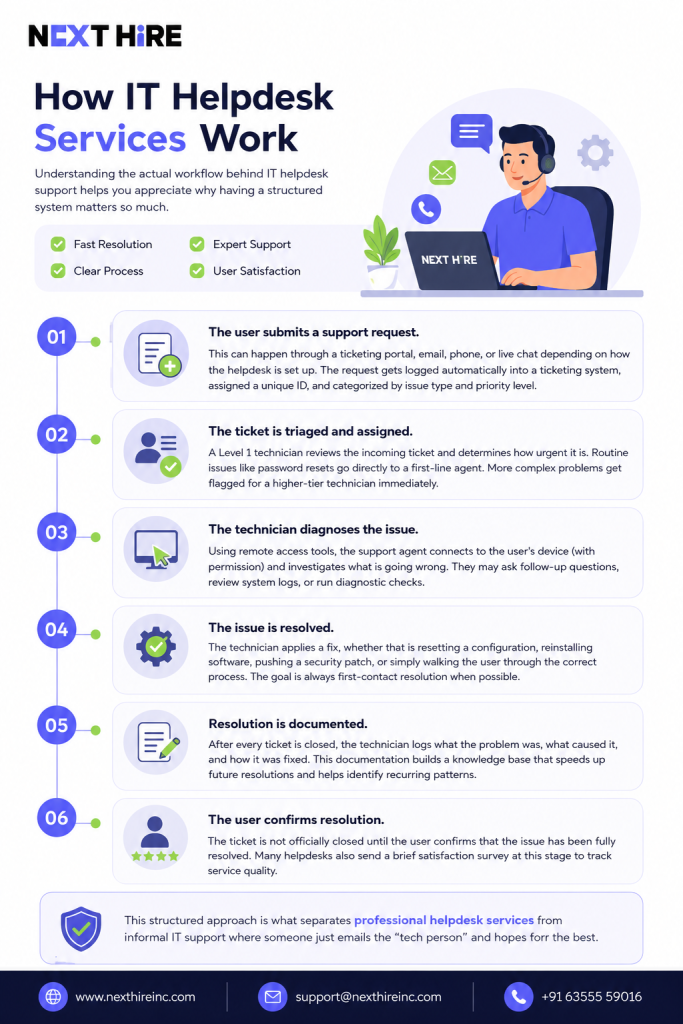
Understanding the actual workflow behind IT helpdesk support helps you appreciate why having a structured system matters so much. When support is unstructured, requests fall through the cracks, the same problems keep coming back, and nobody knows how long anything took to fix.
Here is a typical flow from start to resolution:
Step 1: The user submits a support request. This can happen through a ticketing portal, email, phone, or live chat depending on how the helpdesk is set up. The request gets logged automatically into a ticketing system, assigned a unique ID, and categorized by issue type and priority level.
Step 2: The ticket is triaged and assigned. A Level 1 technician reviews the incoming ticket and determines how urgent it is. Routine issues like password resets go directly to a first-line agent. More complex problems get flagged for a higher-tier technician immediately.
Step 3: The technician diagnoses the issue. Using remote access tools, the support agent connects to the user’s device (with permission) and investigates what is going wrong. They may ask follow-up questions, review system logs, or run diagnostic checks.
Step 4: The issue is resolved. The technician applies a fix, whether that is resetting a configuration, reinstalling software, pushing a security patch, or simply walking the user through the correct process. The goal is always first-contact resolution when possible.
Step 5: Resolution is documented. After every ticket is closed, the technician logs what the problem was, what caused it, and how it was fixed. This documentation builds a knowledge base that speeds up future resolutions and helps identify recurring patterns.
Step 6: The user confirms resolution. The ticket is not officially closed until the user confirms that the issue has been fully resolved. Many helpdesks also send a brief satisfaction survey at this stage to track service quality.
This structured approach is what separates professional helpdesk services from informal IT support where someone just emails the “tech person” and hopes for the best.
What Is Included in IT Helpdesk Support?
The scope of what is included in IT helpdesk services varies by provider and service tier, but most comprehensive packages cover a wide range of end-user support functions. Here is a breakdown of what you can typically expect:
Password and account management is usually the highest-volume category. This includes resetting passwords, unlocking accounts, managing multi-factor authentication, and handling access provisioning when new employees join or when roles change.
Software support covers installation, configuration, updates, and troubleshooting of business applications. If an employee cannot open their accounting software or their browser keeps crashing, that goes through the helpdesk. For specific platform needs, like a CMS support and maintenance, a helpdesk can be invaluable.
Hardware troubleshooting involves diagnosing and resolving problems with physical devices like laptops, desktops, printers, monitors, and peripheral equipment. While remote helpdesk teams cannot physically replace hardware, they can diagnose the issue and coordinate next steps.
Network connectivity support addresses issues related to VPN access, Wi-Fi problems, remote desktop connections, and general internet connectivity. This has become one of the most critical support areas as remote and hybrid work has expanded.
Email and communication tools support configuration and troubleshooting for platforms like Microsoft 365, Google Workspace, Outlook, Slack, Zoom, and similar tools that employees depend on daily.
Endpoint security support includes helping employees stay protected through antivirus updates, security patch deployment, and guidance on safe computing practices.
Onboarding and offboarding support helps set up new employees with the tools, accounts, and access they need from day one, and ensures that access is properly revoked when someone leaves the company.
Escalation management ensures that problems beyond first-line support capabilities are handed off to the right technical resource without the user having to start over from scratch.
Types of Helpdesk Support Services
Not all helpdesk services operate the same way or serve the same purpose. Depending on your business needs, you may require different types of support structures.
Reactive support is the most traditional model. Users report problems, and the helpdesk responds. This model is straightforward, but it means problems are only addressed after they have already impacted someone’s work.
Proactive support involves monitoring systems in real time to catch issues before users ever notice them. A proactive helpdesk might detect that a server is running low on storage and address it before it causes an outage, rather than waiting for employees to start reporting problems.
Remote helpdesk support allows technicians to connect to user devices and resolve issues without being physically present. This is the dominant model today and works extremely well for software-related problems, configuration issues, and anything that does not require hands-on hardware replacement.
On-site helpdesk support involves technicians who physically travel to your location. This is necessary for hardware replacements, network infrastructure work, and situations where remote access is not possible or practical.
Tiered support (L1, L2, L3) structures the helpdesk into escalation levels based on complexity:
Level 1 handles routine, high-volume requests like password resets, basic software questions, and simple connectivity issues.
Level 2 takes on more technical problems that require deeper system knowledge, such as application errors, network configuration issues, or device imaging.
Level 3 involves specialists who handle the most complex issues, including custom development problems, server-level failures, and integration errors between systems. These often include roles like cloud server administrators or tech support engineers.
Outsourced helpdesk services means you partner with an external provider rather than maintaining an in-house team. This is increasingly popular because it provides access to a larger pool of specialists, extended availability, and more predictable costs.
Benefits of Managed Helpdesk Services
The business case for professional IT helpdesk services is strong, and it goes well beyond just having someone to call when something breaks. Here are the real benefits organizations experience:
Faster issue resolution directly impacts productivity. When employees know exactly where to go for help and can expect a response within a defined timeframe, they spend less time waiting around and more time doing their jobs. A well-run helpdesk with proper ticketing and escalation can cut average resolution times significantly compared to informal support.
Reduced downtime is closely related to faster resolution. Technology downtime is expensive. Every hour an employee cannot access their tools, a system is offline, or a critical application is malfunctioning costs the business money. Helpdesk services with proactive monitoring catch problems early and resolve them before they turn into extended outages.
Lower operational costs come from the economics of scale. Maintaining a fully staffed internal IT helpdesk with coverage across multiple time zones and skill levels is extremely expensive. Outsourced helpdesk services spread those costs across many clients, making it far more affordable to get professional-grade support.
Consistent service quality is another major advantage. When support depends on whoever happens to be available, quality varies wildly. Managed helpdesk services operate under service level agreements and standardized processes, which means users get the same quality of support every time they need help.
Scalability means the helpdesk grows with your business. If you hire 50 new employees, add a new office, or expand to new markets, a managed helpdesk scales to meet the increased demand without you needing to hire and train additional IT staff.
Access to broader expertise is something internal teams often struggle to provide. A managed helpdesk typically has technicians with expertise across a wide range of systems, platforms, and technologies. If a problem falls outside the normal scope, there is always someone on the team who knows how to handle it.
24/7 availability means support is there when your team needs it, not just during business hours. For companies with remote workers, multiple time zones, or operations that cannot afford overnight downtime, round-the-clock helpdesk availability is not a luxury. It is a necessity.
IT Helpdesk vs In-House IT Support
One of the most common decisions businesses face is whether to build an internal IT support function or outsource it to a managed helpdesk provider. Both approaches have merit, but the right choice depends on your specific situation.
| Factor | In-House IT Support | Managed Helpdesk Services |
| Cost structure | Fixed salaries, benefits, equipment | Predictable monthly subscription |
| Availability | Typically business hours only | Often 24/7 or extended hours |
| Scalability | Slow, requires hiring and training | Fast, scales with your business |
| Expertise breadth | Limited to your team’s skills | Access to multi-discipline specialists |
| Response time | Depends on team size and workload | Governed by SLA commitments |
| Consistency | Varies by individual | Standardized processes |
| Setup speed | Months to hire and onboard | Weeks or less to get started |
| Knowledge documentation | Often informal | Structured knowledge base |
In-house IT works well for very large enterprises with the budget to maintain large, specialized teams and the volume of work to justify it. For small to midsize businesses, the economics almost always favor a managed or outsourced helpdesk model.
Key Features to Look for in Helpdesk Services
Not every helpdesk provider delivers the same quality or scope of service. When evaluating options, these are the features that actually matter:
A proper ticketing system is non-negotiable. Every request should be logged, tracked, and assigned a resolution time. If a provider cannot show you how tickets flow through their system, that is a red flag.
Defined service level agreements (SLAs) tell you exactly what to expect. A good SLA specifies response times by priority level, escalation procedures, and uptime guarantees. Always read the SLA carefully before signing any contract.
Multi-channel support means users can reach the helpdesk through whichever method works best for them, whether that is phone, email, live chat, or a self-service portal. Limiting users to a single channel creates friction and slows down resolution.
Self-service capabilities have become increasingly important. A well-built knowledge base and self-service portal allow employees to resolve common issues on their own without ever needing to open a ticket. This reduces helpdesk volume and gives users more control.
Remote access tools that are secure and reliable are essential for any remote helpdesk operation. Look for providers that use encrypted remote sessions, require authentication before establishing a connection, and maintain session logs.
Reporting and analytics give you visibility into what is happening across your IT environment. Good helpdesk providers offer regular reports on ticket volume, resolution times, common issue types, and user satisfaction scores.
Escalation pathways ensure that when a Level 1 technician cannot resolve something, it gets to the right person quickly without the user having to re-explain everything from the beginning.
Proactive monitoring capabilities set apart the best providers from average ones. A helpdesk that only reacts to problems is useful. One that also watches your systems and catches issues before they escalate is far more valuable. You might want to hire system maintenance experts for this.
Common IT Issues Helpdesk Teams Resolve
To give you a sense of what a helpdesk actually handles day to day, here is a look at the most common categories of issues:
Password resets and account lockouts represent a huge portion of helpdesk tickets at virtually every organization. Multi-factor authentication has made this even more common as employees occasionally lose access to their authentication apps or devices.
Software crashes and application errors cover everything from Microsoft Office refusing to open to specialized industry software throwing unexpected errors. Helpdesk technicians troubleshoot, reinstall, reconfigure, and escalate these issues depending on complexity.
VPN and remote access problems have surged in recent years as remote work has become standard. Connection drops, configuration errors, and authentication failures with VPN clients are extremely common.
Email configuration and sync issues come up frequently, especially when employees switch devices, update software, or move between email providers. Getting Outlook to sync properly or setting up email on a new phone are routine helpdesk tasks.
Printer and peripheral problems are among the most frustrating for employees and often involve driver conflicts, network configuration issues, or connectivity problems that seem simple on the surface but require careful diagnosis.
Performance and slowness complaints involve investigating what is consuming system resources, whether that is a runaway process, malware, insufficient RAM, or a failing hard drive.
Onboarding setup for new employees involves setting up accounts, configuring devices, installing required software, granting access to necessary systems, and making sure the new hire can actually start working from day one.
Security incidents like phishing attempts, suspicious emails, or accidental malware downloads require immediate helpdesk involvement to assess, contain, and resolve the situation before any damage spreads.
Why Businesses Outsource IT Help Desk Support Services
Outsourcing IT helpdesk support is not about cutting corners. For most organizations, it is a strategic decision that makes operations leaner, faster, and more reliable. Here is why businesses choose to go this route:
The shift to hybrid and remote work has made internal helpdesks harder to sustain. When employees are spread across different locations and time zones, providing consistent support requires infrastructure and staffing that most companies simply do not have. An outsourced helpdesk already has that infrastructure in place.
Internal IT teams are often stretched thin. When the same people handling helpdesk tickets are also managing servers, maintaining network infrastructure, and handling cybersecurity, something always suffers. Outsourcing helpdesk functions frees your internal team to focus on higher-value work.
Small and midsize businesses often cannot justify the cost of a full-time IT support team. A single helpdesk technician’s salary, benefits, and equipment costs can easily exceed what a company would pay for comprehensive outsourced support that covers more hours, more skills, and more users.
Talent acquisition is genuinely difficult in IT. Finding, hiring, and retaining skilled helpdesk technicians is a competitive process, and turnover in IT roles is high. Outsourcing eliminates this burden entirely.
Predictable costs are valuable for financial planning. Instead of dealing with variable salary costs, training expenses, overtime, and equipment budgets, businesses pay a flat monthly fee for a defined scope of service.
Compliance requirements in industries like healthcare, finance, and legal services demand structured IT support with proper documentation, access controls, and audit trails. Managed helpdesk providers typically have these frameworks already in place.
Security and Compliance in Modern Helpdesk Support
Security is not an afterthought in helpdesk operations. It is a core component of how good helpdesk services are designed and delivered. When technicians are remotely accessing employee devices and handling sensitive account information, the potential risks are real and the safeguards need to match.
Multi-factor authentication should be required for all helpdesk technicians accessing client systems. This prevents unauthorized access even if credentials are somehow compromised.
Encrypted remote sessions ensure that all communication between the technician’s system and the user’s device is protected. Any provider that cannot confirm end-to-end encryption for remote sessions should be disqualified immediately.
Role-based access control limits what each technician can see and do. A Level 1 technician handling password resets should not have the same system access as a senior engineer managing servers. Proper access control reduces the risk of accidental or intentional misuse.
Session recording and audit logs create a complete record of every remote support interaction. This is critical for accountability, compliance reviews, and investigating any incidents that may arise.
Compliance with standards like SOC 2, ISO 27001, HIPAA, and GDPR is increasingly important for businesses in regulated industries. A qualified helpdesk provider will understand these requirements and operate in a way that supports your compliance posture rather than creating new risks.
Security training for helpdesk staff is essential because the helpdesk is a common target for social engineering attacks. Attackers sometimes contact helpdesks pretending to be employees and try to trick technicians into resetting credentials or granting access. Well-trained staff know how to verify identities and escalate suspicious requests.
Industries That Need IT Helpdesk Support
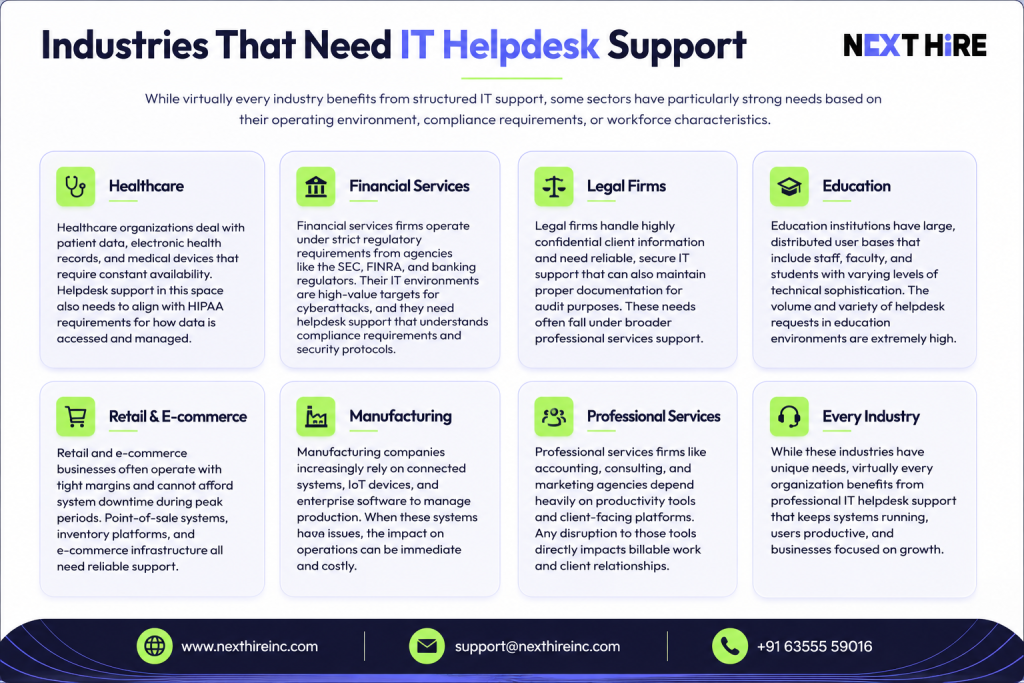
While virtually every industry benefits from structured IT support, some sectors have particularly strong needs based on their operating environment, compliance requirements, or workforce characteristics.
Healthcare organizations deal with patient data, electronic health records, and medical devices that require constant availability. System downtime in a healthcare setting can have serious consequences. Helpdesk support in this space also needs to align with HIPAA requirements for how data is accessed and managed.
Financial services firms operate under strict regulatory requirements from agencies like the SEC, FINRA, and banking regulators. Their IT environments are high-value targets for cyberattacks, and they need helpdesk support that understands compliance requirements and security protocols.
Legal firms handle highly confidential client information and need reliable, secure IT support that can also maintain proper documentation for audit purposes. These needs often fall under broader professional services support.
Education institutions have large, distributed user bases that include staff, faculty, and students with varying levels of technical sophistication. The volume and variety of helpdesk requests in education environments are extremely high.
Retail and e-commerce businesses often operate with tight margins and cannot afford system downtime during peak periods. Point-of-sale systems, inventory platforms, and e-commerce infrastructure all need reliable support.
Manufacturing companies increasingly rely on connected systems, IoT devices, and enterprise software to manage production. When these systems have issues, the impact on operations can be immediate and costly.
Professional services firms like accounting, consulting, and marketing agencies depend heavily on productivity tools and client-facing platforms. Any disruption to those tools directly impacts billable work and client relationships.
AI-Powered Helpdesk Automation and Self-Service Portals
This is one of the areas where IT helpdesk services are evolving the fastest, and it is worth understanding because it directly affects the quality and cost of support you can expect from a modern provider.
AI-powered automation is not about replacing human technicians. It is about making the entire support process faster and more efficient. Here is how it shows up in practice:
Intelligent ticket routing uses machine learning to analyze incoming support requests and automatically assign them to the right technician based on the issue type, required skill level, and current workload. This eliminates the manual triage process for routine tickets and gets users connected to help faster.
Chatbots and virtual agents can handle a significant portion of Level 1 support requests without any human involvement. Password resets, account unlocks, software download links, and answers to common questions can all be handled by a well-built virtual agent at any hour of the day.
Predictive issue detection uses data from monitoring tools and historical ticket patterns to identify potential problems before they become user-reported incidents. If a particular device model tends to fail in a certain way after a software update, an AI system can flag at-risk devices proactively.
Automated remediation goes even further by not just detecting issues but resolving them automatically. Disk cleanup, patch deployment, service restarts, and similar routine maintenance tasks can often be handled without any technician involvement at all.
Self-service portals give employees the ability to resolve common issues on their own through a searchable knowledge base. A good self-service portal includes step-by-step guides, video tutorials, and interactive troubleshooting tools. When employees can solve basic problems themselves, it reduces ticket volume, speeds up resolution, and improves user satisfaction.
The combination of AI automation and self-service capabilities is what separates a modern, efficient helpdesk from one that is still operating on models from a decade ago. When evaluating providers, ask specifically about what percentage of tickets are resolved through automation and what their self-service adoption rate looks like.
Helpdesk Tiers Explained: L1, L2, and L3 Support
The tiered support model is fundamental to how professional helpdesks operate, and understanding it helps you know what kind of coverage you are getting and what issues will be handled at each level.
Level 1 (L1) support is the first point of contact. These technicians handle high-volume, low-complexity requests that follow predictable resolution paths. Password resets, account unlocks, basic software questions, connectivity checks, and printer troubleshooting all live at this level. The goal at L1 is speed and volume. First-contact resolution is the primary metric. When a problem cannot be resolved at L1 within a reasonable timeframe, it gets escalated.
Level 2 (L2) support handles more technically complex issues that require deeper system knowledge. These technicians typically have more experience and access to deeper diagnostic tools. Application configuration errors, network troubleshooting, device imaging, data recovery assistance, and software conflicts are common L2 tickets. L2 technicians also often handle the callbacks and follow-ups for unresolved L1 tickets.
Level 3 (L3) support is where the most specialized expertise lives. These are engineers and senior technicians who handle complex infrastructure issues, custom application problems, security incidents, and anything that requires deep platform expertise or vendor escalation. L3 support may also coordinate directly with third-party vendors when hardware or software defects are involved.
The efficiency of this model comes from the routing. Simple problems get resolved quickly by L1 without consuming the time of senior engineers. Complex problems get routed to someone with the expertise to actually solve them. And the documentation from each level feeds into a knowledge base that improves resolution speeds at every tier over time.
Helpdesk KPIs and Metrics That Actually Matter
If you are evaluating a helpdesk provider or managing one internally, these are the performance indicators worth paying attention to:
First Contact Resolution (FCR) rate measures the percentage of tickets resolved on the very first interaction without escalation or follow-up. A high FCR rate indicates that the helpdesk is well-staffed, well-trained, and has good access to diagnostic tools. Industry benchmarks typically target FCR rates above 70 percent.
Average Resolution Time tracks how long it takes from when a ticket is opened to when the issue is fully resolved. This metric should be segmented by priority level, because a critical system outage should be resolved in minutes while a low-priority request might acceptably wait a few hours.
Mean Time to Respond (MTTR) measures how quickly the helpdesk acknowledges a new ticket and assigns it to a technician. Even if resolution takes time, users want to know their request has been received and is being worked on.
Ticket volume by category helps identify patterns. If 30 percent of your tickets are password resets, that might signal that your password policy or self-service capabilities need improvement. If network issues are spiking, it might indicate infrastructure problems that need deeper attention.
User satisfaction scores (CSAT) come from post-ticket surveys and measure how happy users are with the support they received. This is one of the most direct indicators of service quality from the perspective of the people who actually use the helpdesk.
SLA compliance rate measures what percentage of tickets are resolved within the timeframes committed to in the service level agreement. This should consistently be above 95 percent for a well-run helpdesk.
Escalation rate tracks how often tickets need to be bumped from L1 to higher tiers. A very high escalation rate from L1 might indicate that first-line technicians need better training or that the knowledge base needs to be expanded.
Proactive vs Reactive IT Support
The distinction between proactive and reactive support is one of the most important concepts in modern IT helpdesk services, and it has a direct impact on how much downtime your business actually experiences.
Reactive support is the traditional model. Something breaks, someone reports it, the helpdesk fixes it. This approach is straightforward and still necessary, but it means problems only get addressed after they have already disrupted someone’s work. For routine issues like password resets, reactive support is perfectly appropriate. For infrastructure failures, security breaches, and system degradation, it is not enough.
Proactive support involves monitoring your systems continuously and taking action before issues affect users. This might look like detecting that a server’s CPU usage is trending upward and identifying the cause before it creates an outage. It might involve noticing that a large number of failed login attempts are occurring on a specific account and flagging it as a potential security concern before any breach happens. It could also mean identifying devices that have not received recent security patches and pushing those updates before they become vulnerabilities.
The business case for proactive support is straightforward. Preventing a problem is almost always cheaper and less disruptive than recovering from one. The cost of an hour of proactive monitoring is far lower than the cost of an hour-long system outage affecting your entire team.
The best helpdesk providers offer both modes. They react quickly and effectively when issues are reported, and they actively watch for problems before they escalate.
SLA Response Time Examples
Service level agreements can be confusing if you have not dealt with them before. Here is a practical breakdown of what typical SLA tiers look like and what they mean in real terms:
| Priority Level | Issue Type | Initial Response | Resolution Target |
| Critical (P1) | System-wide outage or total work stoppage | Within 15 minutes | Within 2 hours |
| High (P2) | Major function impaired, significant user impact | Within 1 hour | Within 4 hours |
| Medium (P3) | Partial functionality loss, workaround available | Within 4 hours | Within 1 business day |
| Low (P4) | Minor issue, minimal business impact | Within 1 business day | Within 3 business days |
| Informational | General questions, how-to requests | Within 1 business day | Within 2 business days |
These are representative benchmarks. Actual SLA terms vary by provider and service tier. When reviewing any helpdesk contract, pay close attention to whether SLA timers apply 24/7 or only during business hours, how priority levels are defined and who determines priority, and what the consequences are if SLA targets are consistently missed.
How to Choose the Right Helpdesk Service Provider
Choosing a helpdesk provider is not a decision to rush. The right choice can meaningfully improve your operations. The wrong one can create more problems than it solves. Here is a practical framework for evaluation:
Start with scope clarity. Before you talk to any provider, define exactly what you need. How many users need support? What systems and platforms do they use? What hours do you need coverage? Do you have compliance requirements? What does your current support situation look like? Having clear answers to these questions will help you evaluate proposals accurately.
Ask about onboarding. A good provider has a structured onboarding process that includes documenting your environment, setting up monitoring, training their team on your specific tools and workflows, and establishing communication protocols. If a provider cannot explain their onboarding process in detail, that is a concern.
Review the SLA carefully. Do not accept vague language about “fast response times” or “priority support.” Get specific numbers for response and resolution times by priority level, and understand what happens if those commitments are not met.
Evaluate their technology stack. What ticketing system do they use? How do they handle remote access? Do they offer a self-service portal? What monitoring tools do they deploy? The technology they use directly affects the quality of service you receive.
Check references and reviews. Ask for references from clients in your industry or of similar size. Look for reviews that speak specifically to response times, communication quality, and how the provider handles difficult situations.
Consider cultural fit. Your helpdesk team becomes an extension of your business. They interact with your employees every day. The way they communicate, their professionalism, and their attitude toward user experience all matter enormously.
Understand the pricing model. Most providers offer per-user monthly pricing or tiered packages. Make sure you understand exactly what is included, what triggers additional charges, and how pricing scales as your business grows. You can find more details on general pricing structures here.
Future Trends in IT Helpdesk Services
The IT helpdesk space is evolving quickly, and the trends shaping its future are worth understanding whether you are evaluating a provider today or planning your IT support strategy for the next few years.
AI and machine learning integration is accelerating rapidly. Predictive analytics, intelligent routing, and automated remediation are moving from premium features to standard expectations. Helpdesks that rely entirely on manual processes will struggle to compete on speed and cost.
Omnichannel support is becoming the expectation rather than the exception. Users want to get help through chat, email, phone, or a mobile app depending on the situation. Providers that offer only one or two channels will increasingly lose out to those with fully integrated omnichannel platforms.
Security-integrated support is growing in importance as cyber threats become more sophisticated. Future helpdesks will not just resolve technical issues but will serve as a first line of defense in identifying and responding to security incidents across the organization.
Experience-focused metrics are shifting the conversation from purely operational measures like resolution time to broader experience indicators like user effort scores and outcome quality. The best helpdesks will measure not just whether they fixed the problem, but how easy the experience was for the user.
Work-from-anywhere support requirements are solidifying as the new normal. Helpdesks built for traditional office environments are being redesigned from the ground up to support distributed teams with different connectivity environments, device types, and time zone coverage needs.
Final Thoughts
IT helpdesk services are one of those investments that tend to be undervalued until something goes wrong. When your team cannot work because of a technical issue, the real cost becomes clear very quickly.
A well-structured helpdesk does more than fix problems. It creates a reliable support environment where employees can focus on their work knowing that help is available when they need it. It reduces downtime, improves morale, protects your systems, and frees your internal resources for work that actually moves the business forward.
Whether you are a small business looking for your first structured IT support solution or a growing company reassessing an internal setup that has outgrown itself, the fundamentals are the same. You need clear processes, defined response expectations, the right technology, and a team that knows what they are doing.
At NextHire Inc., we help businesses build and manage IT helpdesk operations that are actually built around how your team works. If you want to talk through what the right support model looks like for your organization, we are happy to start that conversation.



