



The way businesses build their teams has changed a lot over the past few years. Not just because of the pandemic, that accelerated things but didn’t start them. The shift toward hiring virtual employees has been building for a while, driven by better communication tools, a global talent pool, and a growing realization that great work doesn’t require everyone to be in the same room.
If you’re considering hiring virtual employees or just trying to understand what the term actually means in practice, this guide covers the full picture. What virtual employees are, what roles make sense for this model, how to hire and onboard them properly, and how to keep them engaged long-term.
What Is a Virtual Employee?
A virtual employee is someone who works for your business remotely, typically from a different location than your main office, sometimes even a different country. They’re not a freelancer juggling ten clients at once. They’re not a contractor you hire for a single project. A virtual employee is dedicated to your business, works your hours or defined hours, and functions as a genuine part of your team.
The distinction matters. Virtual employees are integrated into your workflows, your communication channels, your culture. They attend your meetings, use your tools, report to your managers, and take ownership of their responsibilities just like someone sitting in your office would.
What makes them “virtual” is simply the location. Everything else about the employment relationship can be essentially the same.
For businesses, this model opens up access to talent that wouldn’t otherwise be available locally, often at more competitive rates, without sacrificing the accountability and consistency that comes with a true employee relationship.
Common Roles You Can Hire as Virtual Employees
Best Virtual Employee Roles by Business Need
| Business Need | Virtual Employee Role | What They Typically Handle |
| Website or app development | Frontend, backend, full-stack, or mobile developers | Building websites, apps, APIs, dashboards, and technical features |
| Marketing growth | SEO experts, PPC specialists, content marketers, social media managers | Traffic growth, campaigns, content, ads, and brand visibility |
| Design and user experience | UI/UX designers, graphic designers, website designers | Wireframes, prototypes, landing pages, app screens, and brand assets |
| Customer operations | Customer support reps, virtual assistants, operations coordinators | Ticket handling, admin support, scheduling, CRM updates, and daily workflows |
| Finance and accounting | Bookkeepers, payroll specialists, accounting managers, virtual CFOs | Payroll, bookkeeping, reporting, budgeting, and financial planning |
| Sales support | Lead generation experts, appointment setters, CRM specialists | Prospecting, outreach, meeting booking, pipeline updates, and follow-ups |
| Content production | Blog writers, copywriters, technical writers, video editors | Blogs, website copy, scripts, documentation, and digital content |
One of the most common questions is: what kinds of roles actually work as virtual positions? The honest answer is most of them, as long as the work can be done digitally.
Here’s a realistic look at what businesses hire virtual employees for:
Technology and Development
Software developers, front-end and back-end engineers, mobile app developers, QA testers, DevOps engineers, and IT support specialists are among the most commonly hired virtual roles. The nature of development work is already highly digital, making the transition to remote seamless.
Design and Creative
UI/UX designers, graphic designers, video editors, motion graphics artists, and content creators work effectively as virtual employees. Creative collaboration tools have made remote design work genuinely smooth.
Digital Marketing
SEO specialists, social media managers, content marketers, email marketers, paid ads experts, and performance marketing professionals are roles that translate well to virtual arrangements. Most of the work happens in platforms and tools that are accessible from anywhere.
Content and Copywriting
Blog writers, technical writers, copywriters, scriptwriters, and content strategists are natural fits for virtual employment. Their output is entirely digital.
Customer Support and Operations
Customer service representatives, virtual assistants, data entry specialists, operations coordinators, and project managers can all function effectively as virtual employees with the right systems in place.
Finance and Accounting
Bookkeepers, payroll specialists, accounts managers, and virtual CFOs are roles that many businesses now hire remotely with strong results.
Sales and Business Development
Inside sales representatives, appointment setters, lead generation specialists, and CRM managers can work remotely, especially in businesses that operate primarily through digital channels.
The list is long because the model is flexible. What matters more than the role itself is whether the work can be clearly defined, measured, and communicated digitally.
At NextHire Inc., we help businesses across industries find virtual employees for a wide range of roles, from technical specialists to creative professionals to business support functions.
Benefits of Hiring Virtual Employees
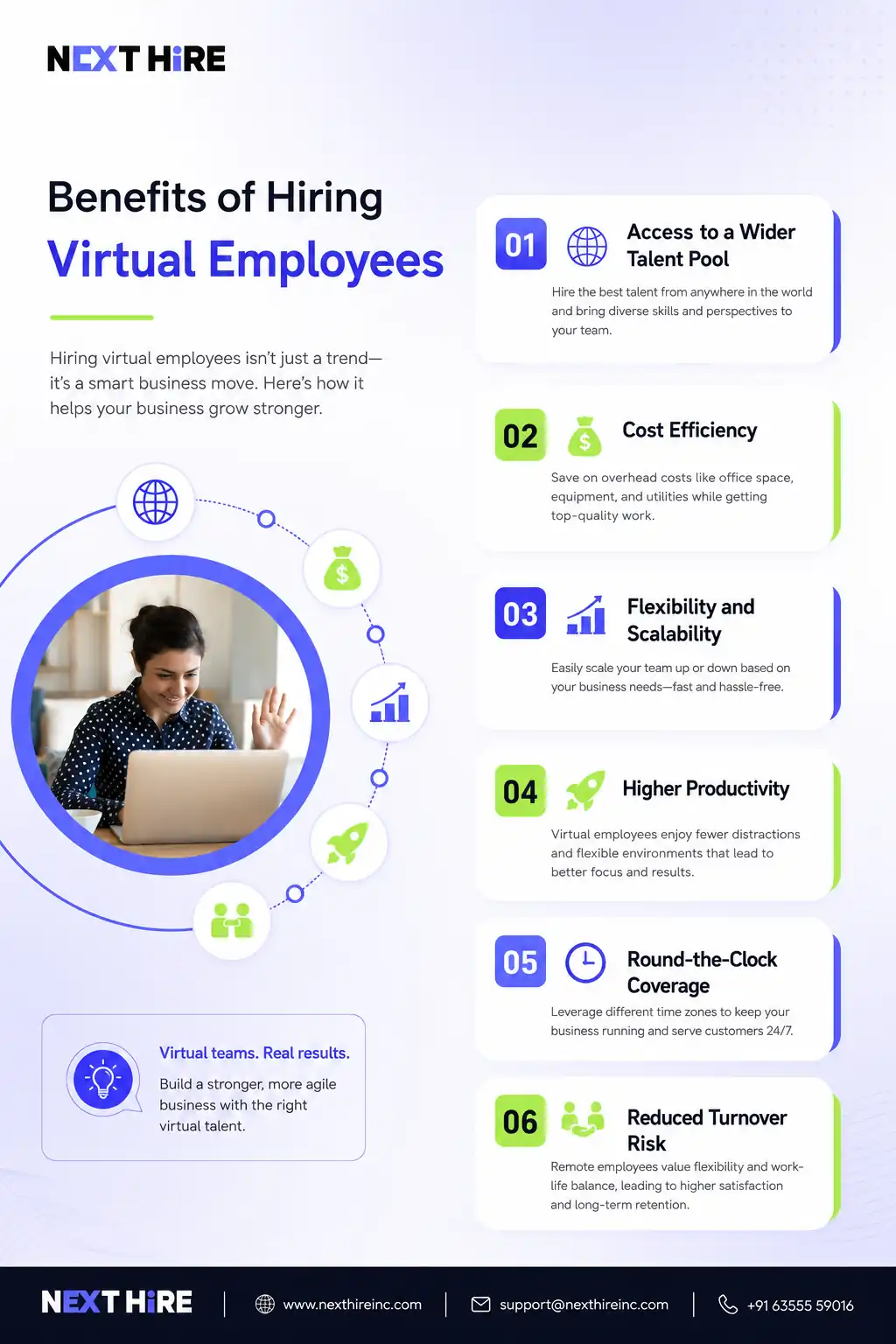
Let’s be straightforward about this. Hiring virtual employees isn’t the right move for every business or every role. But for businesses where it fits, the advantages are significant.
Access to a Wider Talent Pool
When you limit hiring to a specific city or region, you’re working with a fraction of the available talent. Virtual hiring removes that constraint. You can find the best person for the role regardless of where they live. That’s a genuine competitive advantage, especially for specialized positions where local talent is scarce.
Cost Efficiency
This one requires some nuance. Hiring virtual employees, particularly from regions with lower costs of living, can reduce salary costs meaningfully. But cost shouldn’t be the only driver. The goal is value, getting excellent talent at a price that works for your budget. When those two things align, the savings are real.
Beyond salaries, you also reduce overhead. No desk, no office space, no equipment costs if the employee works with their own setup, and reduced administrative burden in some cases.
Flexibility and Scalability
Need to scale your team quickly? Adding virtual employees is generally faster than going through a traditional local hiring process. And if your needs change, the model is more flexible to adjust.
Productivity
This surprises some people, but remote workers often report higher productivity than their office-based counterparts. Fewer interruptions, no commute, and the ability to structure their environment for focus all contribute. That said, productivity depends heavily on how well the role is defined and how effectively the team is managed.
Round-the-Clock Coverage
If your virtual employees are spread across time zones, you can effectively extend your operational hours without paying overtime. Customer support, monitoring, and content operations are areas where this works especially well.
Reduced Turnover Risk in Some Cases
Virtual employees who value the flexibility of remote work and are well-supported tend to stay longer than office workers dealing with long commutes and rigid schedules. That’s not universal, but it’s a pattern worth noting.
How to Hire Virtual Employees for Your Business
The process of hiring virtual employees isn’t radically different from traditional hiring, but there are a few things that deserve extra attention.
Define the Role Clearly
This is more important in a virtual context than in-office hiring. When you can’t walk over to someone’s desk and course-correct in real time, the initial role definition does a lot of heavy lifting. Be specific about responsibilities, expected output, working hours, communication expectations, and how performance will be measured.
Look in the Right Places
Specialized staffing platforms and agencies that focus on remote talent give you better results than generic job boards for most roles. NextHire Inc. specifically focuses on connecting businesses with vetted virtual talent across a wide range of functions.
Evaluate for Remote Readiness
Beyond skills and experience, look for indicators that someone will thrive working remotely. Do they have a track record of remote work? Do they communicate clearly in writing? Are they self-directed? These qualities matter as much as technical qualifications in a virtual role.
Structured Interviews
Because you’re likely conducting interviews over video, be intentional about how you structure them. Test communication clarity, ask situational questions about remote work scenarios, and give candidates a realistic picture of how your team operates.
Skills Assessment
For roles where output quality is measurable, a practical assessment or short test project gives you real signal beyond what a resume can tell you. Keep it reasonable in scope and compensate candidates if the task requires significant time.
Check References Thoroughly
References become more important when you can’t observe a candidate in person. Ask specifically about their work habits, communication style, ability to self-manage, and how they handle ambiguity.
Be Transparent About Your Expectations
Be upfront about tools, working hours, communication norms, and how performance is evaluated. Virtual employees who know exactly what success looks like from day one are far more likely to deliver it.
Virtual Employee Onboarding and Training
Simple 30-Day Virtual Employee Onboarding Plan
| Timeline | Focus Area | What to Do |
| Before Day 1 | Preparation | Send login details, welcome email, tool access, company overview, and first-week schedule |
| Day 1 | Introduction | Introduce the employee to the team, explain their role, review tools, and set communication expectations |
| Week 1 | Role Clarity | Walk through responsibilities, workflows, reporting structure, and immediate priorities |
| Week 2 | Training | Provide virtual employee training through live sessions, recorded videos, SOPs, and sample tasks |
| Week 3 | Hands-On Work | Assign real tasks with manager feedback and check progress through short review meetings |
| Week 4 | Performance Review | Review early performance, answer questions, clarify goals, and set expectations for the next 60 days |
This is where a lot of businesses drop the ball. They hire great virtual employees and then send them a login and a Slack invite and wonder why things aren’t going smoothly two months in.
Virtual employee onboarding deserves the same attention you’d give in-person onboarding, arguably more, because the new hire can’t absorb culture and context just by being in the office.
Start Before Day One
Send a welcome message before their first day. Share relevant documentation, an overview of the team structure, and what the first week will look like. This reduces first-day anxiety and signals that you’re organized and intentional.
Structured First Week
Map out the first week with specific activities, introductions, and learning objectives. Don’t leave a new virtual employee to figure out who to talk to or what to do first. A clear schedule communicates that the role is taken seriously.
Assign a Point of Contact
Designate someone, whether a manager or a peer, as the primary person the new hire can ask questions to without feeling like they’re bothering anyone. That accessibility matters especially in the first few weeks.
Virtual Employee Training
Virtual training for employees needs to be more deliberate than in-person training. Use a combination of recorded training materials, live sessions, documentation, and hands-on practice. Don’t rely on a single format. Different people absorb information differently, and a mix of approaches covers more ground.
Make sure training covers not just the technical aspects of the role but also how the team communicates, what tools are used for what, and the unwritten norms that shape how work actually gets done.
Regular Check-ins Early On
In the first 30 to 60 days, schedule more frequent one-on-one check-ins than you would for a tenured employee. This gives you the opportunity to catch misalignments early and gives the new hire a channel to raise questions or concerns.
Document Everything
Good onboarding documentation is a gift that keeps giving. When processes, tools, and expectations are written down clearly, new virtual employees can self-serve answers instead of waiting for someone to be available. It also makes your next onboarding cycle faster.
How to Manage and Engage Virtual Employees
Getting the hire right is one thing. Keeping virtual employees engaged and performing over the long term is where the real management challenge lives.
Virtual employee engagement doesn’t happen automatically. It requires intentional effort, especially because the casual moments that build connection in an office setting, the lunch conversations, the spontaneous hallway chats, don’t exist in a remote environment.
Communicate with Consistency
Set a regular cadence for team meetings and one-on-ones. Not so many meetings that people can’t get work done, but enough that team members feel connected and informed. Irregular or infrequent communication is one of the fastest ways to make virtual employees feel isolated.
Make Recognition Visible
In an office, recognition often happens naturally. Someone does great work, their manager mentions it in passing, others hear it. In a virtual environment, recognition has to be more deliberate. Call out good work in team channels. Acknowledge milestones. Make people feel seen.
Create Space for Non-Work Connection
This sounds like a nice-to-have but it’s actually important for retention. Virtual employee engagement activities that are purely social, a virtual coffee chat, a casual Friday check-in, an online team game, give people a chance to connect as humans rather than just as coworkers. These interactions build the kind of trust that holds teams together when things get stressful.
Give Autonomy with Accountability
Micromanaging remote workers backfires badly. It signals distrust and drives good people away. Instead, define clear outcomes and give people the autonomy to achieve them in ways that work for them. Pair that autonomy with regular accountability through progress updates, goal tracking, and performance conversations.
Invest in Their Development
Virtual employees who feel like they’re growing professionally are more engaged and more loyal. Offer access to training resources, encourage skill development, and have genuine conversations about career progression. If someone feels like they’re just executing tasks with no path forward, they’ll eventually look elsewhere.
Ask for Feedback and Act on It
Run regular pulse surveys or check-ins to understand how your virtual employees are actually feeling. And when they share concerns, address them. Nothing kills engagement faster than feeling like your feedback disappears into a void.
Virtual Employee Engagement Activities Worth Trying
- Virtual team trivia or online games
- Monthly virtual coffee chats between team members who don’t normally collaborate
- Online celebration of work anniversaries and personal milestones
- Shared virtual coworking sessions for people who like the feeling of working alongside others
- Team challenges or learning sprints focused on a shared goal
None of these are magic solutions. But together, they create an environment where virtual employees feel like part of something, not just a remote resource plugged into a workflow.
Tools for Managing Virtual Employees
You don’t need twenty different tools. You need the right ones used consistently. Here’s a practical stack that covers most of what businesses need to manage virtual employees effectively.
Communication
Slack or Microsoft Teams for day-to-day messaging. Zoom or Google Meet for video calls. The key is having clear norms around which tool is used for what so things don’t get fragmented.
Project Management
Asana, Trello, Monday.com, Notion, or ClickUp depending on your team’s preference and the complexity of your workflows. The goal is visibility into who’s doing what and when things are due.
Documentation
Notion, Confluence, or Google Workspace for shared documentation, SOPs, onboarding materials, and knowledge bases. Good documentation reduces dependency on any single person.
Time Zone Management
World Time Buddy or similar tools help teams across time zones find overlap and schedule meetings without the mental gymnastics.
HR and Payroll
For internationally distributed virtual employees, platforms like Deel, Remote.com, or Rippling handle contracts, compliance, and payroll across different countries and employment structures.
Virtual Employee Monitoring Software
This is a genuinely nuanced topic. Some businesses use tools like Time Doctor, Hubstaff, or Teramind to track activity and productivity. These can provide useful data, but they need to be implemented carefully. Heavy-handed monitoring damages trust and morale. If you’re going to use monitoring tools, be transparent about it, use the data constructively rather than punitively, and focus on outcomes rather than just hours logged.
The best monitoring is honestly just good management: clear goals, regular check-ins, and output-based performance evaluation.
How NextHire Inc. Helps You Build Your Virtual Team
At NextHire Inc., building virtual teams is core to what we do. We connect businesses with vetted remote talent across a wide range of functions, from software developers and digital marketers to content writers, UI/UX designers, and accounting and business support professionals.
We understand that hiring a virtual employee isn’t just about finding someone with the right skills. It’s about finding someone who fits your team, communicates well, and can thrive in a remote environment. That’s the nuance we focus on.
If you’re ready to hire virtual employees or just want to explore what’s possible, let’s talk.
Final Thoughts
Virtual employees aren’t a compromise. When the model is set up well, with clear roles, proper onboarding, consistent communication, and genuine engagement, virtual teams can be just as cohesive and productive as in-office ones.
The businesses that struggle with virtual employees are usually the ones that treat remote hiring as a cost-cutting move and skip the infrastructure that makes it actually work. The ones that succeed treat their virtual employees as real members of the team, because that’s exactly what they are.



