

Key Takeaways
- A realistic mobile app development timeline ranges from 3 months for a simple app to 12 months or more for a complex, enterprise-grade product.
- The timeline is shaped by app complexity, team size, platform choice, and how clearly requirements are defined before development starts.
- Most delays happen not during development itself but during discovery, design revision cycles, and app store review.
- Understanding each stage of the mobile app development process helps you plan budgets, set stakeholder expectations, and avoid the most common scheduling mistakes.
- Next Hire Inc provides experienced mobile developers who can be shortlisted within 24 hours and start contributing to your project within 24 to 48 hours.
Introduction
One of the first questions anyone building a mobile app asks is: how long is this going to take? And the honest answer is that it depends, but in a way that’s actually useful to unpack rather than just frustrating to hear.
A simple utility app with a handful of screens and no backend can realistically be built and launched in eight to twelve weeks. A marketplace app with two-sided user flows, real-time features, payment processing, and admin tools might take nine to twelve months. An enterprise application with custom integrations, compliance requirements, and multi-platform support could take longer.
The range is wide because the variables are wide. Team size, feature scope, platform choice, design complexity, backend requirements, third-party integrations, and app store review times all feed into the final timeline. Understanding how these variables interact is what allows you to plan realistically rather than optimistically.
This guide walks through the mobile app development timeline from the first discovery session to getting approved in the App Store and Google Play, covering what each stage involves, how long it typically takes, and what causes the delays that push projects past their original estimates.
What Is a Mobile App Development Timeline?
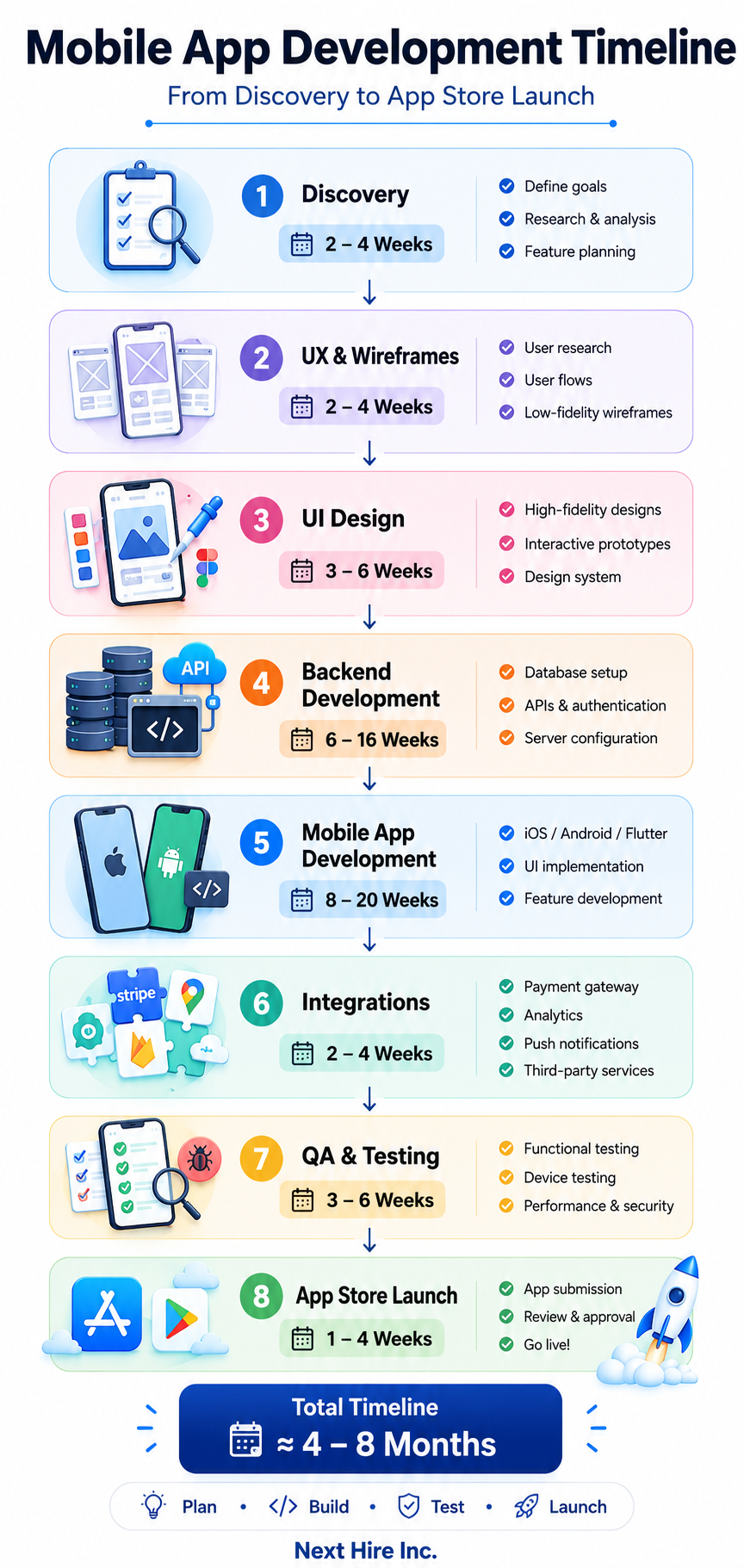
A mobile app development timeline is the projected schedule for completing all phases of an app from initial concept through to live deployment. It covers every stage: discovery and planning, design, development, testing, and launch, with estimated durations for each.
The app development timeline isn’t just a project management tool. It’s a communication document. It sets expectations for stakeholders, informs budget planning, and creates accountability for everyone involved in the project.
A realistic timeline accounts for:
- The scope of features in the current version (not the eventual product vision)
- The size and experience of the development team
- The platform or platforms being targeted
- The complexity of backend infrastructure and third-party integrations
- Design review cycles and feedback loops
- QA and bug fixing time, which is consistently underestimated
- App store submission and review periods
What it doesn’t account for, and where most projects get into trouble, is scope changes after development has started. Every significant change to requirements mid-development extends the timeline. This is why the discovery phase matters so much.
How Long Does It Take to Develop an App?
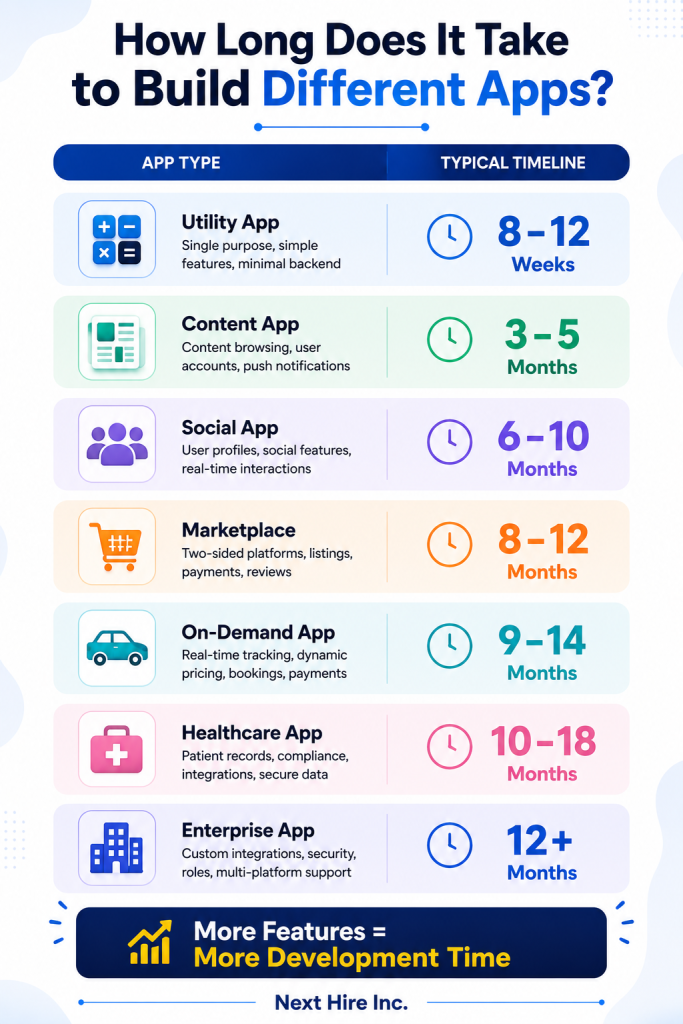
This is the question most people start with, so let’s give a direct answer before getting into the details.
Simple apps (single-purpose utilities, basic informational apps, simple tools with limited user flows and no custom backend): 8 to 16 weeks
Medium complexity apps (user authentication, moderate feature sets, API integrations, push notifications, basic CMS or admin panel): 4 to 8 months
Complex apps (marketplace functionality, real-time features, complex backend, multiple user roles, payment processing, third-party integrations): 8 to 12 months
Enterprise apps (custom integrations with legacy systems, compliance requirements, multi-platform, large team, extensive security): 12 months and beyond
These ranges assume a competent team working full-time on a reasonably well-defined scope. They’re not guarantees, and they’re not targets to optimize toward at the expense of quality. They’re realistic expectations based on how long each stage of development actually takes when done properly.
The timeline for app development also varies by whether you’re building for iOS only, Android only, or both. Building native apps for both platforms simultaneously roughly doubles the development work. Cross-platform frameworks like Flutter can reduce this, though they have their own trade-offs.
Mobile App Development Process from Discovery to Launch
The mobile app development process is not a single activity. It’s a sequence of distinct phases, each with its own deliverables, dependencies, and timeline contribution. Understanding this sequence is what allows you to plan a realistic schedule and know where the real risks to your timeline sit.
The phases, broadly, are:
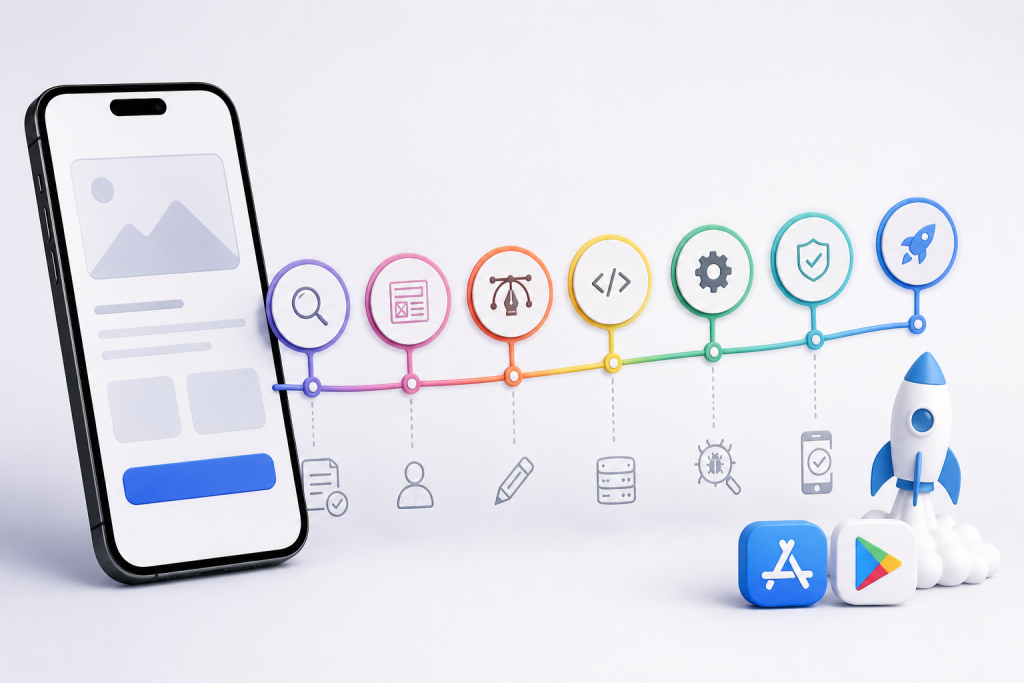
Discovery and planning → UX research and wireframing → UI design → Frontend and backend development → Integration and testing → QA → Deployment → App store submission and review → Post-launch monitoring
These don’t always happen strictly in sequence. Agile development teams run design and development in parallel to some degree, which compresses the overall timeline. But the general flow holds: you can’t design what you haven’t discovered, and you can’t develop what you haven’t designed.
Each phase is worth understanding in detail because the time estimates for each are where unrealistic overall timelines come from. Teams that underestimate QA or ignore discovery end up with timelines that look efficient on paper and are chaotic in reality.
Mobile App Development Process Steps
Step 1: Discovery and Planning (2 to 4 Weeks)
Discovery is where the project is actually defined. It covers: what the app needs to do, who it’s for, what problems it solves, what the technical requirements are, and what scope is in and out of the current version.
This phase produces a product requirements document, a feature list with priorities, user personas, and an initial technical architecture outline. Teams that skip or rush discovery often find themselves revisiting these decisions during development, which is far more expensive.
For apps in regulated industries like healthcare or finance, discovery also covers compliance requirements that need to be baked into the architecture before a line of code is written.
Discovery also includes competitive analysis, which helps define what “good enough for launch” looks like in the context of what users are already using.
Step 2: UX Research and Wireframing (2 to 4 Weeks)
Before visual design begins, the user experience needs to be mapped. UX researchers and wireframing specialists create low-fidelity representations of every screen and user flow. This is where navigation logic, information architecture, and key interaction patterns are defined.
Wireframes catch structural problems early. Discovering that a user flow doesn’t make sense at the wireframe stage takes hours to fix. Discovering the same problem after the screens are designed and built takes days.
User testing on wireframes, even informal testing with a handful of target users, is one of the most cost-effective investments in the entire project timeline. Problems surfaced here are the cheapest they’ll ever be to fix.
Step 3: UI Design (3 to 6 Weeks)
UI design transforms wireframes into the actual visual experience of the app. Mobile app UI designers working in tools like Figma produce high-fidelity mockups of every screen, including interactive prototypes that demonstrate transitions and interactions.
This phase typically includes a design system or style guide that establishes typography, color, component library, and spacing rules. Having a design system reduces design inconsistency and speeds up development because developers are working from a shared library of components rather than interpreting designs screen by screen.
Design review cycles with stakeholders are where timelines often stretch unexpectedly. Two or three rounds of revision are normal. Unlimited revision cycles without clear approval gates are where projects lose weeks.
Step 4: Backend Development (6 to 16 Weeks, Often Parallel to Frontend)
The backend is the infrastructure that powers the app: databases, APIs, authentication, business logic, third-party integrations, and server configuration. Backend developers build the systems that the mobile app communicates with.
Backend complexity is the single biggest driver of overall timeline variation. An app that reads from a simple REST API is fundamentally different in backend scope from an app that handles real-time messaging, financial transactions, complex user permissions, and third-party data sync.
API developers who specialize in mobile backend work typically build faster and with fewer integration issues than generalists, because they understand how mobile clients consume APIs and design accordingly.
For apps using Firebase as a backend, the timeline compresses considerably because authentication, real-time database, push notifications, and analytics are provided as managed services. Firebase developers can set up a production-ready backend significantly faster than building equivalent infrastructure from scratch.
Step 5: Frontend and Mobile Development (8 to 20 Weeks)
This is where the actual mobile application is built. Frontend developers implement the UI designs and connect them to the backend APIs. The timeline here is driven by the number of screens, the complexity of interactions, the platform or platforms being targeted, and the experience level of the development team.
iOS development using Swift and SwiftUI has excellent tooling and clear platform conventions. Swift developers working on a well-designed app can move quickly when designs are clean and APIs are stable.
Android development with Kotlin and Jetpack Compose covers a much wider range of device types and screen sizes, which adds testing overhead that pure iOS development doesn’t have. Android developers experienced with the Android device ecosystem navigate this more efficiently than generalists.
Cross-platform development with Flutter allows a single codebase to target both iOS and Android. Flutter developers can deliver a polished cross-platform app faster than maintaining two native codebases, though there are trade-offs for features requiring deep platform integration.
Step 6: Integration and Third-Party Services (2 to 4 Weeks, Often Overlapping)
Most apps depend on third-party services: payment gateways (Stripe, Braintree), analytics platforms, push notification services, social login providers, maps, and others. Integrating these services takes more time than it looks on paper, especially when documentation is unclear or APIs behave unexpectedly.
Integration testing is its own phase of work, separate from unit testing and UI testing. Third-party APIs change, rate limits apply, and edge cases in integrations are responsible for a disproportionate share of production bugs.
Step 7: QA and Testing (3 to 6 Weeks)
QA is consistently the most underestimated phase in mobile app development timelines. Teams that allocate a week for testing and then discover hundreds of bugs spend three weeks fixing them, which blows the overall timeline.
Professional QA involves functional testing (does the app do what it’s supposed to do?), regression testing (did fixing this break something else?), performance testing (does the app hold up under load?), security testing (are there vulnerabilities?), and device testing (does it work correctly on different devices and OS versions?).
Automation testers can build test suites that run automatically with each code change, catching regressions faster than manual testing and freeing manual QA time for exploratory testing. Performance testers specifically validate how the app behaves under realistic load conditions, which is a different question from whether it works correctly for a single user.
Security test engineers are worth involving before launch, especially for apps handling sensitive user data, financial information, or health records.
Step 8: App Store Submission and Review (1 to 4 Weeks)
This is the phase that surprises teams most often because it’s outside their control. Getting an app approved by Apple’s App Store and Google Play requires meeting specific technical and content guidelines, and both stores review submissions manually before approval.
Apple App Store review typically takes 1 to 3 days for a straightforward submission, though it can take longer for complex apps or if the review team has questions. Rejection, which happens more often than people expect, requires addressing the feedback and resubmitting, which adds time. First-time developers and apps in sensitive categories (healthcare, finance, gambling adjacent) tend to face more scrutiny.
Google Play review is generally faster, often 1 to 3 days, but Google has tightened its review process in recent years and rejections are increasingly common for policy reasons.
Build in at least two weeks for the submission process per store, accounting for the possibility of at least one rejection and resubmission cycle.
Key Stages of Mobile App Development
To summarize the mobile app development stages with approximate timelines:
| Stage | Typical Duration |
| Discovery and planning | 2 to 4 weeks |
| UX research and wireframing | 2 to 4 weeks |
| UI design | 3 to 6 weeks |
| Backend development | 6 to 16 weeks |
| Mobile development | 8 to 20 weeks |
| Integration and third-party services | 2 to 4 weeks |
| QA and testing | 3 to 6 weeks |
| App store submission and review | 1 to 4 weeks |
| Total (medium complexity app) | 4 to 8 months |
These stages overlap significantly in practice. Backend development often starts while UI design is still in progress. QA starts before all development is complete, catching issues in earlier features while later ones are still being built.
Mobile App Development Lifecycle Stages
The lifecycle of a mobile app doesn’t end at launch. Understanding the full lifecycle helps you plan resources and expectations beyond the initial release.
Pre-development. Discovery, research, planning, and architecture decisions. Everything that happens before a line of code is written.
Development. The active build phase covering design, coding, integration, and initial testing.
Launch. App store submission, marketing preparation, and initial release.
Post-launch iteration. Bug fixes, performance improvements, and feature additions based on real user feedback. This is where most apps spend the majority of their lifetime.
Scaling. As user numbers grow, infrastructure and architecture need to scale with them. Performance monitoring, backend optimization, and sometimes architectural refactoring happen in this phase.
Sunset or major rebuild. Eventually, accumulating technical debt or significant product pivots require either a major rebuild or a decision to retire the app.
Planning for the post-launch lifecycle during the pre-development phase, particularly around technical architecture and team continuity, saves significant cost and complexity later. Apps built with the right architectural decisions from the start are meaningfully cheaper to maintain and evolve than those built without architectural thought.
Timeline for App Development by Project Type
Different types of apps have fundamentally different timeline profiles. Here’s a realistic breakdown:
Simple Utility App
Single function, minimal backend (or no backend), a handful of screens, no user accounts.
Timeline: 8 to 12 weeks
Examples: calculator, simple tracker, offline tool, basic reference app.
Content or Media App
Browsable content, user accounts, push notifications, simple CMS backend.
Timeline: 3 to 5 months
Examples: news app, podcast player, recipe app, blog reader.
Social or Community App
User profiles, social connections, content feeds, real-time features, notifications, moderation tools.
Timeline: 6 to 10 months
Examples: community platform, interest-based social network, professional networking tool.
Marketplace App
Two-sided user flows, listing management, search and filtering, payment processing, reviews, admin dashboard.
Timeline: 8 to 12 months
Examples: service marketplace, peer-to-peer rental, freelance platform.
On-Demand Service App
Real-time location tracking, dynamic pricing, driver or provider management, payment processing, rating system.
Timeline: 9 to 14 months
Examples: delivery app, ride-sharing, home services booking.
Healthcare App
Patient records, provider scheduling, telehealth features, HIPAA compliance, secure messaging, integration with health platforms.
Timeline: 10 to 18 months
Compliance requirements and third-party health system integrations extend timelines significantly in the healthcare and life sciences space.
Enterprise App
Custom backend integrations, role-based access control, multi-platform support, security auditing, enterprise SSO.
Timeline: 12 months and beyond
Android and iOS App Development Timeline
Building for both platforms adds complexity that’s worth planning for specifically.
iOS only: Faster to build for a single, well-defined device ecosystem. Apple’s platform conventions are consistent, and iOS developers don’t have to account for the device fragmentation that Android presents.
Android only: More device variety means more testing overhead. Screen sizes, OS versions, and manufacturer customizations all need to be considered. Android developers experienced with the full Android ecosystem handle this more efficiently than those who’ve only worked on flagship devices.
Both platforms, native: Roughly doubles the mobile development timeline if both codebases are maintained separately. Requires separate iOS and Android specialists, parallel sprints, and coordinated releases.
Both platforms, cross-platform: Flutter developers or hybrid app developers can target both platforms from a single codebase, reducing the development timeline by roughly 30 to 40 percent compared to dual native development. The trade-off is occasional limitations for features requiring deep platform-specific integration.
Progressive Web App: Progressive web app developers can deliver a cross-platform experience without app store submission for use cases where a browser-based app is acceptable. Significantly faster and cheaper, but with limitations on device access and no native app store presence.
A common approach for startups trying to move quickly is to launch on one platform first (usually iOS in markets where iPhone penetration is higher, or Android where it’s dominant), validate, and then build the second platform with the learnings from the first.
Agile Mobile App Development Process
Most professional mobile development teams work in an agile framework, which affects how the timeline is structured and communicated.
In an agile mobile app development process, work is organized into sprints, typically one to two weeks long. Each sprint has defined deliverables, and progress is reviewed at the end of each sprint before the next one begins. This creates regular checkpoints where scope can be adjusted, priorities can be reprioritized, and stakeholders can see working software rather than just status updates.
The agile approach changes the mobile app development timeline in a few important ways:
Estimates are given in story points or sprint capacity, not fixed dates. This is more honest because it acknowledges that requirements evolve. Stakeholders who want a fixed end date from the beginning of development are usually asking for a number that will be wrong.
Features are delivered incrementally. Rather than waiting for everything to be complete before seeing anything, stakeholders see working features at the end of each sprint. This catches misalignments much earlier.
Scope is managed continuously. When new requirements are added, something else is deferred. The overall timeline stays manageable because scope is treated as a variable, not a constant.
QA is integrated throughout, not saved for the end. Testing happens sprint by sprint, which means bugs are found and fixed in context rather than discovered in a large batch at the end of development.
For stakeholders used to waterfall project management, the agile timeline can feel less certain because it doesn’t provide a single fixed delivery date. In practice, it’s more reliable because it surfaces scope and estimation problems early rather than hiding them until the original deadline arrives and passes.
What Causes App Development Timeline Delays
Understanding the most common causes of delays is the most practical thing you can take away from a discussion about timelines, because most of them are avoidable with the right planning.
Scope creep. New features get added after development starts without removing anything else. Every addition has a timeline cost that isn’t always acknowledged in the moment.
Unclear requirements. When developers have to make assumptions about how something should work because the requirements are ambiguous, they sometimes make the wrong assumption. Discovering this late in development causes rework.
Design revision cycles without approval gates. Design that goes through five rounds of revisions because there’s no clear decision-maker delays the handoff to development.
Third-party integration surprises. APIs behave unexpectedly, documentation is outdated, or integration requirements are more complex than estimated. Building in buffer time for integration is realistic planning, not pessimism.
Underestimated QA. Every app has more bugs than expected. The QA phase consistently takes longer than its initial estimate. Teams that fight this reality by cutting QA time create post-launch problems that are more expensive than the time saved.
App store rejections. A rejection from Apple or Google that requires code changes, not just policy clarification, can add one to three weeks to the timeline.
Team turnover or availability gaps. A developer who leaves mid-project or is unavailable for several weeks creates a context-transfer cost that isn’t trivial. This is one reason why working with a provider that offers backup resource support matters for longer engagements.
Feedback delays from stakeholders. When design or development reviews wait days or weeks for feedback, sprints slip. Fast feedback loops are one of the most controllable factors in keeping a timeline on track.
How to Plan a Realistic Mobile App Development Timeline
The difference between a timeline that holds and one that doesn’t usually comes down to a few planning practices that are straightforward but often skipped.
Invest properly in discovery. The clearer the requirements before development starts, the fewer surprises during development. Discovery is not a delay; it’s insurance against much larger delays later.
Prioritize ruthlessly. Define what must be in the first version versus what can wait. The features that must be there are non-negotiable. Everything else is negotiable. Apply this discipline throughout development.
Build in QA time from the beginning. Not as an afterthought, but as a planned phase with its own allocation. If you’re building a medium-complexity app, allocate at least three to four weeks of dedicated QA time.
Buffer for app store submission. Two weeks is a reasonable minimum. Four weeks is safer for apps in categories that face more scrutiny.
Don’t plan for perfect attendance. Developers get sick, have other obligations, or face unexpected blockers. A realistic timeline accounts for less than 100 percent availability rather than assuming perfect conditions.
Communicate the timeline as a range, not a fixed date. “We expect to launch between week 20 and week 24” is honest. “We will launch on week 20” is usually a promise that hasn’t been earned yet.
Checking the top trends in mobile applications is also worthwhile during the planning phase to make sure the technology choices you’re making now don’t create technical debt against where the market is heading.
How Next Hire Inc Helps You Plan a Faster App Development Timeline
Timeline delays in mobile app development almost always trace back to one of two things: scope problems or team problems. Next Hire Inc addresses the team side directly.
When you need to staff a mobile development project, the traditional hiring process adds weeks before you even write a line of code. Posting jobs, reviewing applications, running interviews, making offers, and waiting for start dates. That’s time that could have been development time.
Next Hire Inc shortlists pre-vetted mobile developers within 24 hours of receiving your requirements. Engagements start within 24 to 48 hours of approval. A 3-day free trial lets you evaluate fit before committing.
The talent available includes iOS developers, Android developers, Flutter developers, React Native specialists, backend developers, UI/UX designers, QA testers, and API developers, covering every role in the mobile app development process.
Pricing starts from $5/hour for hourly engagements and $799/month for dedicated monthly hires. Full details are on the pricing page.
Every candidate is screened for technical skills, communication, and professional reliability before you see their profile. A dedicated account manager handles the engagement on the provider side. If a team member is unavailable, backup resources are in place so your sprint doesn’t lose momentum.
Next Hire Inc works with businesses across technology, retail and ecommerce, education, healthcare, logistics, and finance, with experience matching development talent to different project types and timelines.
For businesses that have already built an MVP and are planning their next version, pairing development talent with ASO experts and digital marketing specialists from the same provider keeps the post-launch growth work aligned with the development timeline.
The infrastructure supporting all engagements is designed for continuity and security, which matters when you’re trusting a remote team with source code and product roadmap information.
Planning a mobile app and want to build the team before the timeline starts slipping? Next Hire Inc shortlists pre-vetted developers within 24 hours. Tell us what you’re building.
Frequently Asked Questions
How Long Does It Take to Develop an App?
It depends heavily on complexity. Simple apps take 8 to 16 weeks. Medium-complexity apps take 4 to 8 months. Complex apps with marketplace functionality, real-time features, or enterprise integrations typically take 8 to 12 months or more.
What Is the Biggest Factor in Mobile App Development Timeline?
Feature scope is the biggest factor, followed by team experience and how clearly requirements are defined before development starts. Discovery quality has a compounding effect: clear discovery leads to smoother design, smoother design leads to faster development, and faster development leads to more time for proper QA.
Does Building for iOS and Android Take Twice as Long?
If you’re building separate native apps, roughly yes. Cross-platform development with Flutter or React Native can reduce this to about 30 to 40 percent more time than a single native platform, depending on the features involved.
How Long Does App Store Review Take?
Apple’s App Store typically takes 1 to 3 days for a straightforward review, but rejections and resubmissions can add one to three weeks. Google Play is generally faster. Build at least two weeks of buffer into your timeline for app store submission.
What Is the Most Underestimated Phase of App Development?
QA. Almost universally. Teams allocate too little time for testing, discover more bugs than expected, and then either rush the fixes (creating new bugs) or push the launch date. Proper QA allocation is one of the most reliable ways to keep an overall timeline realistic.
Can Agile Development Shorten the Timeline?
Agile development doesn’t necessarily shorten the total timeline, but it makes better use of the time available. It surfaces scope and quality problems earlier, when they’re cheaper to fix, and it produces working software throughout the project rather than only at the end.
How Do I Avoid Delays in My App Development Project?
Invest in discovery before development starts, maintain scope discipline throughout the project, allocate proper time for QA, buffer for app store review, and establish fast feedback loops with stakeholders during design and development reviews.
Conclusion
There’s no single correct answer to how long a mobile app takes to build, but there is a correct way to plan for it. Understanding what each stage of the mobile app development process involves, how long each stage realistically takes, and where the common sources of delay hide is what separates projects that launch close to schedule from those that drag on for months past their original estimates.
The most controllable factors in your mobile app development timeline are the ones you address before development starts: how clearly requirements are defined, how thoughtfully the scope is prioritized, how the team is structured, and whether QA and app store review are treated as real phases rather than afterthoughts.
Get those right, and the timeline becomes something you can plan around rather than something that keeps moving on you.
Ready to build your mobile app team without the usual hiring delays? Next Hire Inc shortlists experienced mobile developers within 24 hours. Start with a 3-day free trial.