

Key Takeaways
- Mobile app architecture is the structural blueprint that determines how your app’s components communicate, scale, and evolve over time.
- Decisions made before development starts, about patterns, layers, backend, and cloud infrastructure, are far cheaper to change than decisions made mid-build.
- Common architecture patterns like MVC, MVVM, and Clean Architecture each have trade-offs worth understanding before choosing one.
- Security and scalability aren’t features you add later. They’re design decisions baked into the architecture from the beginning.
- Next Hire Inc provides experienced mobile app developers and architects who can help you get the structural decisions right before a single line of code is written.
Most app development problems that surface six months into a project were actually architecture problems that existed from week one. The app that crashes under load, the codebase that becomes impossible to maintain, the feature that takes three weeks to add because it breaks five other things: these usually trace back to structural decisions made too quickly or without enough thought at the beginning.
Mobile app architecture isn’t the most exciting part of building a product. It doesn’t look like anything to users, it doesn’t show up in a demo, and it’s easy to skip when there’s pressure to start coding. But it’s the difference between a product that scales with your business and one that needs to be partially rebuilt every time you try to grow it.
This guide walks through what mobile application architecture actually involves, the core decisions you need to make before development starts, the patterns worth knowing, and the mistakes that are entirely avoidable if you think through the structure first.
What Is Mobile App Architecture?
Mobile app architecture is the structural design of a mobile application. It defines how the different components of the app, the user interface, business logic, data layer, and external services, are organized, how they communicate with each other, and how they’re expected to scale and evolve over time.
Think of it as the blueprint before the building. A construction project without architectural plans might produce something that looks like a building initially, but it won’t hold up under real-world conditions. The same is true for mobile apps. You can build something that works for a few hundred users without thinking deeply about architecture. Scaling to tens of thousands of users, or adding new features without breaking existing ones, requires structure.
Mobile application architecture decisions cover:
- How the app is divided into layers or modules
- Which architectural pattern governs component relationships
- How data flows through the application
- Where business logic lives and how it’s separated from UI logic
- How the app communicates with backend services and APIs
- How the app handles state, errors, and offline scenarios
- Where and how the app scales when user load increases
These decisions interact with each other. A choice about your data layer affects your business logic layer. A choice about your backend communication approach affects your security model. Getting the big decisions right early prevents cascading rework later.
For businesses building apps in healthcare, retail and ecommerce, finance, or logistics, where apps need to handle real transaction volume and sensitive data, architecture quality isn’t optional.
Why Mobile App Architecture Matters Before Development Starts
The honest answer is that architecture is cheapest to change before code exists. Once a pattern is embedded in thousands of lines of code, changing it requires refactoring work that’s expensive, time-consuming, and introduces regression risk.
Here’s where the cost shows up when architecture is skipped or rushed:
Scalability failures. An app designed for 500 users won’t automatically handle 50,000. If the architecture doesn’t account for scale from the beginning, adding capacity later means reworking the data layer, backend communication, caching strategy, and sometimes the fundamental pattern the app is built on.
Feature velocity drops over time. A well-structured application gets easier to add features to as it matures because components are modular and separated. A poorly structured one gets harder, because every new feature risks breaking something that already works.
Testing becomes difficult or impossible. Testability is a direct consequence of architecture. If business logic is tangled with UI logic, writing meaningful unit tests becomes very hard. This creates a codebase where bugs are harder to catch before they reach users.
Team coordination breaks down. When multiple developers are working on an app with no clear architecture, they step on each other constantly. Clear separation of concerns, enforced by architecture, is what allows a team to work in parallel without constant conflicts.
Technical debt accumulates faster. Shortcuts taken in architecture compound. What starts as a slightly messy data layer becomes an unmaintainable tangle six months later when five more features have been built on top of it.
The application architecture design phase is worth the time it takes. A week or two of thoughtful planning before development starts can save months of rework later.
Core Layers of Mobile App Architecture
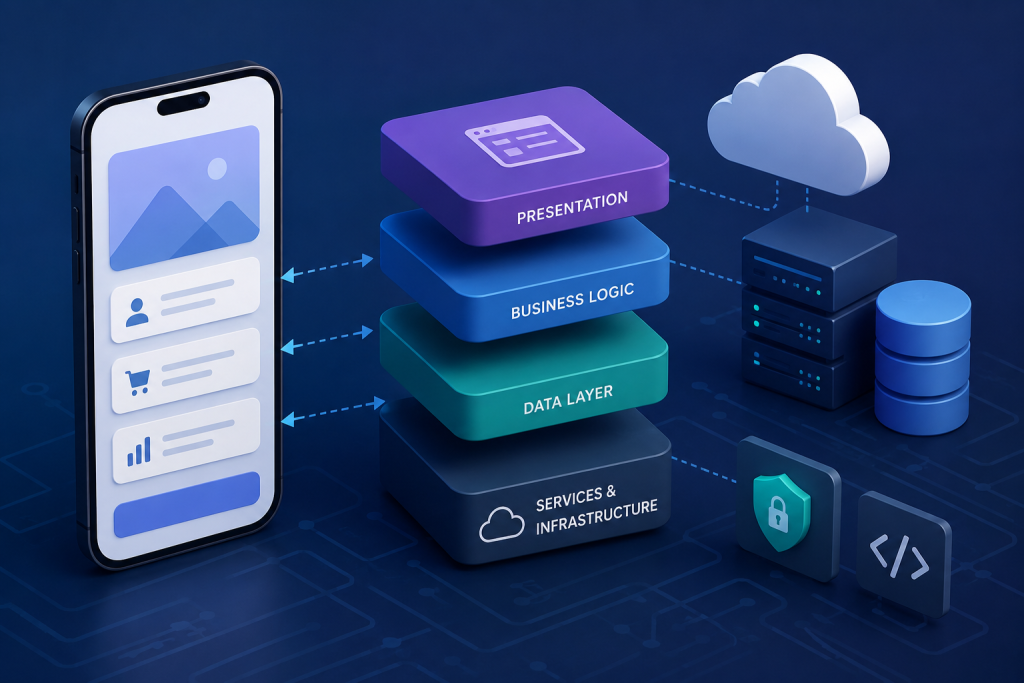
Most modern application architectures separate the app into distinct layers, each with a clear responsibility. The exact naming and number of layers varies by pattern and team preference, but the underlying principle is consistent: separation of concerns.
Presentation Layer
This is the UI layer: everything the user sees and interacts with. Screens, components, navigation, animations. The presentation layer should be as thin as possible, meaning it handles display and user input, and delegates everything else.
When business logic leaks into the presentation layer, the app becomes hard to test and hard to maintain. The goal is a presentation layer that knows how to show data and capture input, but doesn’t know how data is fetched, transformed, or stored.
Business Logic Layer
This is where the rules of your application live. What happens when a user places an order? How are discounts calculated? What validation runs before a form is submitted? The business logic layer handles all of this, independently of the UI and independently of the data source.
Keeping business logic separate is what allows it to be tested reliably without having to render UI or mock databases.
Data Layer
The data layer manages how the app retrieves, stores, and caches data. It abstracts the details of whether data comes from a REST API, a GraphQL endpoint, a local database, or a combination of sources. The business logic layer asks for data; the data layer figures out where to get it.
A clean data layer means you can swap out your API, change your caching strategy, or add offline support without touching business logic or UI code.
Domain Layer
In more complex applications, a separate domain layer sits between business logic and data, defining the core entities and rules of the application independent of any framework or infrastructure. This is a common element of Clean Architecture, which is worth considering for larger, longer-lived applications.
Services and Infrastructure
External dependencies like push notification services, analytics, authentication providers, and third-party APIs live at the infrastructure level. Isolating these behind interfaces means you can swap providers without rebuilding the parts of the app that depend on them.
Mobile App Architecture Diagram: What to Plan First
An application architecture diagram is a visual representation of how your app’s components relate to each other. You don’t need a complex tool to create one, a whiteboard or a simple diagramming tool is enough, but having it documented before development starts gives the team a shared reference point.
What should your architecture diagram include before you write any code?
Component map. What are the main modules or components of the app? How do they relate to each other? Which ones depend on which others?
Data flow. How does data move through the system? Where does it originate (API, local storage, user input)? Where does it get transformed? How does it reach the UI?
Backend communication. How does the app talk to its backend? REST, GraphQL, WebSockets, or a combination? Where are API calls made, and how are responses handled?
State management. Where does application state live? How is it updated? How do different parts of the app access shared state?
Authentication and security boundaries. Where does auth happen? How are tokens stored? Which requests require authentication? Where is sensitive data handled?
External service integrations. Which third-party services does the app depend on? Analytics, payments, notifications, maps? How are these isolated from core app logic?
The act of creating this diagram forces decisions that might otherwise be deferred until they’re expensive to make. Teams that skip this step often find themselves making inconsistent decisions across the codebase because there’s no shared reference.
How to Design a Scalable Mobile App Architecture
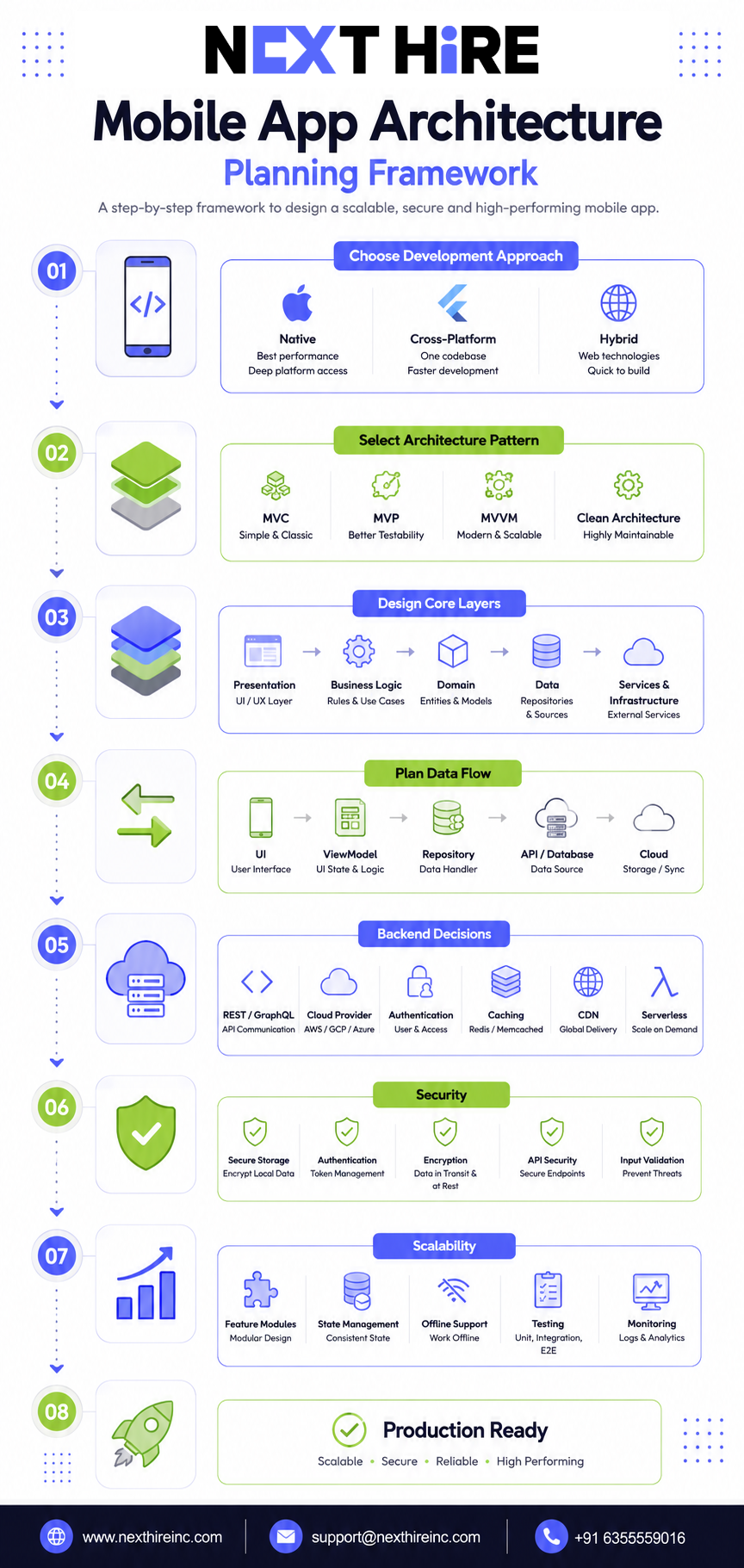
Scalability in mobile app architecture has two dimensions: technical scalability (can the app handle more users and more data?) and organizational scalability (can more developers work on it without stepping on each other?). Both matter, and both are influenced by architecture decisions.
Choose a Pattern That Supports Separation
The most widely used patterns in mobile app architecture are MVC, MVP, MVVM, and Clean Architecture. Each has trade-offs.
MVC (Model-View-Controller) is the oldest and simplest. The Model handles data, the View handles display, and the Controller handles the connection between them. It’s easy to understand but can lead to “massive view controllers” where the controller becomes overloaded as the app grows.
MVP (Model-View-Presenter) separates the presenter from the view more cleanly than MVC. The View is more passive, and the Presenter handles most of the logic. Better for testability, slightly more verbose.
MVVM (Model-View-ViewModel) is currently the most popular pattern for both iOS and Android development. The ViewModel holds UI state and handles business logic for the view, while the View observes and reacts to changes. Works particularly well with reactive programming approaches and is the default in SwiftUI and Jetpack Compose.
Clean Architecture is a more principled approach that enforces strict dependency rules between layers. It’s more complex to set up but produces a codebase that’s genuinely modular and independently testable. Worth the overhead for large, long-lived applications.
Design for Modularity
Structure the app into feature modules where possible. Each feature (authentication, user profile, payments, notifications) should be a self-contained module with clear external interfaces. This allows teams to work on different features in parallel and makes it possible to replace or rewrite a feature without touching the rest of the app.
Plan Your State Management Strategy
State management is one of the most consequential architecture decisions in mobile apps. Unmanaged state is the source of an enormous number of bugs: race conditions, stale data, UI that doesn’t reflect the actual application state.
On iOS, patterns like Redux (via TCA), Combine, and SwiftUI’s built-in observation tools are common. On Android, ViewModel with StateFlow or LiveData is the standard approach. Cross-platform frameworks like Flutter and React Native have their own state management ecosystems (Bloc, Riverpod, Redux, Zustand).
The right choice depends on the complexity of your app, the platform, and what your development team is experienced with. What matters more than the specific tool is having a consistent, documented strategy rather than different approaches in different parts of the app.
Account for Offline and Network Variability
Mobile users don’t always have reliable connectivity. An app architecture that assumes always-on internet creates a poor user experience and potential data loss. Design the data layer with offline support in mind: local caching, sync strategies, and graceful degradation when the network is unavailable.
This is especially critical for apps in healthcare or logistics where data accuracy in offline scenarios matters.
Backend and Cloud Decisions for Mobile Apps
The mobile app itself is only half of the architecture picture. Backend and cloud decisions have a massive impact on how the app performs, scales, and behaves under real-world conditions.
REST vs GraphQL
REST APIs are the standard and work well for most applications. GraphQL offers more flexibility for complex data requirements, particularly when different screens need different shapes of the same data. For apps with highly varied data requirements, GraphQL can reduce over-fetching and under-fetching problems that make REST feel inefficient.
API developers with experience in both approaches can help you evaluate which fits your specific use case rather than defaulting to whichever is more fashionable.
Cloud Application Architecture
For most modern mobile apps, the backend runs on cloud infrastructure. The main choices are AWS, Google Cloud, and Azure, with a secondary ecosystem of services like Firebase that are specifically designed for mobile backends.
Firebase is worth mentioning specifically because it provides real-time database sync, authentication, push notifications, analytics, and crash reporting as managed services. For apps that need real-time features or want to minimize backend development complexity, Firebase developers can build a production-ready backend much faster than building custom infrastructure from scratch.
For more complex requirements, microservices architecture allows different backend functions to scale independently. A notification service, a payment processor, and a content delivery service can each scale based on their own load patterns rather than scaling a monolithic backend as a whole.
CDN and Asset Delivery
Images, videos, and static assets should be served through a CDN rather than directly from your application server. This reduces latency, improves performance for global users, and reduces server load. This is a small decision that has a noticeable impact on app performance, especially in regions far from your primary server.
Serverless for Specific Functions
Serverless functions (AWS Lambda, Google Cloud Functions, Azure Functions) work well for specific backend operations that are event-driven or don’t need to run continuously. They scale automatically and you pay for actual execution rather than for idle server capacity. For notification triggers, webhook handlers, or scheduled data processing, serverless is often a cleaner solution than running a dedicated service.
Security in Mobile App Architecture
Security in mobile apps is not a layer you add on top. It’s a set of decisions embedded in the architecture from the beginning. An app that handles user data, payments, or personal information needs to treat security as a first-class concern at every layer.
Authentication and Token Management
How your app handles authentication tokens affects both security and user experience. Tokens stored in plaintext or in insecure storage are vulnerable. Use the platform’s secure storage mechanisms: the iOS Keychain and Android Keystore are designed for this purpose.
Token refresh strategies matter too. Short-lived access tokens with refresh token rotation reduce the risk of token theft without requiring users to re-authenticate constantly.
API Security
Every API endpoint the app calls should be authenticated and authorized. Don’t assume that because an endpoint isn’t linked from the UI, it’s not discoverable. SSL pinning can prevent man-in-the-middle attacks, though it adds maintenance overhead when certificates rotate. The trade-off is worth understanding before making the decision.
Data Encryption
Sensitive data stored locally should be encrypted. This applies to cached user data, session information, and any personal or financial data that the app stores for offline use. Encryption at rest combined with secure key management is the standard approach.
Input Validation
Never trust input that comes from the client. Validate all user input on both the client side (for UX) and the server side (for security). Client-side validation can be bypassed; server-side validation cannot.
Third-Party SDK Risk
Every third-party SDK you include in your app is a potential attack surface. Be deliberate about which SDKs you include, keep them updated, and audit the permissions they request. Analytics and advertising SDKs in particular have a history of collecting more data than strictly necessary.
Security test engineers who specialize in mobile security can run penetration tests and security audits on your architecture before launch, which is significantly cheaper than addressing vulnerabilities after a breach.
Mobile Application Development Architecture Best Practices
Beyond patterns and layers, there are practical habits that consistently produce better mobile app architecture:
Write architecture decision records. For significant architectural choices, document what you decided, why you decided it, and what alternatives were considered. This is invaluable when the team grows or when you’re revisiting a decision six months later.
Define clear boundaries between modules. Modules should communicate through defined interfaces, not by directly accessing each other’s internals. This enforceability is what makes modular architecture actually modular in practice.
Treat testability as an architecture requirement. If a component is hard to test, that’s an architecture signal. Well-structured code is testable code. Automation testers can help define testability requirements before development starts, which shapes architecture decisions in a useful way.
Design for change. The features you’re building today are probably not the features the app will have in two years. Architecture that anticipates change doesn’t try to predict the future; it creates enough modularity that adding, changing, or removing features doesn’t require rebuilding the foundation.
Agree on coding standards before development starts. Code style, naming conventions, error handling patterns, and file organization should be documented and agreed on before the first sprint. Inconsistent practices across a codebase compound into real maintenance problems.
Review architecture before reviewing code. In code reviews, it’s easy to catch syntax errors and obvious bugs. Architectural drift, where new code gradually deviates from the agreed structure, is harder to catch without explicit attention. Include architecture alignment as a review criterion.
Common Mobile App Architecture Mistakes to Avoid
These come up repeatedly in real projects, and they’re worth naming directly:
Skipping architecture planning entirely. “We’ll refactor when we need to” is the most expensive approach to mobile app architecture. Refactoring a running production app is much harder than designing it correctly the first time.
Choosing a pattern because it’s popular, not because it fits. Clean Architecture is excellent for large, complex applications. It’s overkill for a simple utility app. MVC is fine for small apps and becomes a problem at scale. Match the pattern to the project, not to what’s trendy.
Letting business logic into the UI layer. This is the most common specific mistake. When ViewControllers, Fragments, or screen components contain business logic, the app becomes hard to test and impossible to change UI frameworks without rebuilding significant portions of the app.
No state management strategy. Apps that manage state ad hoc, using global variables, singletons, or passing data through constructors everywhere, develop race conditions and sync bugs that are extremely hard to debug. Establish a state management approach early and use it consistently.
Ignoring offline scenarios. Assuming always-on connectivity leads to apps that fail ungracefully when the network is unavailable. Design the data layer to handle offline states from the beginning.
Over-engineering for scale you don’t have yet. The opposite mistake also exists. Building a microservices backend for an app with 100 users creates operational complexity that slows you down for no benefit. Start with the simplest architecture that could work, but design it so it can be evolved rather than replaced.
Not involving the team in architecture decisions. Architecture decided by one person and handed to a team often doesn’t stick. Developers who understand why architectural decisions were made enforce them more consistently than developers who just received instructions.
How to Choose the Right Architecture Before App Development
Choosing the right mobile application architecture isn’t about finding the objectively best option. It’s about finding the best fit for your specific context. Here’s how to think through the decision:
Consider the scale you actually expect. A consumer app targeting millions of users needs different architecture than an internal business tool used by 50 people. Don’t over-engineer for scale you might never reach, but do plan for the scale you’re credibly targeting.
Consider the team you have. A team experienced with MVVM will produce better results with MVVM than with a pattern they’re learning on the job. Architecture decisions should account for the team’s actual knowledge and experience.
Consider the platform and framework. iOS, Android, Flutter, and React Native each have architectural patterns that work naturally with the platform’s conventions. Swimming against the current is rarely worth it.
Consider the longevity of the project. A short-term MVP might reasonably take architectural shortcuts that would be unacceptable in a long-term product. Just be honest about which one you’re building.
Consider your testing requirements. If you need high test coverage, that constrains your architecture toward patterns that make testing easier (MVVM, MVP, Clean Architecture). If testing is less critical, simpler patterns are acceptable.
Involve an experienced architect early. For applications of meaningful complexity, having a senior mobile architect review your plans before development starts is one of the most cost-effective investments you can make. They’ll see problems that aren’t obvious until they’ve been encountered before.
Mobile app developers with architectural experience can be the difference between a project that scales smoothly and one that requires expensive rework at the worst possible time.
The Architecture Decision Before the Architecture Decision
There’s a meta-decision that often gets skipped: choosing between native, cross-platform, and hybrid development. This choice fundamentally shapes what architectural patterns are available to you.
Native iOS development (Swift, SwiftUI) offers the best performance and deepest platform integration. Swift developers working with MVVM or TCA can produce apps that behave exactly as iOS users expect.
Native Android development (Kotlin, Jetpack Compose) similarly offers full platform access and the best Android-specific user experience.
Cross-platform frameworks like Flutter allow a single codebase to target both iOS and Android. Flutter developers can produce high-quality apps with shared business logic while maintaining platform-appropriate UI. The architectural patterns available in Flutter (Bloc, Riverpod, Provider) are mature and well-documented.
Hybrid app development uses web technologies wrapped in a native container. Hybrid app developers can deliver faster if the team is primarily web-experienced, but there are performance and platform integration trade-offs worth understanding.
Progressive web apps are another option for use cases that don’t require deep device integration and where a browser-based experience is acceptable.
Each path has different architectural constraints and different talent requirements. Making this decision thoughtfully before committing to a technical direction saves significant pain later.
Bringing the Right Team Together
Architecture is only as good as the people implementing it. A well-designed system on paper becomes a problem if the development team doesn’t understand it, enforce it, or have the skills to execute it.
For most mobile app projects, you need:
A mobile architect or senior developer who owns the overall structure and makes final calls on significant architectural decisions.
Platform specialists who know the specific platform deeply, whether that’s iOS developers, Android developers, or cross-platform specialists.
Backend developers who can design and build the server-side architecture that the mobile app depends on. Node.js developers, Python developers, or API developers depending on your stack.
QA engineers who test architectural assumptions as well as feature behavior. Performance testers specifically validate that the app behaves correctly under load, which is an architectural concern.
UI/UX designers who design within the constraints of the architecture rather than creating designs that require architectural workarounds. Mobile app UI designers who understand development constraints produce specs that are actually buildable.
Building this team through virtual staffing solutions gives you access to specialists across all these roles without the overhead of full-time local hires for each function.
How Next Hire Inc Can Help With Your Mobile App Architecture
Next Hire Inc provides experienced mobile developers and technical specialists who can contribute to architecture decisions before development starts and execute cleanly against an agreed architecture once it’s defined.
Whether you need a senior mobile architect to review your plans, platform specialists to build against your chosen pattern, or QA engineers to validate performance and security assumptions, the talent is available and can be shortlisted within 24 hours.
What working with Next Hire Inc looks like:
Candidates shortlisted within 24 hours of sharing your requirements. Engagement starts within 24 to 48 hours of approval. A 3-day free trial to evaluate the match before committing. Pricing from $5/hour, with monthly engagements from $799/month. Dedicated account manager and backup resource support throughout the engagement.
For businesses in technology, healthcare, retail, education, and finance building mobile products, getting the architecture right before development starts is one of the most important investments in the project. Having experienced developers who’ve seen what works and what doesn’t is the fastest path to making good architectural decisions.
Full details on engagement options and pricing are on the pricing page. You can also explore the infrastructure that supports remote engagements or read client testimonials from businesses that have built technical teams through Next Hire Inc.
Planning a mobile app and want to get the architecture right before development starts? Next Hire Inc can match you with experienced mobile developers and architects within 24 hours. Tell us what you’re building.
Frequently Asked Questions
What Is Mobile App Architecture?
Mobile app architecture is the structural blueprint of a mobile application. It defines how components like the UI, business logic, data layer, and backend services are organized, how they communicate, and how the system scales and evolves over time.
Why Does Architecture Matter Before Development Starts?
Because architectural decisions are cheapest to change before code exists. Poor architecture choices made during development compound into scalability failures, maintenance burdens, and feature development slowdowns that are expensive and time-consuming to fix later.
What Are the Most Common Mobile App Architecture Patterns?
MVC, MVP, MVVM, and Clean Architecture are the most widely used. MVVM is currently the most popular for both iOS and Android. Clean Architecture offers the strongest separation of concerns for complex, long-lived applications but has more initial overhead.
What Is an Application Architecture Diagram?
An architecture diagram is a visual map of how an application’s components relate to each other, how data flows through the system, and how external services are integrated. It serves as a shared reference point for the development team before and during development.
How Does Cloud Application Architecture Affect a Mobile App?
The backend and cloud infrastructure decisions determine how the app performs under load, how it handles real-time data, and how it scales as user numbers grow. Choices about REST vs GraphQL, serverless vs dedicated servers, and CDN strategy all affect the mobile app’s behavior and performance.
How Do I Know Which Architecture Is Right for My App?
Consider the expected scale, the platform and framework, your team’s existing expertise, the longevity of the project, and your testing requirements. For applications of meaningful complexity, consulting with a senior mobile architect before committing to a pattern is one of the most cost-effective investments you can make.
Can Architecture Be Changed After Development Starts?
Yes, but it’s expensive and risky. Significant architectural changes in a running production app require careful refactoring, extensive testing, and carry regression risk. This is why investing in architecture planning before development starts pays off so consistently.
Conclusion
Mobile app architecture is the foundation that everything else is built on. Get it right and the app scales, the team can work efficiently, features are easier to add, and bugs are easier to find. Get it wrong and you’re paying compounding interest on technical debt for the life of the product.
The good news is that most architecture mistakes are preventable. They happen when decisions are deferred, when planning feels like a delay, or when there isn’t enough experience on the team to recognize the long-term cost of a short-term shortcut.
Investing time in architecture before development starts, choosing the right patterns, designing for the scale you actually expect, thinking through backend and cloud decisions, and baking security in from the beginning, is what separates mobile products that grow gracefully from ones that require painful rebuilds every time the business tries to scale.
Ready to build your mobile app on a solid architectural foundation? Next Hire Inc matches you with experienced mobile developers and architects within 24 hours. Start with a 3-day free trial.