

Key Takeaways
- Virtual employee onboarding is the process of integrating remote hires into your team, tools, culture, and workflows before and after their start date.
- A structured remote onboarding process directly affects how quickly new hires become productive and how long they stay.
- Most onboarding failures come from poor communication, unclear expectations, and not giving remote employees enough context early on.
- A practical virtual onboarding checklist covers everything from tool access to team introductions to 30-day check-ins.
- Next Hire Inc supports businesses with pre-vetted remote professionals who are ready to onboard quickly, with dedicated account management to keep things on track.
Introduction
There’s a version of remote onboarding that a lot of businesses default to: send the new hire some login credentials, add them to a Slack channel, and then basically hope they figure things out.
It doesn’t work. And the cost shows up a few weeks later when the person is still uncertain about their role, producing work that misses the mark, or quietly disengaging before they’ve had a real chance to contribute.
Virtual employee onboarding done well is one of the highest-leverage investments a business can make in a remote hire. The difference between a structured, intentional onboarding process and a disorganized one isn’t just about the first week. It shapes the quality of work, the length of the engagement, and how quickly someone becomes genuinely useful rather than just technically employed.
This guide covers what a good remote onboarding process actually looks like, what to include in a virtual onboarding checklist, the mistakes that derail even good hires, and how to build onboarding practices that scale as your remote team grows.
What Is Virtual Employee Onboarding?
Virtual employee onboarding is the process of integrating a new remote hire into your business, covering everything from technical setup and tool access to understanding your culture, workflows, expectations, and team dynamics. It happens before and after the start date, and it typically covers the first 30 to 90 days of the working relationship.
The goal isn’t just orientation. It’s acceleration. Good virtual employee onboarding gets someone from “new and uncertain” to “contributing meaningfully” as fast as possible, while reducing the mistakes and misalignments that happen when people are left to figure things out on their own.
Remote employee onboarding differs from in-person onboarding in a few important ways. There’s no physical environment to absorb context from. No overhearing conversations, no reading the room, no organic relationship-building in a break room. Everything that an office communicates passively has to be communicated actively and deliberately in a remote setting.
That’s not a disadvantage if you plan for it. It’s just a different kind of work.
Businesses that hire through remote staffing providers often find that virtual onboarding is smoother because the provider handles administrative setup, leaving the hiring manager to focus on integration and context rather than logistics.
Why Remote Employee Onboarding Matters
The business case for investing in onboarding remote employees properly is fairly straightforward. Research consistently shows that structured onboarding improves retention, time-to-productivity, and overall performance. The numbers vary by study, but the direction is always the same: onboarding quality has a measurable effect on outcomes.
For remote teams, the stakes are higher because the feedback loops are slower. An office employee who’s confused can ask a colleague in passing. A remote employee who’s confused might not ask at all, work from wrong assumptions for weeks, and produce output that needs to be redone by the time anyone notices.
Productivity timelines are directly affected. A poorly onboarded remote employee might take three to four months to reach full productivity. A well-onboarded one can get there in four to six weeks. That difference compounds over the length of the engagement.
Retention is tied to early experience. A significant number of employees who leave organizations within the first six months cite onboarding and early integration as factors. Remote employees are especially vulnerable to early disengagement because isolation sets in faster when there’s no physical team environment to anchor them.
Clarity reduces errors. When someone understands exactly what’s expected of them, the tools they’re using, the people they’re working with, and the standards they’re being measured against, they make fewer mistakes. That’s not complicated, but it requires intentional communication during onboarding.
It sets the tone for the entire working relationship. How a business treats a new remote employee in the first two weeks tells them a lot about how they’ll be treated ongoing. A chaotic, disorganized start signals that the engagement will be similarly managed.
Understanding how virtual assistants contribute to business scalability gives useful context for why getting onboarding right matters beyond just the individual hire.
Virtual Employee Onboarding Checklist
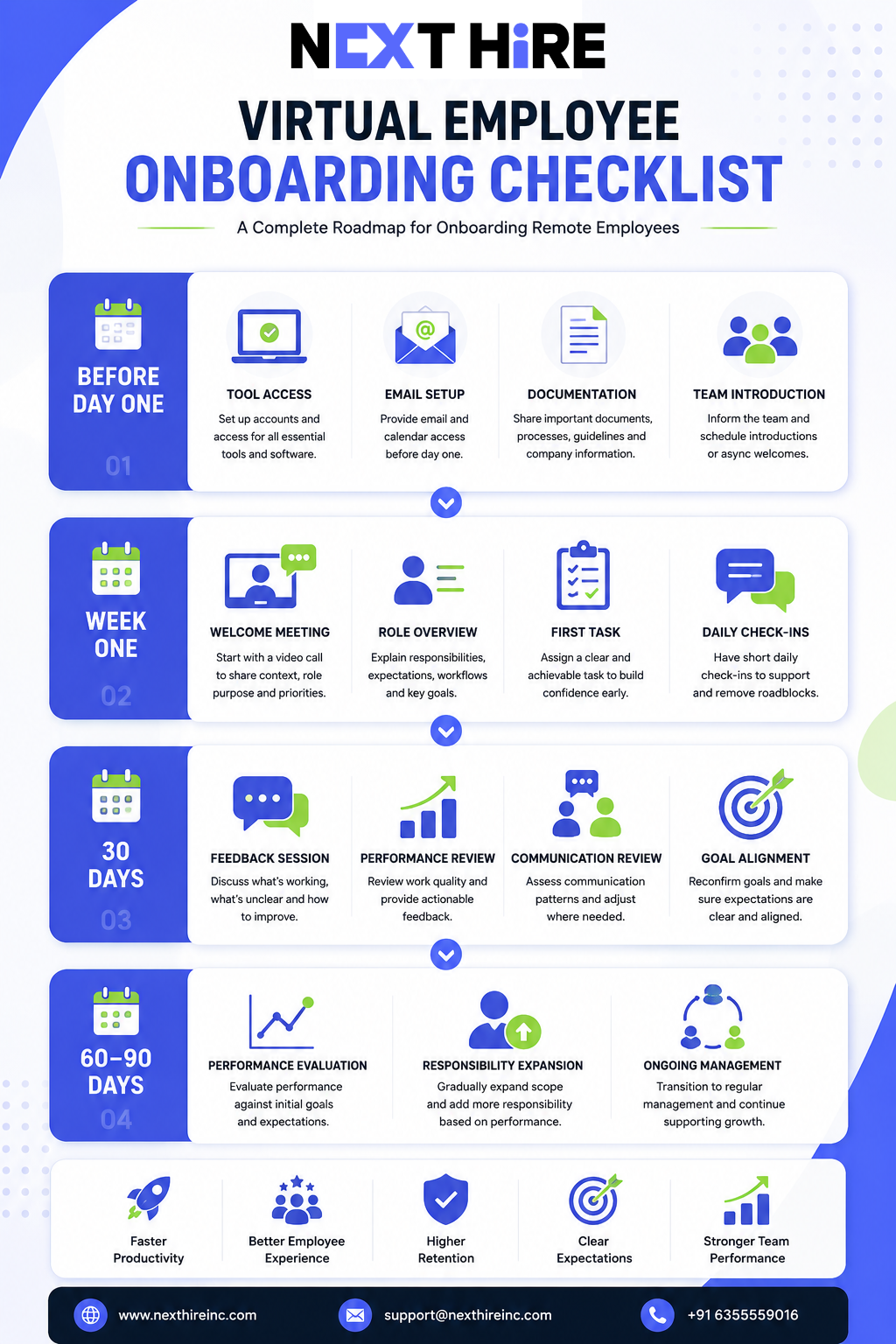
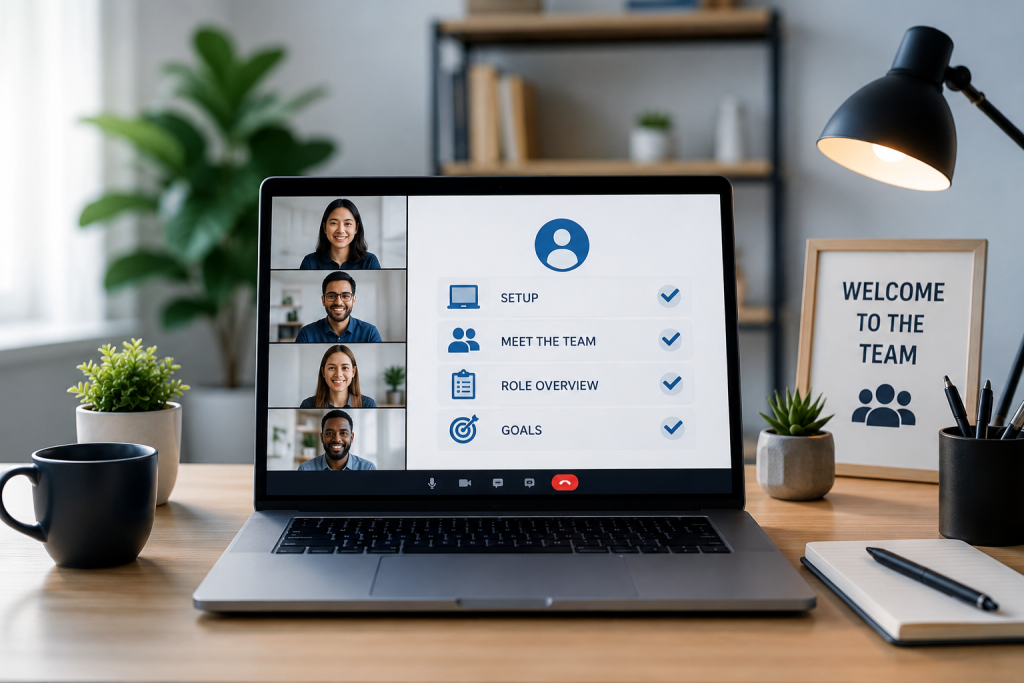
A good virtual onboarding checklist is organized into phases rather than a single overwhelming list. Here’s a practical structure that covers the most important ground.
Before the Start Date
Technical setup
- Create accounts and access for all required tools: project management platforms, communication channels, file storage, and any role-specific software
- Set up email and calendar access
- Provide login credentials securely (not over unencrypted channels)
- Test access before day one so there are no technical barriers on the first morning
Documentation
- Prepare a simple onboarding document covering: your communication preferences, working hours expectations, team structure, immediate priorities, and who to contact for what
- Share relevant company documents: processes, brand guidelines, product information, or technical documentation relevant to the role
- Create or share a glossary of internal terminology, tools, and acronyms if your business uses a lot of them
Team preparation
- Notify relevant team members that a new remote employee is starting
- Schedule introductory calls or async introductions for the first week
- Assign a point of contact or buddy who can answer day-to-day questions
Week One
Day one
- Start with a video call that covers business context, the role’s purpose, immediate priorities, and communication expectations. Don’t skip this in favor of documents.
- Walk through the tools they’ll be using and confirm they have access to everything
- Give them one clear, achievable task to complete in the first day or two
First week structure
- Schedule short check-ins daily, even if just 15 minutes
- Introduce them to team members they’ll work closely with
- Provide examples of past work that represents the quality and style you expect
- Encourage questions explicitly. Remote employees often hesitate to ask because they don’t want to seem incompetent.
30-Day Remote Onboarding Checklist
- Formal feedback session: what’s working, what’s unclear, what needs adjustment
- Review work quality and provide specific, actionable feedback
- Confirm they have everything they need to do their job effectively
- Assess communication patterns and adjust if needed
- Confirm role expectations are understood and being met
60 to 90 Days
- Performance review against the goals set in week one
- Adjust scope, responsibilities, or processes based on what’s been learned
- Confirm the engagement is working for both sides
- Begin transitioning from active onboarding to ongoing management
This remote onboarding checklist isn’t exhaustive, and the right level of detail depends on the role and the individual. A senior developer needs different onboarding than an entry-level content writer. The structure, though, applies broadly.
Step-by-Step Remote Onboarding Process
A remote onboarding process works best when it’s broken into clear phases with specific ownership for each step. Here’s a practical sequence:
Phase 1: Pre-boarding (before day one)
This is often the most neglected phase. The goal is to eliminate day-one friction. Every tool access issue, missing document, or unanswered question on the first day costs trust and time. Handle logistics before the person starts, not during.
Send a welcome message before the start date that includes what to expect on day one, who they’ll speak with first, and any documents worth reviewing in advance. Don’t overwhelm them, but don’t leave them in the dark either.
Phase 2: Orientation (days 1 to 3)
The first video call sets the tone. Use it to share context rather than just information. Explain why the role exists, what success looks like, how the team operates, and what the biggest current priorities are. People do better work when they understand the purpose behind it.
Walk through tools together rather than just listing them. Show them how your team actually uses Slack, Notion, Asana, or whatever your stack includes. Theoretical knowledge of a tool and practical understanding of how your team uses it are different things.
Phase 3: Integration (week 1 to 2)
Assign real work early, but size it appropriately. A task that’s completable within a few days gives the new hire a chance to demonstrate capability and gives you early signal on quality and communication style. Don’t front-load complexity.
Daily check-ins in the first two weeks keep small misalignments from becoming big ones. They don’t need to be long. A 15-minute call or a structured async update is enough.
Phase 4: Calibration (week 3 to 4)
By week three, you should have enough data to have a meaningful conversation about what’s working and what isn’t. This is the feedback session that most managers either skip or delay. Don’t. Early, honest feedback calibrates the relationship and signals that you’re invested in making it work.
Phase 5: Normalization (month 2 and beyond)
Onboarding formally ends but the practices don’t. The check-in cadence may reduce, but the communication rhythm established in onboarding should continue. This is where virtual employee engagement becomes the ongoing priority.
Best Practices for Onboarding Remote Employees
These aren’t rigid rules. They’re the habits that consistently separate smooth remote onboarding from chaotic ones.
Over-communicate in the first two weeks. In a physical office, a lot of context is communicated incidentally. Remotely, you have to be intentional about sharing it. Err on the side of more communication early on, and then find the right rhythm as things settle.
Document everything that matters. If you find yourself explaining the same thing twice, write it down. Good documentation reduces your onboarding overhead over time and gives remote employees a reference they can return to without having to ask.
Use video for anything nuanced. Text-based communication handles logistics well. But anything that involves context, feedback, or relationship-building lands better on a video call. The early weeks of remote onboarding should involve more video than you might think is necessary.
Set explicit goals for the first 30 days. “Get settled in and learn the tools” is not a goal. “By the end of week four, produce three pieces of content that meet our quality standard and attend all project syncs” is a goal. Specificity gives the new hire something to orient toward and gives you something to evaluate.
Assign a buddy or point of contact. Not for formal oversight, but for the day-to-day questions that people hesitate to bring to their manager. Having someone they can ask “how do we handle this?” without it feeling like a performance issue makes a real difference in early confidence.
Give feedback before they ask for it. Remote employees often interpret silence as either approval or indifference. Neither is accurate in most cases. Proactive feedback, especially positive feedback when something is done well, builds the psychological safety that lets people take initiative.
Check in as a human, not just a manager. A brief “how’s everything going?” at the start of a call isn’t a waste of time. It’s what separates a working relationship from a transactional one. Remote work can feel isolating early on, and a little genuine attention goes a long way.
Tips for Building Productive Remote Teams Through Better Onboarding
Onboarding individual employees well is important. But if you’re building a remote team, the cumulative effect of how you onboard each person shapes your team culture over time.
Standardize your remote onboarding checklist across roles. The structure can be the same even if the content varies. A standardized process means nothing falls through the cracks regardless of who’s doing the onboarding.
Create a shared knowledge base. As you onboard more people, the documentation you build becomes more valuable. A well-organized internal wiki or knowledge base reduces the onboarding burden for each subsequent hire.
Build in team connection deliberately. Remote teams don’t develop relationships accidentally. Schedule virtual team touchpoints, shared project reviews, or even informal calls that give people a chance to know each other beyond task handoffs.
Track onboarding outcomes. How long does it take for remote hires to reach full productivity? What’s the early retention rate? Measuring these things gives you data to improve your process over time rather than just hoping each onboarding goes well.
Make it easier for new hires to ask questions. Create a low-stakes channel or mechanism specifically for onboarding questions. When people know there’s a designated place to ask without judgment, they ask more, which means they make fewer assumptions and fewer mistakes.
For small businesses building their first remote team, starting with a clear onboarding structure from the very first hire makes scaling much easier later.
Common Mistakes in Remote Employee Onboarding
These come up consistently, and they’re worth naming directly because they’re easy to fall into even with good intentions.
Treating onboarding as a one-day event. Orientation is not onboarding. Showing someone around the tools on day one and then leaving them to figure things out is the most common remote onboarding failure mode. Onboarding is a process that runs for weeks.
Assuming information shared once is information understood. People retain a fraction of what they hear in their first week. Repeating key information, building it into documentation, and referencing it in context later is how it actually sticks.
Not giving remote employees enough social context. Who are the key stakeholders? What’s the internal dynamic like? What are the unwritten rules of how the team communicates? This context is absorbed naturally in an office. Remotely, it has to be explicitly shared.
Waiting too long to assign real work. Some managers hold new hires in observation mode for too long, worried about setting them up to fail. The opposite is usually true: real work with appropriate support is how people learn fastest and build confidence quickest.
Skipping the 30-day feedback conversation. A formal check-in at the end of the first month is one of the most valuable touchpoints in the entire onboarding process. Managers who skip it miss the window to course-correct before problems compound.
Not confirming tool access before day one. This sounds trivial, but a new remote employee who spends their first morning unable to log into systems feels unwelcome and disorganized before the relationship has even started.
Treating all roles the same. A technical writer and a full-stack developer need different onboarding content, different tool introductions, and different early tasks. Onboarding templates are useful as a framework, not as a one-size-fits-all solution.
Tools and Support for Virtual Employee Onboarding
The right tools don’t replace a good onboarding process, but they make it easier to execute consistently.
Communication tools. Slack, Microsoft Teams, or similar platforms handle day-to-day communication. Establish channel norms early: what goes in which channel, expected response times, how urgent vs. non-urgent communication is handled.
Project management platforms. Asana, Notion, Trello, Linear, or ClickUp depending on your team’s preference. New remote hires should be introduced to how your team actually uses the tool, not just given a login.
Video conferencing. Zoom, Google Meet, or similar. The default choice matters less than the habit of using it. Remote onboarding should involve more video calls in the first two weeks than ongoing work typically does.
Documentation tools. Notion, Confluence, or even a well-organized Google Drive. The goal is a single source of truth that new hires can reference without having to ask someone every time they need information.
Screen recording tools. Loom or similar tools let managers and team members record process walkthroughs that new hires can watch at their own pace and revisit when needed. This is particularly useful for complex workflows.
Access management. LastPass, 1Password, or your organization’s preferred password manager. Handle access setup before day one, and use role-based permissions to give new hires what they need without over-provisioning.
Time tracking and reporting. Tools like Toggl, Harvest, or built-in tracking within your project management platform help remote employees manage their time and give managers visibility into how hours are being spent during onboarding.
Beyond tooling, having a provider with dedicated remote staffing support infrastructure behind your remote hires reduces the administrative burden of onboarding significantly. The provider handles contracts, access coordination, and backup support, leaving you to focus on integration.
How Next Hire Inc Helps With Virtual Employee Onboarding
One of the real friction points in onboarding remote employees is the time it takes to get everything set up before you can even start the integration process. Next Hire Inc reduces that friction significantly.
When you hire through Next Hire Inc, the administrative side of onboarding is handled by the provider. Contracts, access coordination, and communication setup are managed before day one. You focus on sharing context, assigning work, and building the working relationship rather than chasing paperwork.
Here’s what the experience looks like in practice:
Shortlist in 24 hours. Share your requirement and you’ll have pre-vetted candidates to review by the next business day. The candidates have already been screened for skills, communication ability, and reliability.
Start in 24 to 48 hours. Once you approve a candidate, the engagement begins almost immediately. The fast start means your onboarding process can begin while the momentum from hiring is still fresh.
3-day free trial. Evaluate fit before committing to a longer engagement. If the match isn’t right, you know quickly rather than discovering it after months of investment.
Dedicated account manager. One point of contact who understands your requirements and manages the engagement on the provider’s side. If issues come up during onboarding, there’s someone to escalate to immediately.
Backup resource support. If your primary remote hire is unavailable, a backup steps in. For onboarding specifically, this means the work doesn’t stall while coverage is arranged.
Pricing from $5/hour. Monthly engagements from $799/month. Full details on the pricing page.
Next Hire Inc serves businesses across technology, finance, healthcare, education, retail and ecommerce, manufacturing, and media and marketing, with experience matching remote professionals to different business environments and onboarding contexts.
Whether you’re bringing on a virtual employee for the first time or building out a full virtual staffing solution for a growing remote team, the onboarding infrastructure matters as much as the talent itself.
Hiring a remote professional and want to get onboarding right from day one? Next Hire Inc matches you with pre-vetted candidates in 24 hours and provides the account management support to keep the engagement running smoothly. Tell us what you need.
Frequently Asked Questions
What Is Virtual Employee Onboarding?
Virtual employee onboarding is the process of integrating a new remote hire into your business, covering tool access, workflow introduction, team connections, role expectations, and cultural context. It begins before the start date and typically runs through the first 30 to 90 days of the engagement.
Why Does Remote Employee Onboarding Matter?
Because remote employees don’t have the passive context that an office environment provides. Everything that gets communicated incidentally in a physical workspace has to be communicated deliberately remotely. Structured onboarding directly affects how quickly new hires become productive, how long they stay, and how well their work aligns with your expectations.
What Should Be on a Virtual Onboarding Checklist?
A practical remote onboarding checklist includes: tool access setup before day one, a welcome document covering expectations and team structure, introductory calls with key team members, a clear first task, daily check-ins in week one, a 30-day feedback session, and performance review at 60 to 90 days.
How Long Should Remote Employee Onboarding Take?
Formal onboarding typically runs 30 to 90 days depending on the role complexity. The most intensive phase is the first two weeks, where communication should be highest and expectations should be most explicitly communicated. The practices established in onboarding, regular check-ins, clear feedback, documented expectations, should continue throughout the engagement.
What Are the Biggest Mistakes in Onboarding Remote Employees?
The most common mistakes are: treating onboarding as a one-day event, not giving remote employees enough context about team dynamics and culture, waiting too long to assign real work, skipping the 30-day feedback conversation, and not confirming tool access before the start date.
What Tools Help With Virtual Employee Onboarding?
Communication platforms (Slack, Teams), project management tools (Asana, Notion), video conferencing (Zoom, Meet), documentation systems (Notion, Confluence), screen recording tools (Loom), and access management tools (1Password) are the most commonly used. The tool choices matter less than having a consistent, documented process for how your team uses them.
How Is Virtual Onboarding Different from In-Person Onboarding?
The core goals are the same: get someone productive and integrated as fast as possible. The difference is that in-person environments communicate a lot of context passively, through observation, conversation, and physical presence. Remote onboarding has to communicate that context actively and deliberately. This requires more structured communication, more documentation, and more intentional relationship-building.
Conclusion
Virtual employee onboarding isn’t complicated, but it does require intention. The businesses that get it right aren’t doing anything exotic. They’re just being deliberate about something that in-person environments handle passively: communicating context, setting expectations clearly, building relationships, and giving people what they need to do good work.
The cost of poor onboarding is real and measurable. Slow productivity, early disengagement, work that misses the mark, and turnover that forces you to start the process again. The investment in doing it well pays back quickly.
If you’re building a remote team or bringing on your first virtual hire, starting with a clear onboarding process is one of the highest-leverage things you can do. Get that right, and everything else becomes easier.
Looking to hire pre-vetted remote professionals with the support structure to onboard them smoothly? Start with a 3-day free trial through Next Hire Inc.