


Key Takeaways
- Mobile app backend architecture defines how your app stores data, authenticates users, processes business logic, and communicates with external services.
- The backend is invisible to users but determines everything about performance, scalability, and security that they actually experience.
- Core decisions include API design (REST vs GraphQL), database choice (SQL vs NoSQL), authentication strategy, and whether to use a managed backend-as-a-service or build custom infrastructure.
- Backend decisions made early are expensive to change later, which is why getting them right before development starts matters so much.
- Next Hire Inc provides experienced backend developers, API specialists, and cloud engineers who can be shortlisted within 24 hours and start within 24 to 48 hours.
Introduction
Most people who use mobile apps never think about what’s happening behind the screen. They tap a button, data appears, a payment goes through, a notification arrives. The backend is entirely invisible when it works well.
But the backend is where almost everything that matters actually happens. When an app is slow, it’s usually a backend problem. When it crashes under load, that’s backend. When user data gets compromised, that’s almost always a backend security failure. When a feature takes three times longer to build than expected, there’s a good chance the backend architecture made it harder than it needed to be.
This guide covers mobile app backend architecture in practical terms: what it includes, how the main components fit together, the key decisions that shape how well your backend performs, and how to choose the right approach for your specific project. If you’re building a mobile app, whether you’re a founder, a product manager, or a developer, understanding the backend architecture decisions being made on your behalf is worth the time.
What Is Mobile App Backend Architecture?
Mobile app backend architecture is the structural design of the server-side systems that power a mobile application. It covers everything that doesn’t live on the user’s device: the servers that process requests, the databases that store data, the APIs that the mobile app communicates with, the authentication systems that verify user identity, the cloud infrastructure that hosts everything, and the business logic that governs how the app behaves.
Think of the mobile app as the front of a store. What the customer sees and interacts with. The backend is everything behind the counter, in the stockroom, and in the supply chain. The customer experience depends entirely on how well that hidden infrastructure functions.
A well-designed mobile app backend handles:
- Receiving and processing requests from the mobile client
- Authenticating users and authorizing what they can do
- Executing business logic and returning appropriate responses
- Reading from and writing to databases
- Communicating with third-party services
- Scaling to handle more users without degrading performance
- Maintaining security across all of the above
These aren’t independent concerns. Database choice affects API design. Authentication strategy affects security architecture. Hosting decisions affect scalability. The decisions interact, which is why thinking about backend architecture as a whole, rather than a collection of independent choices, produces better outcomes.
This is closely related to the broader mobile app architecture decisions that should be made before development starts.
Why Backend Architecture Matters for Mobile Apps
The mobile app frontend might be what users see, but the backend is what they feel. Load times, reliability, data accuracy, and security all originate in the backend. A beautifully designed app with a poorly architected backend delivers a poor user experience regardless of how good the design is.
Performance is a backend problem. When users wait for data to load, it’s almost always because the backend is slow to respond. Poorly optimized queries, missing caching layers, inefficient API design, and undersized server capacity all show up as user-facing slowness.
Scalability is designed into the backend. An app that works well for 500 users won’t automatically work well for 500,000. Backend architecture determines whether your app can handle growth without requiring a near-complete rebuild. Designing for scalability from the beginning costs more upfront but significantly less overall.
Security lives in the backend. User data, payment information, personal records, and authentication credentials are all stored and processed server-side. Security failures in the backend affect every user of the app simultaneously. This is qualitatively different from frontend security issues.
Feature development speed is shaped by backend quality. A well-structured mobile app backend makes new features easier to add because each component has clear boundaries and responsibilities. A tangled backend makes every new feature a negotiation with existing complexity.
Reliability and uptime depend on backend infrastructure. Downtime is a backend problem. Whether it’s a server crash, a database failure, or a misconfigured deployment, availability issues originate in the backend and are visible to every user.
For businesses in healthcare, finance, retail and ecommerce, and logistics, where app reliability directly affects business operations and customer trust, backend architecture quality isn’t a technical preference. It’s a business requirement.
Core Parts of Mobile App Backend Architecture
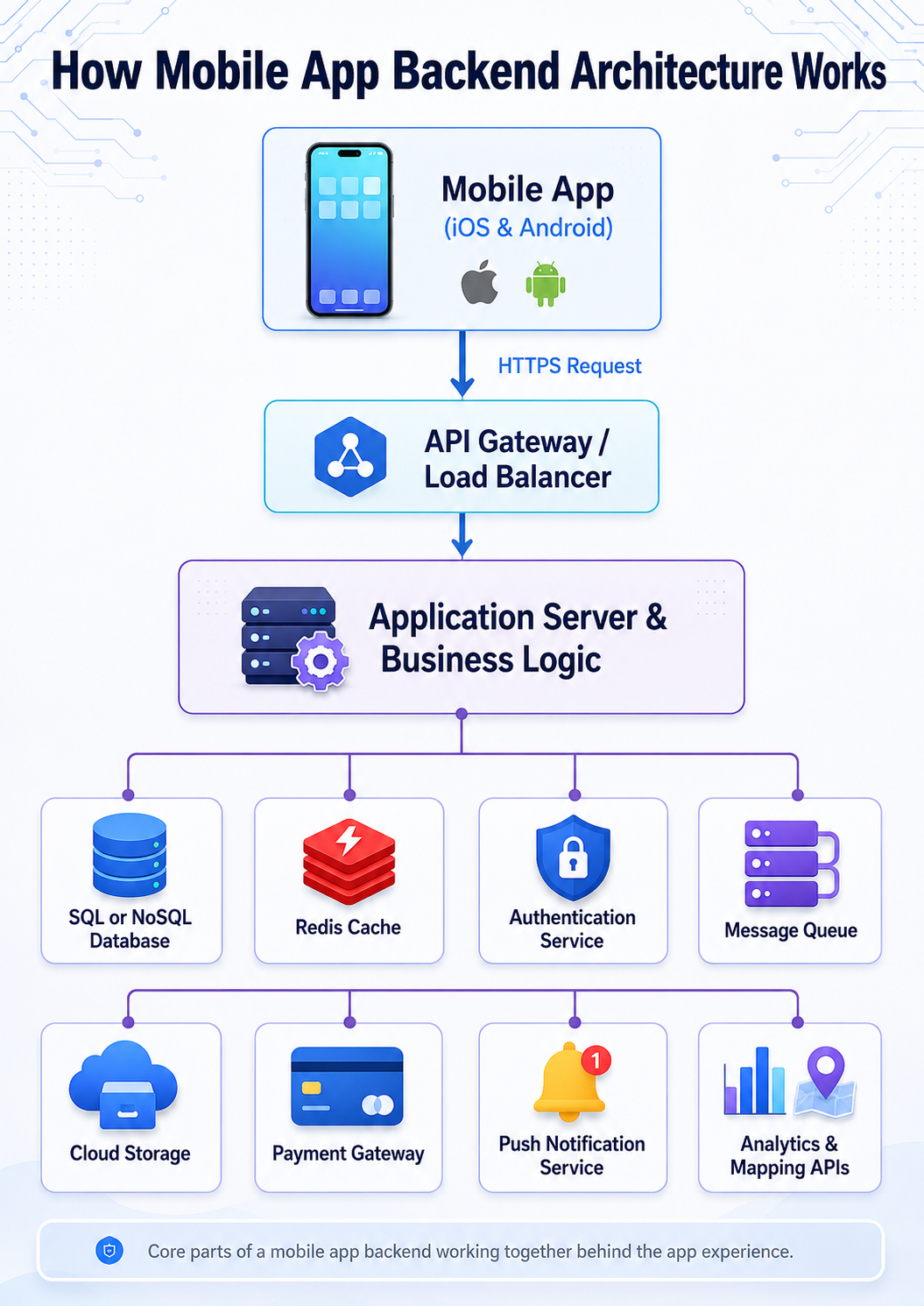
A well-designed mobile app backend typically consists of several interconnected components. Understanding what each one does and how they relate makes the overall architecture much easier to reason about.
API Layer
The API (Application Programming Interface) is the communication interface between the mobile app and the backend. The mobile client sends requests to the API; the API processes them and returns responses. Every action the user takes that involves server data, logging in, loading a feed, submitting a form, making a payment, goes through the API.
The API layer enforces the contract between client and server. It defines what requests are valid, what authentication is required, what data formats are expected, and what responses look like. A well-designed API makes mobile development faster and more reliable. A poorly designed one creates constant friction for frontend developers and produces inconsistent behavior in the app.
Application Server
The application server is where business logic lives. When an API request arrives, the application server processes it: validates the data, applies business rules, interacts with the database, calls external services, and constructs the response.
This is where the rules of your application are enforced. What happens when a user places an order? How is a discount calculated? What validation runs before data is saved? Who is allowed to access which resources? All of this lives in the application server layer.
Separating business logic from the API layer and the data layer is one of the most important structural decisions in backend architecture. When these concerns are mixed together, the backend becomes difficult to test, modify, and scale.
Database Layer
The database stores all persistent data: user accounts, app content, transaction records, configuration, and anything else that needs to survive beyond a single request. Database choice, schema design, indexing strategy, and query optimization all significantly affect backend performance.
Caching Layer
Caching stores frequently accessed data in fast memory so the backend doesn’t have to regenerate it for every request. A cache hit is orders of magnitude faster than a database query. Redis and Memcached are the most common caching solutions. Effective caching strategy is one of the highest-impact performance optimizations available to a backend team.
Authentication and Authorization System
Authentication verifies who the user is. Authorization determines what they’re allowed to do. These are distinct but closely related concerns that touch every part of the backend.
Message Queue and Background Workers
Some operations are too slow or too resource-intensive to run synchronously in a request-response cycle. Sending emails, processing images, generating reports, and syncing data with external systems are examples. Message queues (like RabbitMQ or AWS SQS) and background workers handle these operations asynchronously without blocking the API response.
Third-Party Service Integrations
Most mobile app backends integrate with external services: payment processors, notification services, analytics platforms, mapping APIs, identity providers, and others. These integrations are managed at the backend level, not the mobile client level, which keeps credentials and business logic server-side where they belong.
APIs in Mobile App Backend Architecture
The mobile app API is the interface that makes backend functionality accessible to the mobile client. Getting API design right is one of the most consequential decisions in mobile app backend development, because the API touches every feature of the app.
REST vs GraphQL
The two dominant approaches to mobile app API design are REST and GraphQL, and the choice between them has real implications for development speed, performance, and flexibility.
REST (Representational State Transfer) organizes API endpoints around resources. A user is a resource with a URL. A product is a resource with a URL. You GET, POST, PUT, PATCH, and DELETE resources using standard HTTP methods. REST is well-understood, widely documented, and supported by every framework and toolchain.
The main limitation of REST for mobile apps is over-fetching and under-fetching. A REST endpoint returns a fixed shape of data. If the mobile client needs less than what the endpoint returns, bandwidth is wasted. If it needs more, multiple requests are required. For mobile clients on variable network connections, this matters.
GraphQL allows clients to specify exactly what data they need in a single query. The server returns precisely that data, nothing more, nothing less. This is particularly valuable for mobile apps where different screens need different subsets of the same data.
GraphQL adds complexity to the backend. The schema needs to be carefully designed, resolvers need to be efficient to avoid N+1 query problems, and caching is more complex than with REST. GraphQL developers who understand these trade-offs can navigate them effectively; teams that adopt GraphQL without understanding the complexities often create performance problems.
For most mobile apps, REST is the appropriate choice. GraphQL becomes worth the complexity when the app has diverse data requirements across many screens, when over-fetching is causing meaningful performance issues, or when the team has existing GraphQL expertise.
API Versioning
Mobile apps stay in users’ hands for months or years after release. When you need to change the API, you can’t break existing app versions that haven’t been updated. API versioning (commonly using URL paths like /v1/, /v2/) allows new API versions to be deployed without breaking older clients.
Planning for API versioning from the beginning is much easier than retrofitting it later.
Mobile App API Security
API security deserves its own attention because the mobile app API is the attack surface for your backend. Every endpoint that isn’t properly secured is a potential vulnerability.
Authentication on every endpoint. Every API request that returns private data or performs an action should require valid authentication. Public endpoints (registration, login, public content) are the exception, not the rule.
Input validation. Never trust data sent from the mobile client. Validate all inputs server-side before processing them. Client-side validation can be bypassed; server-side validation cannot.
Rate limiting. Limit how many requests a client can make in a given time period. This prevents brute force attacks on authentication endpoints and protects against API abuse.
HTTPS everywhere. All API traffic should be encrypted in transit. HTTP endpoints for production APIs are not acceptable.
Principle of least privilege. API keys and service credentials should have only the permissions necessary for their function. Admin-level credentials should never be embedded in mobile client code.
API developers who specialize in mobile backends design with these security considerations built in rather than applied as an afterthought.
Databases for Mobile Apps
Database choice is one of the most consequential decisions in mobile app backend architecture, and it’s one that’s difficult to change after the fact. Understanding the main categories helps you make the right initial decision.
Relational Databases (SQL)
Relational databases store data in structured tables with defined schemas and relationships enforced by foreign keys. PostgreSQL and MySQL are the most widely used for mobile app backends.
Relational databases excel when:
- Data has clear, well-defined relationships
- Data integrity is critical (financial transactions, user records)
- Complex queries across multiple related datasets are needed
- ACID compliance matters for your use case
For most business applications, a relational database is the right default choice. Backend developers with strong SQL skills can optimize queries and schema design to handle significant scale.
NoSQL Databases
NoSQL databases store data in formats other than relational tables: documents (MongoDB), key-value pairs (Redis), wide columns (Cassandra), or graphs (Neo4j). They typically offer more flexibility in data structure and scale horizontally more easily than relational databases.
MongoDB is the most commonly used NoSQL database for mobile app backends. It stores data as JSON-like documents, which maps naturally to the data structures mobile apps work with. It’s particularly well-suited for:
- Apps with rapidly evolving data structures
- Applications where data access patterns favor document retrieval over complex joins
- High write-throughput scenarios
- Content management and social feeds
Redis deserves specific mention as a caching layer. It’s not a primary database but an in-memory data store used to cache frequently accessed data and handle session management.
Choosing Between SQL and NoSQL
The SQL vs NoSQL choice is often presented as either/or when many production systems use both: a relational database for structured, relationship-heavy data and a NoSQL store for specific use cases like caching, session management, or flexible content storage.
For most mobile app projects, start with a relational database unless there’s a specific reason not to. The structured data model, query flexibility, and ACID guarantees of SQL are valuable for the vast majority of business use cases.
Real-Time Databases
For apps with real-time features like live chat, collaborative editing, or live data feeds, standard request-response database architectures don’t work well. Real-time databases like Firebase Realtime Database or Firestore push data changes to connected clients immediately rather than waiting for them to poll.
Firebase developers who understand real-time database architecture can design these systems to handle concurrent connections efficiently without degrading performance.
Mobile App Authentication and User Security
Authentication is the mechanism that verifies who a user is. It’s one of the most security-critical parts of mobile app backend architecture and one where poor implementation creates serious vulnerabilities.
Token-Based Authentication
The standard approach for mobile app authentication is token-based. The user provides credentials (email and password, social login, biometric). The backend verifies them and issues a token. The mobile client includes this token in subsequent API requests to prove identity.
JWT (JSON Web Tokens) are the most common token format. A JWT contains a payload (user ID, roles, expiration) signed by the server. The mobile app stores this token and sends it in the Authorization header of API requests.
Access tokens and refresh tokens are used together to balance security and usability. Access tokens are short-lived (15 minutes to 1 hour) which limits the damage if they’re stolen. Refresh tokens are longer-lived and used to obtain new access tokens without requiring the user to log in again. Token rotation on refresh adds another security layer.
Social Authentication
Social login (Sign in with Google, Sign in with Apple, Sign in with Facebook) delegates identity verification to a trusted third party. The user authenticates with the social provider; the provider returns a token that the backend verifies. This reduces the risk of your app storing passwords and improves conversion by removing friction from the signup flow.
Apple requires apps that offer other social login options to also offer Sign in with Apple, which is worth building in from the beginning rather than adding later.
Biometric Authentication
Face ID, Touch ID, and equivalent Android biometric systems authenticate locally on the device. The biometric check unlocks a cryptographic key stored in the device’s secure enclave, which is then used to authenticate with the backend. The biometric data never leaves the device.
Mobile App Authentication Best Practices
Store tokens in secure storage. iOS Keychain and Android Keystore are designed for this. Storing tokens in plain text or in shared preferences is a common mistake that creates serious vulnerabilities.
Use short-lived access tokens. Longer token lifetimes are convenient but increase the window of exposure if a token is compromised.
Implement token revocation. When a user logs out or changes their password, existing tokens should be invalidated server-side.
Rate limit authentication endpoints. Login and registration endpoints are the primary targets for credential stuffing and brute force attacks. Rate limiting is essential.
Never transmit passwords in API logs. Logging frameworks that capture request bodies can inadvertently log passwords. Ensure sensitive fields are scrubbed from logs.
Use multi-factor authentication for sensitive operations. High-stakes actions like transferring funds, changing account details, or accessing sensitive data benefit from an additional verification step beyond the access token.
Security test engineers who specialize in mobile and API security can audit your authentication implementation before launch, which is significantly more cost-effective than addressing compromised accounts after a breach.
Cloud Infrastructure and Backend Hosting
The cloud infrastructure layer determines where your backend runs, how it scales, and how much it costs to operate. The three major cloud providers, AWS, Google Cloud Platform, and Microsoft Azure, offer broadly similar capabilities with different tooling ecosystems and pricing models.
Key Cloud Services for Mobile App Backends
Compute. Your application server runs on compute resources. The main options are:
Virtual machines (EC2 on AWS, Compute Engine on GCP) give you full control over the server environment. You manage the OS, scaling configuration, and security patching.
Container services (ECS, EKS on AWS, GKE on GCP) run application code in containers, which improves consistency between development and production and makes horizontal scaling more manageable.
Serverless functions (Lambda on AWS, Cloud Functions on GCP) run individual functions in response to events without managing servers. These work well for specific backend operations: webhook handlers, image processing, scheduled tasks, notification triggers. They’re not typically a good fit for the main API layer of a mobile app.
Managed databases. Running databases as managed services (RDS on AWS, Cloud SQL on GCP) reduces operational overhead compared to self-hosted databases. Managed services handle backups, failover, patching, and scaling with less manual intervention.
Storage. User-uploaded content like images, videos, and documents should be stored in object storage (S3 on AWS, Cloud Storage on GCP) rather than on application servers. Object storage scales automatically, integrates with CDNs, and separates content storage from application logic.
CDN. A Content Delivery Network serves static assets and cached content from locations geographically close to users. This reduces latency for global users and offloads traffic from origin servers.
Load balancing. Distributes incoming traffic across multiple application server instances so no single instance becomes a bottleneck. Essential for production apps expecting meaningful traffic.
Cloud and Server Administration
Infrastructure management is an ongoing operational responsibility. System maintenance experts and cloud administrators handle server configuration, security patching, scaling adjustments, monitoring, and incident response. For most mobile app teams, having a dedicated infrastructure specialist or working with a managed hosting provider is more reliable than distributing this responsibility among developers.
Scaling Strategies
Vertical scaling means increasing the size of existing servers. It’s simple but has limits and creates a single point of failure.
Horizontal scaling means adding more server instances. It’s more complex to implement but scales without limits and improves redundancy. Load balancers distribute traffic across instances.
Auto-scaling automatically adjusts the number of running instances based on traffic. Cloud providers offer auto-scaling configurations that reduce cost during low-traffic periods and handle spikes without manual intervention.
Designing for horizontal scaling from the beginning, rather than optimizing for vertical scaling and refactoring later, is the more sustainable approach for apps expecting growth.
Mobile Backend as a Service vs Custom Backend
One of the most significant decisions in mobile app backend development is whether to build custom backend infrastructure or use a Backend as a Service (BaaS) platform.
What Is Mobile Backend as a Service?
Mobile backend as a service platforms provide pre-built backend infrastructure as managed services. Rather than building authentication, databases, file storage, real-time sync, and push notifications from scratch, you configure and use what the platform provides.
Firebase (by Google) is the most widely used BaaS for mobile apps. It provides:
- Authentication with multiple providers
- Realtime Database and Firestore (NoSQL databases with real-time sync)
- Cloud Storage for user-uploaded files
- Cloud Functions for custom server-side logic
- Push notifications via Firebase Cloud Messaging
- Analytics and crash reporting
AWS Amplify and Supabase are alternatives worth knowing. Amplify provides AWS-backed services with mobile-focused tooling. Supabase positions itself as an open-source Firebase alternative built on PostgreSQL.
Mobile Backend as a Service Architecture
BaaS platforms are particularly well-suited for:
- MVPs and early-stage apps where speed to market matters more than customization
- Apps with standard feature sets (authentication, CRUD operations, file storage, push notifications)
- Small teams without dedicated backend engineers
- Cross-platform apps where the same backend serves iOS and Android
Firebase developers who understand the platform’s data modeling requirements and security rules can build a production-ready backend significantly faster than custom infrastructure allows.
Custom Backend
A custom backend gives you full control over every architectural decision. You choose the language, framework, database, hosting, and every component of the stack. This flexibility is valuable when:
- Your business logic is complex enough that BaaS limitations become constraints
- You have specific performance requirements that managed services can’t meet
- Data residency or compliance requirements restrict which cloud services you can use
- You need deep integration with existing infrastructure
- The app has outgrown BaaS capabilities and needs to migrate
Custom backends are built using server-side languages and frameworks. Node.js developers using Express or NestJS, Python developers using Django or FastAPI, Java developers using Spring Boot, Go developers for high-performance services, and PHP developers using Laravel are all common choices.
| Factor | BaaS (Firebase, Amplify) | Custom Backend |
| Setup speed | Fast | Slower |
| Cost at low scale | Very low | Moderate |
| Cost at high scale | Can become expensive | More predictable |
| Flexibility | Limited by platform | Unlimited |
| Backend expertise needed | Low to moderate | High |
| Vendor dependency | High | None |
| Complex business logic | Limited | Full support |
| Best for | MVPs, standard apps, small teams | Complex apps, high scale, compliance needs |
Many production apps start with BaaS for speed and migrate to custom infrastructure as requirements outgrow what the platform provides. Planning for this possibility, keeping business logic in Cloud Functions rather than baked into the database rules, makes migration more manageable when the time comes.
How to Build a Backend for a Mobile App
Building a mobile app backend involves several sequential decisions, each of which constrains the ones that follow. Here’s a practical sequence:
Step 1: Define What the Backend Needs to Do
Before choosing technology, define the functional requirements. What data needs to be stored? What business logic needs to run server-side? What third-party services does the app depend on? What are the expected user volumes? What are the security and compliance requirements?
Requirements that are clear before development starts are significantly cheaper than requirements discovered during development.
Step 2: Choose BaaS or Custom
Based on your requirements, team expertise, and budget, decide whether a BaaS platform or custom infrastructure is appropriate. If in doubt, starting with Firebase and migrating later is a viable strategy for many apps.
Step 3: Design the Data Model
Before writing any code, design how data will be structured. For relational databases, this means defining tables, columns, relationships, and constraints. For NoSQL, it means understanding access patterns and designing documents accordingly.
Data model design has downstream effects on query performance, API design, and scalability. Changes to the data model after data exists in production are expensive and risky. Getting it right early is worth the time.
Step 4: Design the API
Define the API contract: what endpoints exist, what authentication they require, what data formats they accept and return, what error codes they use. This specification guides both backend development and mobile client development and allows both to proceed in parallel once the contract is agreed.
Step 5: Implement Authentication
Authentication should be one of the first things implemented because it’s a dependency for most other features. Implement it correctly from the start rather than retrofitting proper security onto an initially unsecured system.
Step 6: Build Core Features Incrementally
Implement backend features in the order the mobile team needs them, which typically follows the critical user journey. Start with the features that block mobile development and work outward.
Step 7: Set Up Monitoring and Logging
Application monitoring (errors, performance, uptime) and structured logging should be set up before launch, not after. Discovering production problems from user complaints rather than monitoring is avoidable and costly.
Step 8: Performance Testing
Before launching to real users, test the backend under realistic load conditions. Performance testers use load testing tools to simulate concurrent users and identify bottlenecks before they affect real users.
How to Choose the Best Backend for Mobile App Development
The “best” backend for mobile app development depends on your specific context. Here’s how to think through the decision:
Start with your team’s existing expertise. A team that knows Node.js well will build a better backend with Node.js than they will with Go, even if Go might theoretically be more performant for your use case. The productivity and quality benefits of using familiar technology are real.
Match the backend to the scale you expect, not the scale you might reach. Building microservices infrastructure for an app with 100 users is over-engineering that slows you down. But designing a monolith with no plan for how it would be scaled is also a mistake. The right answer is usually a well-structured monolith that could be decomposed into services later if needed.
Consider compliance requirements early. Apps in regulated industries have backend requirements that affect technology choices. HIPAA-compliant data handling, PCI DSS for payment data, GDPR for European users. These requirements are much harder to retrofit than to build in from the start.
Evaluate the real cost of BaaS at your target scale. Firebase pricing scales with usage. For apps at low user volumes, it’s very cheap. For apps with millions of reads and writes per month, the cost can exceed equivalent custom infrastructure. Model the costs at your expected scale before committing.
Get backend decisions reviewed by an experienced architect. For apps with meaningful complexity, having a senior backend engineer review the architecture before development starts is one of the most cost-effective investments available. They’ll identify problems that aren’t obvious until they’ve been encountered before.
How Next Hire Inc Helps With Mobile App Backend Development
Next Hire Inc provides access to experienced backend developers, API specialists, database engineers, and cloud infrastructure professionals who can contribute to mobile app backend development from architecture decisions through to production deployment.
Whether you need a senior backend architect to design the system before development starts, specialized developers to build specific components, or cloud administrators to manage infrastructure, the talent is available and can be shortlisted within 24 hours.
Available specialists for mobile app backend projects:
Node.js developers for JavaScript-based backend services. Python developers for data-intensive or ML-adjacent backends. Java developers for enterprise-grade Spring Boot services. Go developers for high-performance microservices. Firebase developers for BaaS-based backend architecture. API developers for REST and GraphQL design and implementation. Cloud and server administrators for infrastructure setup and management. Security test engineers for backend security auditing. Performance testers for load testing before launch.
The engagement model:
Candidates shortlisted within 24 hours. Engagements start in 24 to 48 hours. 3-day free trial to evaluate fit before committing. Pricing from $5/hour, monthly engagements from $799/month. Dedicated account manager and backup resource support throughout. Full pricing details on the pricing page.
Every candidate is pre-vetted for technical skills, communication, and reliability before you see their profile. The infrastructure supporting engagements is built for operational continuity and data security.
Next Hire Inc works with businesses across technology, healthcare, finance, education, retail and ecommerce, and logistics, with experience matching backend development talent to different project requirements and technical environments.
For teams looking at the full picture of mobile app development, combining backend expertise with mobile app developers and QA testers from the same provider creates a more cohesive team with less coordination overhead.
Building a mobile app and want to get the backend architecture right from the start? Next Hire Inc shortlists experienced backend developers and cloud engineers within 24 hours. Tell us what you need.
Frequently Asked Questions
What Is Mobile App Backend Architecture?
Mobile app backend architecture is the structural design of the server-side systems that power a mobile application, including APIs, databases, authentication, business logic, cloud hosting, and external service integrations. It determines how the app stores data, processes requests, authenticates users, and scales with growth.
What Is the Best Backend for Mobile App Development?
There’s no single best backend, the right choice depends on your team’s expertise, app complexity, scale expectations, and compliance requirements. Firebase is excellent for MVPs and apps with standard feature sets. Custom backends with Node.js, Python, Java, or Go are better for complex business logic and high-scale requirements.
What Is Mobile Backend as a Service?
Mobile backend as a service (BaaS) platforms like Firebase provide pre-built backend infrastructure as managed services, including authentication, databases, file storage, real-time sync, and push notifications. They allow teams to build mobile app backends without managing server infrastructure directly.
How Does Mobile App Authentication Work?
Users provide credentials, the backend verifies them and issues a token (typically a JWT). The mobile app stores this token securely and includes it in subsequent API requests. Short-lived access tokens combined with longer-lived refresh tokens balance security with usability.
REST or GraphQL for Mobile App APIs?
REST is the right default for most mobile apps. GraphQL becomes valuable when different screens need different data shapes and over-fetching from REST endpoints is causing performance or bandwidth issues. GraphQL adds backend complexity that needs to be justified by the problem it solves.
How Should Authentication Tokens Be Stored on Mobile?
In iOS Keychain and Android Keystore. These are secure storage mechanisms provided by the platform specifically for sensitive data like authentication tokens. Storing tokens in shared preferences, UserDefaults, or local storage is a security vulnerability.
When Should I Use Firebase vs a Custom Backend?
Use Firebase when speed to market is the priority, the team lacks dedicated backend engineers, and the app’s feature set fits within what Firebase provides. Use a custom backend when business logic is too complex for BaaS, compliance requires it, costs at scale become prohibitive, or the app has outgrown what Firebase can offer.
Conclusion
The mobile app backend is where the real work of an application happens. It’s invisible to users, which makes it easy to underinvest in. But every performance problem, security vulnerability, scalability failure, and development slowdown that users eventually experience traces back to backend decisions.
Getting the backend architecture right means making deliberate decisions about APIs, databases, authentication, cloud infrastructure, and whether to build custom or use a managed service, before those decisions are locked in by code that depends on them.
The good news is that most backend architecture mistakes are avoidable with proper planning and the right expertise. Starting with a clear understanding of your requirements, making technology choices that match your actual needs, and building in security and scalability from the beginning produces backends that support growth rather than constrain it.
Ready to build your mobile app backend with experienced developers who can start this week? Try Next Hire Inc with a 3-day free trial.