

Key Takeaways
| What You’ll Learn | Why It Matters |
|---|---|
| What mobile app API security covers | APIs are the most targeted attack surface in mobile apps |
| Authentication and token security | Stolen tokens give attackers full account access |
| REST API and API gateway security | Backend systems need layered protection, not just auth |
| API security testing before launch | Vulnerabilities found pre-launch cost far less to fix |
| Common mistakes developers make | Most breaches exploit known, preventable weaknesses |
Introduction
When a mobile app gets breached, the entry point is almost never the mobile client itself. Attackers don’t try to reverse-engineer your Swift or Kotlin code to steal data. They go after the API.
The API is where every piece of user data flows, where tokens are issued and validated, where business logic executes, and where backend systems connect. If the API isn’t secured properly, it doesn’t matter how polished the UI is or how well-architected the mobile client is. The data is accessible.
The problem isn’t that developers don’t care about security. It’s that mobile app API security is often treated as something to address after the core features are built, which is exactly backwards. Security controls that are retrofitted onto an existing API are harder to implement correctly and more likely to have gaps than controls designed in from the beginning.
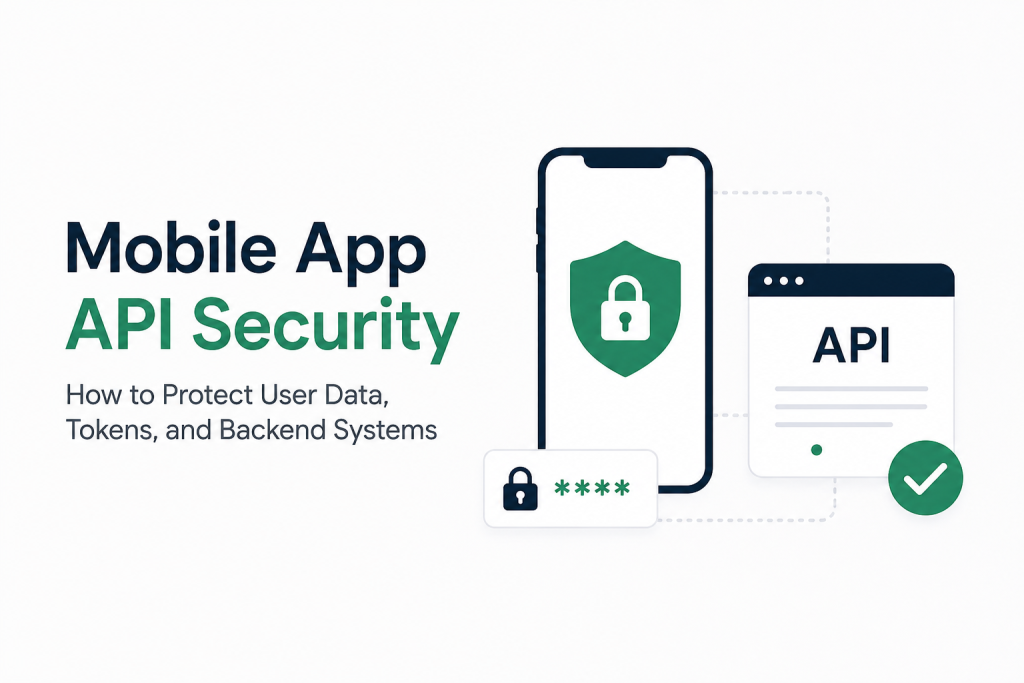
This guide covers what mobile app API security actually involves, the specific controls that matter, how authentication and token security work, what API gateway security looks like in practice, and how to test before you ship.
What Is Mobile App API Security?
Mobile app API security is the set of controls, practices, and architecture decisions that protect the communication channel between a mobile application and its backend systems. It covers:
- Who can make API requests (authentication)
- What authenticated users are allowed to do (authorization)
- How data is protected in transit (encryption)
- How the backend validates and sanitizes incoming data (input security)
- How the system responds to abuse, attacks, and anomalous behavior (rate limiting, monitoring)
- How tokens and credentials are managed across the entire lifecycle
The API is the attack surface. Every endpoint that accepts requests from a mobile client is a potential target. Mobile app API security is about making that attack surface as small and as well-defended as possible.
The API Security Threat Landscape
| Threat Type | What It Means | Real Impact |
|---|---|---|
| Broken authentication | Weak or bypassed auth on endpoints | Unauthorized account access |
| Broken authorization | User A can access User B’s data | Data exposure, GDPR violations |
| Injection attacks | Malicious input executed by the backend | Database corruption, data theft |
| Excessive data exposure | API returns more data than the client needs | Sensitive data in response payloads |
| Rate limiting failures | No request throttling on sensitive endpoints | Brute force, scraping, DDoS |
| Security misconfiguration | Default configs, debug mode in production | Unintended access, information leakage |
| Token theft | Tokens stored insecurely or transmitted over HTTP | Full account takeover |
| Man-in-the-middle | Traffic intercepted between client and server | Credential and data theft |
The OWASP Mobile Top 10 and OWASP API Security Top 10 are the standard references for these threat categories. If you’re not familiar with them, they’re worth reading alongside this guide.
Why API Security Matters for Mobile Apps
Mobile apps present a specific security challenge that web apps don’t face in the same way: the client code is distributed. Anyone who downloads your app has access to the binary. With the right tools, they can observe every API call your app makes, including the endpoints, parameters, headers, and authentication tokens.
This means that security through obscurity doesn’t work for mobile APIs. You can’t protect an endpoint by hoping attackers don’t know it exists. Every endpoint your app calls is discoverable by anyone with a proxy tool and 20 minutes.
The implications are direct:
Every endpoint must enforce its own security. You can’t rely on the client to enforce access restrictions. If an endpoint returns sensitive data, it must require valid authentication regardless of how the client is designed.
Tokens stored insecurely are tokens that will be stolen. If an access token is stored in SharedPreferences on Android or UserDefaults on iOS, it’s accessible to other apps and to attackers with device access.
Input validation cannot happen only on the client. Client-side validation is for UX. Server-side validation is for security. Every request reaching your API should be treated as potentially malicious until validated.
For businesses in healthcare, finance, and retail and ecommerce, API security failures carry regulatory consequences alongside business ones. A HIPAA violation or a PCI DSS breach compounds the reputational damage with regulatory fines.
Mobile App API Security Checklist
Before going deep on individual controls, here’s a practical reference checklist organized by category.
Authentication and Authorization
- Every sensitive endpoint requires valid authentication
- Role-based access control enforced server-side (not just client-side)
- User A cannot access User B’s resources through parameter manipulation
- Admin endpoints are separated and additionally protected
- Authentication failures return consistent, non-revealing error messages
Token Security
- Access tokens are short-lived (15 minutes to 1 hour)
- Refresh tokens are longer-lived and rotated on use
- Tokens stored in iOS Keychain or Android Keystore (never UserDefaults or SharedPreferences)
- Token revocation implemented for logout and password change
- JWT signatures verified on every request (not just decoded)
Transport Security
- HTTPS enforced on all endpoints (HTTP requests rejected)
- TLS 1.2 minimum, TLS 1.3 preferred
- Certificate pinning implemented for high-sensitivity apps
- Sensitive data not passed in URL query parameters
Input Security
- All inputs validated server-side regardless of client-side validation
- SQL queries use parameterized statements or ORM (no string concatenation)
- File uploads validated for type, size, and content
- JSON schema validation on request bodies
Rate Limiting and Abuse Prevention
- Rate limiting on all endpoints, stricter on auth endpoints
- Account lockout or CAPTCHA after repeated failed login attempts
- Anomaly detection for unusual request patterns
- DDoS protection at infrastructure level
Data Protection
- API responses return only data the client actually needs
- Sensitive fields excluded from response payloads by default
- PII handling compliant with relevant regulations (GDPR, CCPA, HIPAA)
- Data encrypted at rest in backend databases
Monitoring and Logging
- All authentication events logged
- Failed requests and error rates monitored
- Alerts configured for unusual patterns
- Logs do not contain sensitive data (passwords, full tokens)
How to Protect User Data in Mobile Apps
User data protection in mobile apps operates at two levels: how data is handled in the mobile client and how it’s protected by the API and backend systems.
On the Mobile Client
Data that doesn’t need to be stored locally shouldn’t be. Minimize the footprint of sensitive data on the device.
When local storage is necessary, use the platform’s secure storage mechanisms:
| Platform | Secure Storage | What to Avoid |
|---|---|---|
| iOS | Keychain Services | UserDefaults, plain files |
| Android | EncryptedSharedPreferences, Keystore | SharedPreferences, SQLite without encryption |
| React Native | react-native-keychain | AsyncStorage for sensitive data |
| Flutter | flutter_secure_storage | SharedPreferences for sensitive data |
Avoid logging sensitive data. Analytics and crash reporting tools capture a lot of information automatically. Ensure sensitive fields like passwords, tokens, card numbers, and personal identifiers are excluded from any logging configuration.
In the API Layer
Return only what the client needs. An API endpoint that returns a full user object when the client only needs a display name exposes data unnecessarily. Design API responses to match the actual data requirements of the client screen consuming them.
Encrypt sensitive data at rest. Database fields containing personally identifiable information, payment data, and health records should be encrypted at the database level, not just protected by access controls.
Audit data access. For regulated industries, logging who accessed what data and when is both a compliance requirement and a practical security control. Audit logs catch insider threats and help reconstruct what happened in the event of a breach.
Implement data minimization. Collect only the data you actually need for the service you’re providing. Data you don’t collect can’t be breached.
API Authentication for Mobile Apps
Authentication answers the question: who is making this request? Getting authentication right is the foundation of everything else in mobile app API security.
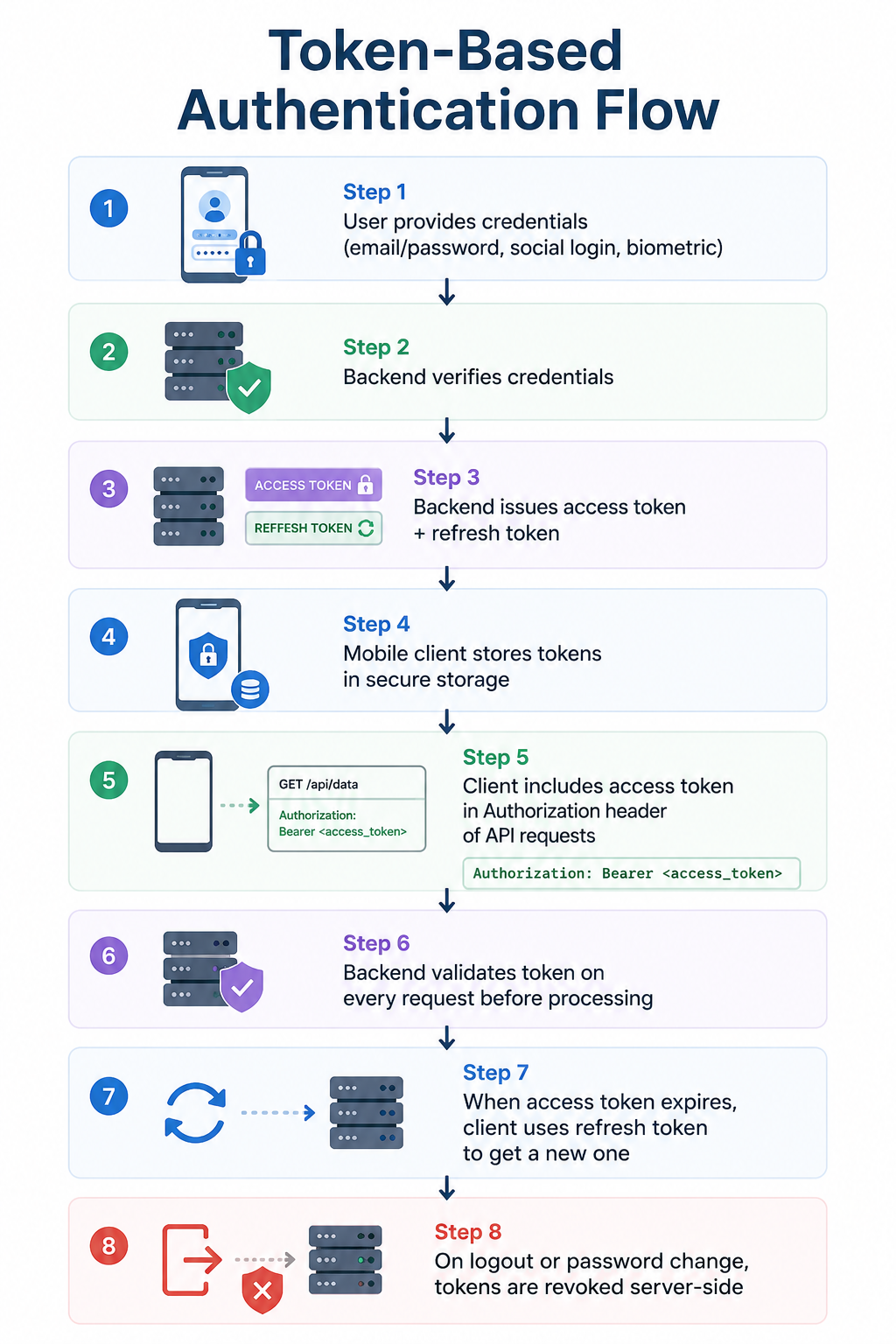
Token-Based Authentication Flow
Authentication Methods Compared
| Method | How It Works | Security Level | Best For |
|---|---|---|---|
| JWT (JSON Web Token) | Signed token containing claims | High if implemented correctly | Most mobile apps |
| OAuth 2.0 | Delegated authorization framework | High | Apps using third-party identity providers |
| API Keys | Static key sent with each request | Medium (if treated carefully) | Server-to-server, not mobile clients |
| Session cookies | Server-managed session state | Medium | Web apps, less common in mobile |
| mTLS (Mutual TLS) | Both client and server present certificates | Very high | High-security enterprise apps |
| Biometric + secure enclave | Device-local auth unlocks stored credential | Very high | Banking, healthcare apps |
For most mobile apps, JWT-based token authentication within an OAuth 2.0 framework is the appropriate choice. It’s well-understood, widely supported, and provides the security properties needed for consumer and business apps.
What Makes JWT Secure (or Not)
JWT is often implemented incorrectly. The common mistakes:
Not verifying the signature. A JWT can be decoded without the secret key. Some implementations check whether a token is well-formed but don’t verify the signature, which means any attacker can create a valid-looking token.
Using the “none” algorithm. JWT supports an algorithm value of “none” which means no signature. Some libraries accept this by default, allowing unsigned tokens to pass validation. Explicitly reject tokens with no algorithm.
Not checking expiration. The exp claim in a JWT specifies when it expires. If your validation code doesn’t check this claim, expired tokens remain valid indefinitely.
Long token lifetimes. Access tokens with multi-hour or multi-day lifetimes give attackers a long window if a token is stolen. Shorter is safer.
Token Security, API Keys, and Session Protection
Token Lifecycle Management
Good token security covers the entire lifecycle, not just issuance.
Issuance: Short-lived access tokens (15 to 60 minutes) paired with longer-lived refresh tokens (days to weeks). The refresh token is used only to obtain new access tokens.
Storage: Tokens stored in platform secure storage (iOS Keychain, Android Keystore). Never in plain text files, SharedPreferences, or UserDefaults.
Transmission: Tokens transmitted only over HTTPS in the Authorization header. Never in URL query parameters (they appear in server logs and browser history).
Rotation: Refresh token rotation on every use. When a refresh token is used to obtain a new access token, the old refresh token is invalidated and a new one is issued. This limits the damage from a stolen refresh token.
Revocation: Server-side revocation when a user logs out, changes their password, or when suspicious activity is detected. A revocation list or a token version counter prevents revoked tokens from being used.
API Key Security
API keys are sometimes used in mobile apps to identify the application rather than authenticate a specific user. There’s an important security limitation: anything embedded in a mobile app binary can be extracted.
| Practice | Description |
|---|---|
| Never embed server-side API keys in mobile client code | They can be extracted from the binary |
| Use Android’s SafetyNet / Play Integrity or Apple’s DeviceCheck | Verify the request comes from a legitimate app instance |
| Rotate API keys if compromised | Have a process for key rotation without downtime |
| Restrict API key scope | Keys should have only the permissions they need |
| Use backend-for-frontend (BFF) pattern | Mobile client talks to your backend, which holds third-party API keys |
The BFF pattern is worth understanding specifically: rather than embedding a third-party API key (Maps, payment processor, etc.) in the mobile client, the mobile app calls your backend, which makes the third-party API call and returns the result. The third-party key never touches the mobile client.
REST API Security for Mobile Applications
REST APIs have specific security considerations based on how HTTP methods and resources are structured.
HTTP Method Security
| HTTP Method | Expected Use | Security Consideration |
|---|---|---|
| GET | Retrieve resources | Must not change state; safe to cache |
| POST | Create resources | Requires authentication for user-specific resources |
| PUT/PATCH | Update resources | Must verify the requester owns the resource |
| DELETE | Remove resources | High-impact; require explicit authorization |
Object-Level Authorization (IDOR Prevention)
Insecure Direct Object Reference (IDOR) is one of the most common API vulnerabilities. It happens when a user can access another user’s resources by manipulating an ID in the request.
Example of an IDOR vulnerability:

GET /api/users/12345/documents/67890

If the backend only checks that the user is authenticated
but not that user 12345 is the authenticated user,
any authenticated user can access document 67890 by
guessing or iterating the ID.

Fix: Check both authentication AND authorization
- Is this user authenticated? (auth check)
- Does this user own resource 67890? (authz check)
Both must pass. Neither is sufficient alone.
Input Validation at the API Level
Every piece of data arriving at the API should be validated before processing. This includes:
- Type validation: Is this field actually a number? An email? A date in the expected format?
- Range validation: Is this integer within acceptable bounds?
- Length validation: Is this string within the expected length range?
- Format validation: Does this value match the expected pattern?
- Business rule validation: Does this value make sense in the business context?
Use parameterized queries or an ORM for all database interactions. String concatenation to build SQL queries is how SQL injection happens. It’s a decades-old vulnerability that still appears in production APIs.
HTTPS and Transport Security
All API traffic should be encrypted in transit. This means:
- All endpoints served over HTTPS, never HTTP
- TLS 1.2 as the minimum supported version, TLS 1.3 preferred
- Weak cipher suites disabled
- HSTS (HTTP Strict Transport Security) headers set
Certificate pinning is worth considering for high-sensitivity apps. It configures the mobile client to accept only specific certificates (or certificate authorities) for your domain, preventing man-in-the-middle attacks even when an attacker installs a trusted certificate on the device.
The trade-off is maintenance overhead: when your certificate rotates, you need to update the app. For apps in healthcare or finance where the data sensitivity justifies the overhead, certificate pinning is worth implementing.
API Gateway Security for Backend Systems
An API gateway sits in front of your backend services and provides centralized security controls. For mobile apps, the API gateway is where many of the most important security functions are implemented.
What an API Gateway Handles
| Security Function | How the Gateway Handles It |
|---|---|
| Authentication verification | Validates tokens before requests reach backend services |
| Rate limiting | Throttles requests per user, IP, or API key |
| IP allowlisting/blocklisting | Restricts or blocks traffic from specific IP ranges |
| Request/response transformation | Strips sensitive headers, enforces response schemas |
| SSL/TLS termination | Handles certificate management centrally |
| DDoS protection | Absorbs and filters malicious traffic volumes |
| Logging and monitoring | Centralized access logs across all services |
| Bot detection | Identifies and blocks automated malicious traffic |
API Gateway Security Best Practices
Enforce authentication at the gateway level. Rather than each backend service implementing its own token validation, the gateway validates the token and passes only authenticated requests downstream. This ensures no backend service is accidentally exposed without authentication.
Implement rate limiting by multiple dimensions. Per-IP rate limiting catches some attacks but not credential stuffing (which comes from many IPs). Per-user rate limiting catches abuse by authenticated users. Per-endpoint rate limiting applies stricter thresholds to sensitive endpoints like login and password reset.
Use different rate limits for different endpoint sensitivity:
| Endpoint Type | Suggested Rate Limit |
|---|---|
| General API endpoints | 100 to 1000 requests per minute per user |
| Login / authentication | 5 to 10 attempts per minute per IP |
| Password reset | 3 to 5 requests per hour per user |
| Payment processing | 10 to 20 per minute per user |
| Data export | 2 to 5 per hour per user |
Log everything at the gateway. Every request, response code, authentication event, and rate limit violation should be logged. This data is essential for incident investigation and for identifying attack patterns before they become breaches.
Separate public and private APIs. Endpoints that serve public data (product listings, content, public profiles) and endpoints that serve private user data should be clearly separated, with different authentication requirements and monitoring thresholds.
API developers who design mobile backends with gateway security in mind produce systems that are significantly harder to attack than those where security is applied inconsistently endpoint by endpoint.
API Security Testing Before App Launch
Security testing before launch is the most cost-effective security investment you can make. Vulnerabilities found in development cost a fraction of what they cost to fix after a breach.
Types of API Security Testing
| Test Type | What It Covers | When to Run |
|---|---|---|
| Static analysis | Code-level security issues, hardcoded credentials | During development (every commit ideally) |
| DAST (Dynamic testing) | Running API vulnerabilities against live endpoints | Pre-launch and quarterly |
| Penetration testing | Manual expert-led attack simulation | Pre-launch, after major changes |
| Fuzzing | Random/malformed inputs to find crashes and unexpected behavior | Pre-launch |
| Authentication testing | Token handling, session management, access control | Pre-launch |
| Authorization testing | IDOR, privilege escalation, object-level checks | Pre-launch |
API Security Testing Process
Step 1: Map all endpoints
Document every API endpoint: URL, HTTP method, required authentication, expected input, expected output. This becomes the testing scope. Undocumented endpoints that aren’t in scope are a security risk in themselves.
Step 2: Test authentication on every endpoint
Make unauthenticated requests to every endpoint. Any endpoint that returns data or accepts changes without a valid token is a vulnerability.
Step 3: Test authorization (IDOR)
Log in as User A and attempt to access User B’s resources by manipulating IDs. Any successful access is a critical vulnerability.
Step 4: Test input validation
Send malformed inputs: SQL injection strings, extremely long strings, unexpected data types, null values, negative numbers. Observe how the API responds.
Step 5: Test rate limiting
Send rapid repeated requests to authentication and sensitive endpoints. Verify that rate limiting engages and that error responses don’t reveal useful information.
Step 6: Test token handling
Use expired tokens, tampered tokens, tokens belonging to other users. All should be rejected with appropriate error codes.
Step 7: Review response payloads
Check API responses for data that shouldn’t be there: internal IDs, server stack traces, other users’ data, sensitive fields.
Security test engineers who specialize in API and mobile security conduct structured penetration tests that cover these categories systematically rather than relying on developers testing their own code.
API Security Tools Businesses Can Use
Testing and Scanning Tools
| Tool | Type | Best For | Cost |
|---|---|---|---|
| OWASP ZAP | DAST scanner | Automated vulnerability scanning | Free, open source |
| Burp Suite | Proxy + scanner | Manual penetration testing | Free (Community) / Paid (Pro) |
| Postman | API client + testing | Functional and security test scripting | Free tier + paid |
| Insomnia | API client | API exploration and testing | Free + paid |
| MobSF (Mobile Security Framework) | Static + dynamic analysis | Mobile app and API security analysis | Free, open source |
| Checkmarx | SAST | Code-level security scanning | Paid (enterprise) |
| Snyk | Dependency scanning | Vulnerable library detection | Free tier + paid |
Runtime Protection Tools
| Tool | What It Does | Cost |
|---|---|---|
| AWS WAF | Web Application Firewall at API Gateway level | Usage-based |
| Cloudflare API Shield | API discovery, rate limiting, bot protection | Paid |
| Kong Gateway | API gateway with security plugins | Open source + enterprise |
| Apigee (Google) | Enterprise API management with security | Paid |
| Azure API Management | API gateway with auth, rate limiting, monitoring | Usage-based |
Monitoring and Detection
| Tool | Purpose |
|---|---|
| Datadog | API performance and security monitoring |
| Sentry | Error tracking that surfaces security-related errors |
| Elastic SIEM | Security information and event management |
| AWS CloudTrail | API activity logging for AWS-hosted backends |
| Splunk | Log aggregation and security analytics |
Common Mobile API Security Mistakes to Avoid
These aren’t theoretical. They’re the mistakes that appear repeatedly in real-world mobile app security audits.
Mistake 1: Trusting the Client
The mobile client can be modified, intercepted, and automated. Never make security decisions based on what the client sends without independent server-side verification.
Wrong thinking: “We validate the input on the client before sending it, so we don’t need server-side validation.”
Reality: Client-side validation can be bypassed in seconds with a proxy tool.
Mistake 2: Inconsistent Authentication Enforcement
Applying authentication to most endpoints but missing a few is how attackers find their entry points. They enumerate endpoints systematically.
Wrong thinking: “That endpoint just returns public data, it doesn’t need auth.”
Reality: Even public-data endpoints need rate limiting. And “public data” endpoints sometimes return more than intended.
Mistake 3: Exposing Too Much in API Responses
Returning a full user object when the client needs a display name exposes fields that could be useful to an attacker even if they’re not directly sensitive.
Bad: Return full user object
{
  "id": 12345,
  "email": "user@example.com",
  "password_hash": "$2b$10$...",
  "internal_role": "admin",
  "created_at": "...",
  "display_name": "John"
}

Good: Return only what the client needs
{
  "display_name": "John"
}
Mistake 4: Logging Sensitive Data
Logging systems that capture request bodies in full will capture passwords, tokens, and personal data. Review logging configuration explicitly to exclude sensitive fields.
Mistake 5: Not Revoking Tokens on Logout
Logging out of the app should invalidate the tokens server-side. An app that only deletes the token from local storage leaves the token valid on the server. Anyone who captured the token before logout can continue using it.
Mistake 6: Rate Limiting Everything the Same Way
A rate limit of 1000 requests per minute might make sense for a content API. Applied to the login endpoint, it means an attacker can attempt 1000 passwords per minute per IP. Authentication endpoints need much stricter limits.
Mistake 7: Skipping Security Testing Under Time Pressure
Security testing gets cut when launch timelines are tight. The logic is that you’ll do it after launch. In practice, post-launch security testing rarely happens on the same schedule, and the cost of a breach in the meantime is orders of magnitude higher than a pre-launch security audit.
API Security by Industry: What Compliance Requires
Different industries carry different regulatory requirements that directly shape API security obligations.
| Industry | Regulation | Key API Security Requirements |
|---|---|---|
| Healthcare | HIPAA | Encryption in transit and at rest, access controls, audit logs, PHI handling |
| Finance / Payments | PCI DSS | Cardholder data encryption, access control, vulnerability scanning, penetration testing |
| EU user data | GDPR | Data minimization, right to deletion, data breach notification, lawful basis for processing |
| US consumer data | CCPA | Right to know, right to delete, opt-out of sale |
| Financial services | SOC 2 | Security, availability, processing integrity, confidentiality, privacy |
Compliance doesn’t guarantee security, but meeting compliance requirements covers a meaningful baseline of controls. For businesses in finance and professional services or healthcare and life sciences, understanding which regulations apply and what they require for API security is foundational, not optional.
How Next Hire Inc Helps With Mobile App API Security
API security requires specialists who understand both mobile development and backend security. Developers who build features can write secure code, but API security testing and architecture review require specific expertise in how attackers think and what they look for.
Available Specialists for API Security Work
| Role | Contribution to API Security |
|---|---|
| Security test engineers | Penetration testing, vulnerability assessment, API security audits |
| API developers | Secure API design, authentication implementation, input validation |
| Backend developers | Secure backend architecture, authorization logic, data protection |
| iOS developers | Keychain integration, certificate pinning, secure token storage |
| Android developers | Keystore usage, EncryptedSharedPreferences, network security config |
| Automation testers | Automated security regression testing in CI/CD pipelines |
| Cloud and server administrators | API gateway configuration, WAF setup, infrastructure security |
Engagement Model at a Glance
| Detail | What to Expect |
|---|---|
| Candidate shortlist | Within 24 hours |
| Engagement start | 24 to 48 hours after approval |
| Trial period | 3-day free trial |
| Pricing | From $5/hour, monthly from $799/month |
| Support | Dedicated account manager + backup resource |
Full details on the pricing page. Every candidate is pre-vetted for technical skills, communication, and reliability. The infrastructure supporting engagements is designed for operational continuity and data security.
Next Hire Inc works with businesses across technology, healthcare, finance, retail and ecommerce, education, and logistics.
For teams focused on broader mobile security, the mobile app security testing checklist covers security across both the client and backend. And for teams thinking about overall architecture decisions that affect security, mobile app architecture planning is where many of the most impactful security choices are made.
Building or auditing a mobile app API and want security specialists who can start this week? Next Hire Inc shortlists pre-vetted security engineers and backend developers within 24 hours. Tell us what you need.
Frequently Asked Questions
What Is Mobile App API Security?
Mobile app API security is the set of controls and practices that protect the communication between a mobile application and its backend systems. It covers authentication, authorization, data encryption, input validation, rate limiting, token management, and monitoring.
What Are the Most Common Mobile API Security Vulnerabilities?
The most common vulnerabilities include: broken authentication on endpoints, IDOR (insecure direct object reference) where users can access other users’ data, missing rate limiting on authentication endpoints, tokens stored insecurely on the device, API responses that expose more data than needed, and missing server-side input validation.
What Is Token-Based Authentication and Why Does It Matter?
Token-based authentication issues a signed token (typically a JWT) after a user authenticates. The mobile client stores this token and includes it in subsequent API requests. The server validates the token on every request. Short-lived tokens limit the damage from theft. The alternative, session cookies, is less common in mobile APIs but functionally similar.
How Should Tokens Be Stored on Mobile Devices?
iOS Keychain for iOS apps. Android Keystore or EncryptedSharedPreferences for Android. React Native apps should use react-native-keychain. Flutter apps should use flutter_secure_storage. Never store tokens in UserDefaults, SharedPreferences, or any plain text file.
What Is API Security Testing?
API security testing is the process of deliberately attempting to exploit vulnerabilities in an API before attackers do. It includes automated scanning (OWASP ZAP, Burp Suite), manual penetration testing by security specialists, authentication and authorization testing, and input fuzzing to find unexpected behavior.
What Is API Gateway Security?
API gateway security refers to the security controls implemented at the gateway layer that sits in front of backend services. The gateway handles token validation, rate limiting, IP filtering, DDoS protection, logging, and request/response inspection centrally, so individual backend services don’t need to implement these controls independently.
How Often Should API Security Testing Happen?
Before every major release at minimum. Ideally, automated security scanning runs on every code change in CI/CD pipelines. Manual penetration testing should happen at least annually for most apps, and more frequently for apps in regulated industries or handling high-value data.
Conclusion
Mobile app API security isn’t a feature to add before launch. It’s a discipline that runs through every architecture decision, every endpoint design, every authentication flow, and every deployment. The most secure APIs aren’t the ones that had security bolted on at the end. They’re the ones where security was a design requirement from the first line of code.
The good news is that the most impactful security controls are well-understood and implementable by any competent development team. Short-lived tokens with rotation. Server-side authorization on every endpoint. Input validation that doesn’t trust the client. Rate limiting that’s calibrated to the sensitivity of each endpoint. HTTPS everywhere. Monitoring that catches anomalies before they become breaches.
None of this is exotic. What it requires is treating security as a first-class concern rather than an afterthought, and having developers and security specialists who know what to build and how to test it.
Ready to build a more secure mobile API? Next Hire Inc connects you with security engineers and backend developers who can start within 48 hours. Try a 3-day free trial.