

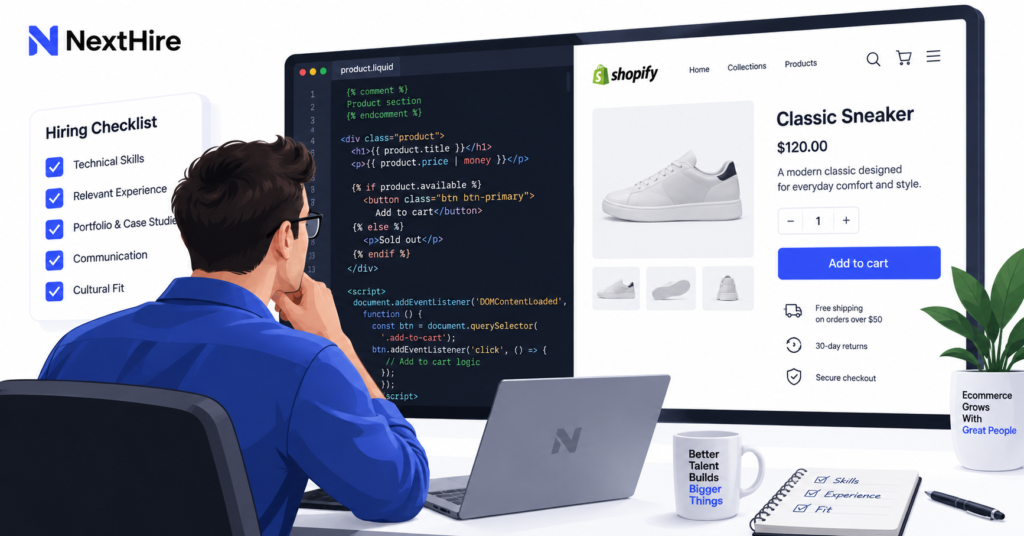
A Shopify developer can look strong on paper and still be a poor fit for your store. The real question is whether their skills match the work you actually need done, from theme customization to custom apps, integrations, speed fixes, and ongoing maintenance.
This guide breaks down the Shopify developer skills worth checking before you hire, how to test them, and which capabilities matter for different project types.
Once you know the capabilities your project requires, the next step is finding a developer whose experience actually matches that scope. If you already have defined Shopify work and are ready to compare candidates, you can hire Shopify developers for theme development, custom functionality, integrations, performance work, maintenance, and ongoing technical support.
Key Takeaways
- Strong Shopify developers need platform-specific skills such as Liquid, theme architecture, APIs, and app integrations, not just general web development experience.
- Match the developer’s skills to your scope. A theme specialist is not automatically the right choice for a custom app or complex backend integration.
- Verify skills through relevant portfolio work, scenario-based questions, and practical technical checks instead of relying on years of experience alone.
Which Shopify Developer Skills Actually Matter?
The right skill set depends on what you want the developer to own.
If you need a few storefront edits, deep backend app experience may be unnecessary. If you need an ERP integration or custom product workflow, a developer who mainly edits themes may not be enough.
That is why hiring should start with scope, not a generic checklist. If you are still deciding whether the technical workload is significant enough to justify outside help, review the signs for when to hire a Shopify developer before you begin evaluating candidates.
For most store owners, the strongest candidates combine Shopify-specific technical knowledge with front-end fundamentals, API familiarity, performance awareness, testing discipline, and clear communication. These capabilities also recur across current Shopify hiring and assessment guides.
1. Shopify Liquid and Theme Architecture
For storefront work, Shopify Liquid is one of the first skills to verify.
Liquid controls how dynamic store data is rendered inside Shopify themes. A capable developer should understand objects, tags, filters, loops, conditional logic, and how Liquid works with products, collections, variants, carts, and metafields.
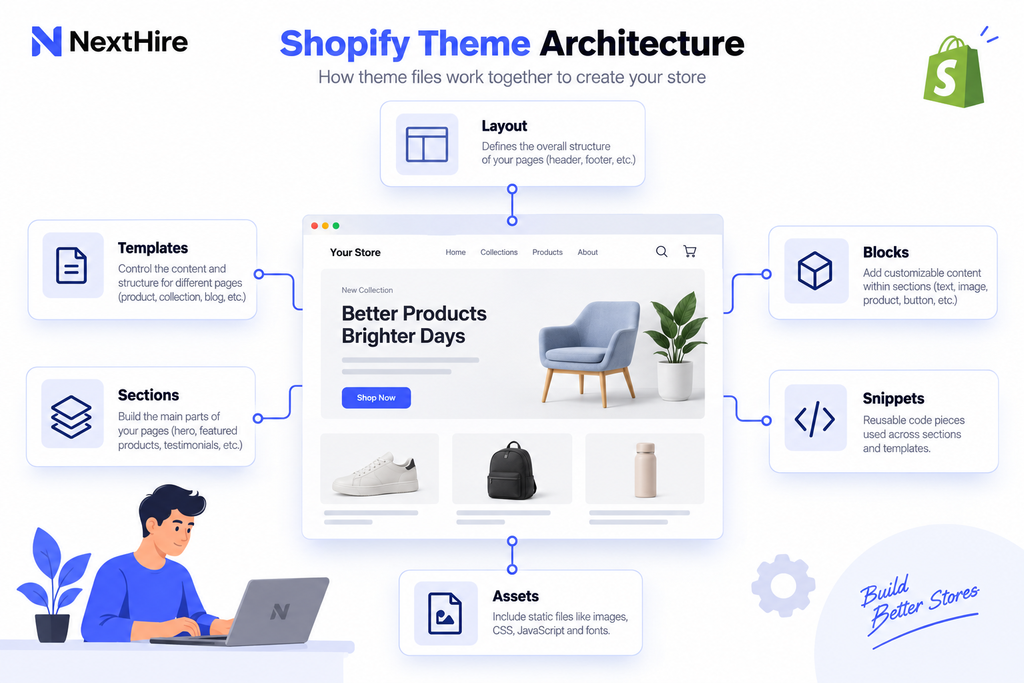
They should also understand modern Shopify theme architecture. Shopify themes use layouts, templates, sections, blocks, snippets, assets, and configuration files. Current Online Store themes also rely heavily on JSON templates and reusable sections.
Do not just ask, “Do you know Liquid?” Ask the developer to explain how they would build a reusable product section that a non-technical store manager can edit later.
That answer tells you whether they think beyond making the code work once.
2. HTML, CSS, and JavaScript
A Shopify developer still needs strong front-end fundamentals.
HTML controls page structure. CSS controls layout and styling. JavaScript handles interactive features such as variant selectors, drawers, filtering, sticky add-to-cart components, and custom storefront behavior.
The important part is not simply knowing these languages. The developer needs to use them without making the theme fragile or unnecessarily heavy.
Ask how they keep JavaScript from blocking page rendering. Ask how they handle responsive behavior across breakpoints. Ask how they prevent a design change on one template from breaking another.
For Shopify theme development, clean front-end code is directly tied to maintainability and store performance.
3. Shopify Theme Development Skills
Theme editing and theme development are not the same thing.
Someone who can change colors, fonts, and basic section settings may be fine for small updates. Custom Shopify theme development requires deeper knowledge of sections, blocks, JSON templates, schema settings, reusable snippets, responsive layouts, app blocks, and merchant-editable components.
A good developer should build changes that your team can manage after launch.
For example, if they create a promotional banner, you should not need a developer every time you want to change the text, image, or call to action.
4. Shopify App Development and API Knowledge
Not every Shopify developer needs to build apps. But if your project depends on custom business logic, external systems, or advanced integrations, this becomes critical.
A developer working on Shopify app development should understand authentication, webhooks, app extensions, data flow, permissions, and Shopify APIs.
Shopify’s current developer documentation says new apps should use the GraphQL Admin API, while the REST Admin API is legacy. That makes current Shopify API knowledge a useful screening signal, especially for app and integration work.
Ask the candidate which APIs they have used recently and what they built with them.
A strong answer should describe a real workflow, such as syncing inventory, pushing order data to an ERP, creating a custom admin tool, or connecting a subscription platform.
If custom functionality, proprietary workflows, API integrations, or external business systems are central to the project, theme-development skills alone may not be enough. Review when a custom Shopify app developer is the better fit before evaluating candidates for app or integration work.
5. Shopify Performance Optimization
Speed work is a technical skill, not a plugin installation task.
A capable developer should know how to diagnose the source of a slowdown before changing code. That includes reviewing JavaScript, app scripts, Liquid rendering, images, fonts, third-party requests, and theme structure.
Shopify’s performance guidance specifically focuses on metrics such as Largest Contentful Paint, Cumulative Layout Shift, and Interaction to Next Paint, while also recommending careful handling of critical images, assets, and third-party connections.
For Shopify performance optimization, ask what the developer measures before and after a change.
If the answer is only “we compress images,” the skill level is probably too shallow for serious optimization work.
If speed is already a known problem, our breakdown of Shopify speed optimization cost can help you set a realistic scope before hiring.
6. Debugging, Testing, and Version Control
Developers are not hired only to write new code. They also need to find problems without creating new ones.
Look for a structured debugging process. The developer should be comfortable reproducing issues, checking browser errors, isolating app conflicts, reviewing network requests, testing theme changes, and validating behavior across devices.
Git or another version-control workflow is also valuable.
You want someone who can explain what changed, roll back safely, and avoid editing a live theme blindly.
A practical hiring question is simple: “How would you deploy a major theme change without risking the live store?”
Their process matters as much as the final technical answer.
7. E-commerce, UX, SEO, and Conversion Awareness
A technically correct change can still be bad for the business.
Strong Shopify developers understand that storefront decisions affect customer experience, search visibility, conversion rate, and merchandising.
They do not need to be your SEO strategist or UX lead. But they should know enough to avoid obvious mistakes such as removing important structured content, breaking redirects during a migration, hiding essential product information on mobile, or adding heavy scripts for a minor visual effect.
This is where general developers often differ from experienced Shopify specialists.
The best technical decision is not always the most complicated one. It is the one that solves the store’s problem with the least unnecessary risk.
8. Communication and Problem-Solving Skills
You should be able to understand what your developer is doing without reading code.
A reliable Shopify developer can explain trade-offs, estimate complexity, flag dependencies, and tell you when a requested feature creates unnecessary cost.
That matters even more with remote developers.
Ask how they report progress, handle blockers, document work, and confirm scope changes. A developer who communicates problems early is usually easier to manage than one who gives optimistic updates until the deadline slips.
Problem-solving also matters more than memorized platform knowledge. Shopify changes. Apps change. Your store changes. You need someone who can diagnose new problems logically.
Match the Skills to the Project You Are Hiring For
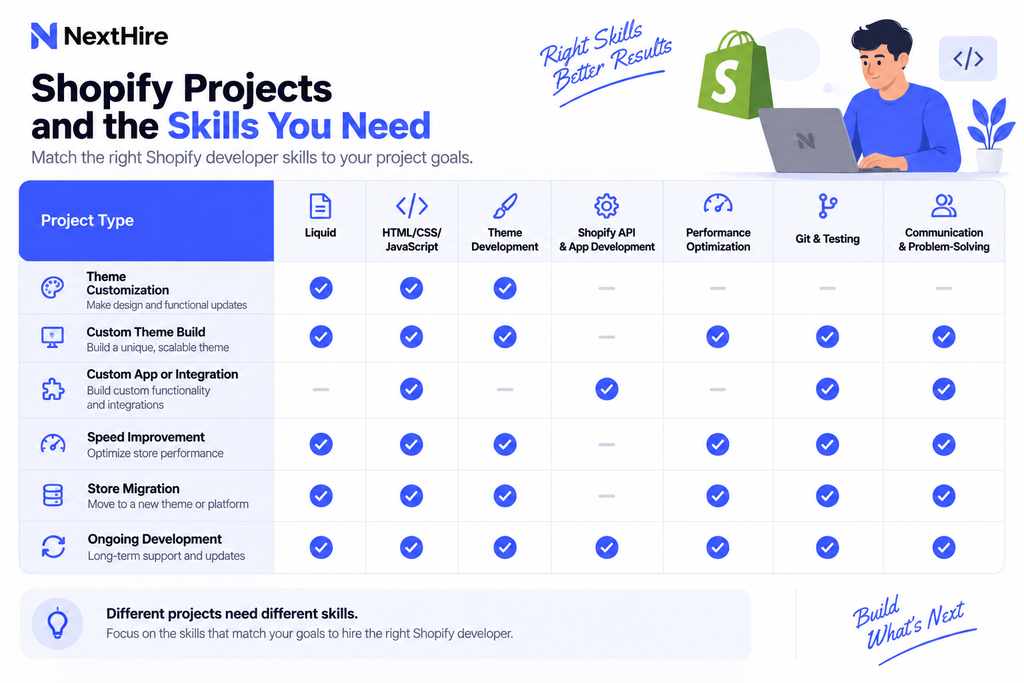
Do not require every candidate to be an expert in every Shopify area.
Use your project as the filter.
| Project Need | Skills to Prioritize |
| Theme customization | Liquid, HTML, CSS, JavaScript, responsive design |
| Custom theme build | Advanced Liquid, sections, blocks, JSON templates, accessibility, performance |
| Custom app or integration | Shopify app development, GraphQL, webhooks, authentication, backend development |
| Speed improvement | Performance auditing, JavaScript optimization, Liquid efficiency, app-script analysis |
| Store migration | Theme architecture, data migration, redirects, QA, SEO awareness |
| Ongoing development | Git, documentation, debugging, communication, broad Shopify platform knowledge |
How to Verify Shopify Developer Skills Before Hiring
A resume tells you what the candidate says they can do. Your screening process should show whether they can actually do it.
Review a Relevant Shopify Developer Portfolio
A Shopify developer portfolio should include work similar to your project.
Do not judge it only by visual design. Ask what the developer personally built, what limitations they faced, and what changed after their work.
For live stores, test the mobile experience and page speed. Look at how product options work. Check whether the theme feels stable rather than overloaded with effects.
One strong relevant project is often more useful than ten unrelated examples.
Use Scenario-Based Shopify Developer Interview Questions
Good Shopify developer interview questions test reasoning.
Ask: “A product page becomes slow after installing three apps. How would you isolate the cause?”
Ask: “We need a custom bundle workflow. How would you decide whether to use an app, theme code, Shopify Functions, or a custom app?”
Ask: “How would you protect SEO during a theme rebuild or migration?”
These questions reveal how the developer approaches trade-offs.
Give a Small Practical Task
For serious hires, use a short paid technical task.
The task should resemble your actual work. It might involve modifying a development theme, fixing a Liquid issue, creating a reusable section, or reviewing a small performance problem.
Do not use a large unpaid test. You are trying to validate skill, not get free development work.
Check Ownership and Maintainability
Ask who owns the code after delivery.
Ask whether the developer documents custom logic. Ask how another developer would continue the work later.
A good solution should not lock your store to one person forever.
Red Flags to Watch for Before You Hire
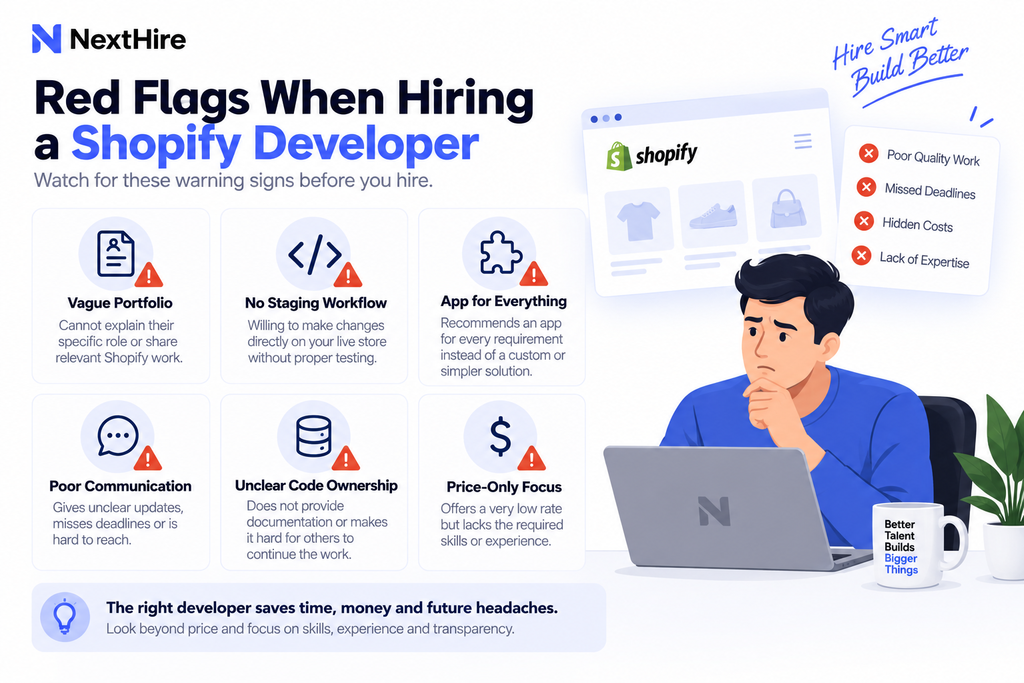
Be cautious if a developer claims they can handle every Shopify task but cannot explain any specific project in detail.
Another warning sign is editing production code without a backup or development workflow.
You should also question candidates who recommend an app for every problem. Apps can be useful, but each additional dependency can add cost, complexity, or performance overhead.
Finally, avoid hiring based on the lowest hourly rate alone. A cheaper developer who needs twice as long or introduces rework can cost more overall.
Frequently Asked Questions
What are the most important Shopify developer skills?
For most projects, prioritize Shopify Liquid, HTML, CSS, JavaScript, theme architecture, debugging, responsive design, and performance awareness. Add API and app development skills when the project includes custom integrations or backend functionality.
Does a Shopify developer need to know Liquid?
For theme customization and storefront development, yes. Liquid is Shopify’s templating language and is central to rendering dynamic store content inside themes.
How can I test a Shopify developer before hiring?
Review relevant portfolio work, ask scenario-based technical questions, and use a small paid practical task that reflects the work they would handle after hiring.
Should I hire a theme developer or an app developer?
Hire a theme-focused developer for storefront design and theme functionality. Choose an app developer when you need custom business logic, integrations, external data, or functionality that cannot be handled cleanly inside the theme.
Hire for the Work You Actually Need
The best Shopify developer is not the person with the longest list of technologies. It is the person whose experience matches your store, can explain their decisions clearly, and can deliver without creating unnecessary technical debt.
Define the scope first. Then evaluate the specific Shopify developer skills that scope requires.
Once you know the skills your project requires, you can hire dedicated Shopify developers through NextHire for theme development, custom apps, integrations, performance optimization, migrations, maintenance, and ongoing ecommerce development. Use the requirements in this guide to keep your screening focused on the capabilities your store actually needs.