



Shopify makes it easy to launch a store without touching code. The harder question comes later: when should you stop patching problems yourself and bring in a developer? Knowing when to hire a Shopify developer can save founder time, reduce rework, and keep technical problems from slowing growth.
Key Takeaways
- Hire a Shopify developer when the work moves beyond theme settings into custom code, APIs, integrations, migrations, performance fixes, or recurring technical problems.
- Keep simple content edits, standard theme changes, product setup, and basic app configuration in-house unless they create a real bottleneck.
- Match the hiring model to the workload. Use project help for defined fixes, dedicated support for a steady backlog, and an agency when several disciplines must work together.
What Does a Shopify Developer Actually Handle?
A Shopify developer works on technical store changes that the visual editor, standard apps, or a general marketing team cannot safely handle.
That can include Liquid theme development, JavaScript, custom sections, app logic, API integrations, checkout extensions, migrations, speed optimization, bug fixing, and deployment workflows.
The goal is not to outsource every change. It is to bring in technical depth when guessing becomes more expensive than professional help.
When to Hire a Shopify Developer: 8 Clear Signs
1. Your Theme Editor Cannot Create the Experience You Need
If you can make the change with sections, blocks, colors, typography, or built-in theme settings, you probably do not need a developer.
Consider one when you need custom product layouts, advanced filtering, unique cart behavior, reusable components, complex metafields, or interactions your theme does not support.
Quick code snippets can solve one screen while creating mobile, accessibility, or maintenance problems elsewhere.
2. You Are Installing Apps to Work Around One Missing Feature
Apps are useful, but stacking several apps to solve one workflow is a warning sign. You can end up with duplicated functionality, extra subscription costs, slower pages, and more failure points.
A developer can assess whether the feature should stay app-based, use Shopify Functions or theme logic, or become a custom app.
The best solution is often the simplest architecture that meets the business need.
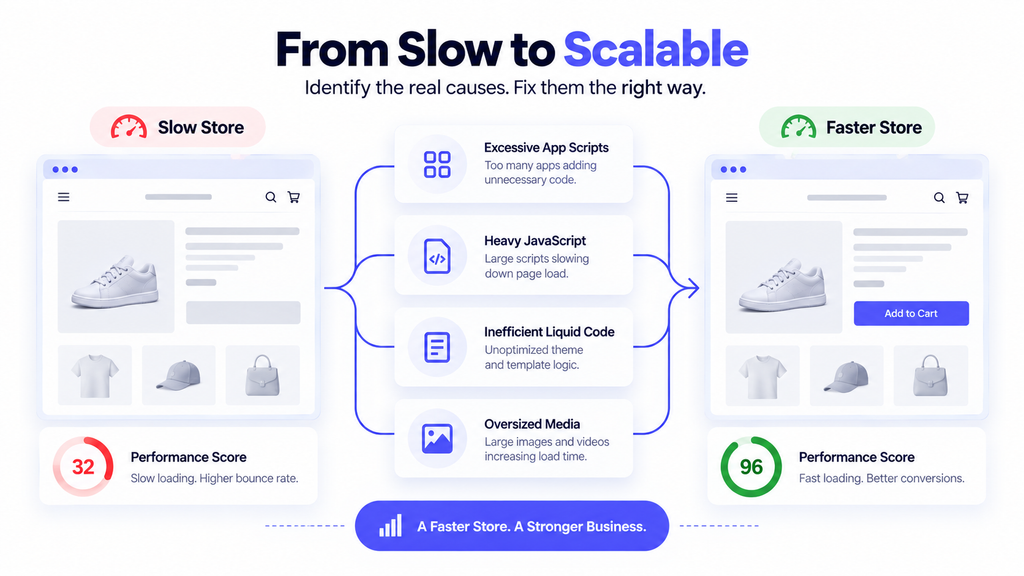
3. Store Speed Problems Keep Coming Back
Image compression will not fix a store slowed by heavy scripts, duplicated tracking, app code, inefficient Liquid, or poorly loaded assets.
Shopify’s performance best practices for themes highlight JavaScript, Liquid rendering, images, and third-party scripts as important performance areas. If speed drops whenever you add a campaign tool or feature, you need someone who can trace the bottleneck instead of installing another optimization app.
This matters even more when you pay for traffic. Slow product and landing pages can waste ad spend before customers properly see the offer.
4. You Need Shopify to Connect With Other Business Systems
Standard integrations are fine when a supported app already handles the job. Custom workflows are different.
If Shopify must exchange data with an ERP, CRM, warehouse platform, subscription system, accounting tool, marketplace, or internal database, you are dealing with APIs, authentication, webhooks, data mapping, and failure handling.
That requires current platform knowledge. Shopify designates the REST Admin API as legacy and directs app and integration development toward the GraphQL Admin API. Its REST-to-GraphQL migration guidance explains the current direction. Outdated technical choices can create avoidable rebuild work later.
5. You Are Migrating to Shopify or Rebuilding a Live Store
Migration is one of the worst times to learn by trial and error.
You may need to move products, customers, orders, collections, redirects, tracking, apps, subscriptions, international settings, and SEO-critical URLs.
A developer should be involved before implementation when the project affects important revenue workflows. If design and UX are also changing, bringing in a website redesign specialist can help coordinate the broader rebuild.
The cost of a migration mistake can show up as broken redirects, missing data, checkout issues, lost tracking, or delayed launch dates.
6. Small Bugs Are Turning Into a Recurring Backlog
One bug is a task. Ten small bugs every month are an operating problem.
If your team repeatedly handles broken sections, app conflicts, tracking issues, theme updates, mobile inconsistencies, or seasonal launch changes, one-off hiring becomes inefficient.
Ongoing CMS support and maintenance or a dedicated Shopify developer keeps store context with the same resource and reduces repeated onboarding.
7. Your Team Is Avoiding Changes Because They Might Break the Store
This signals that the store has become too fragile for the current workflow.
Marketing wants a landing page, merchandising wants new product logic, and operations needs an integration change, but everyone waits because nobody trusts the deployment process.
A capable developer should improve that process with version control, preview themes or staging workflows, testing, documented releases, and a rollback plan.
The goal is not only better code. It is safer change.
8. Technical Work Is Consuming Founder or Marketing Time
The final trigger is usually economic, not technical.
If a founder spends eight hours per month troubleshooting Shopify and values that time at $100 per hour, the opportunity cost is already $800 before lost sales or rework. Those numbers are only illustrative, but the decision rule is useful.
When the monthly cost of doing the work slowly or badly starts approaching the cost of professional help, hiring becomes easier to justify.
When You Probably Do Not Need a Shopify Developer Yet
You can usually stay DIY for adding products, updating copy and images, changing navigation, configuring standard theme sections, creating discount codes, publishing blog posts, and installing well-supported apps with straightforward setup.
You may also need a designer, marketer, SEO specialist, or operations person instead. A developer cannot fix weak positioning, poor product photography, an unclear offer, or an unprofitable acquisition channel.
Use a simple test: if the task can be completed safely through Shopify’s normal admin and theme settings, and it does not affect a critical revenue workflow, keep it in-house.
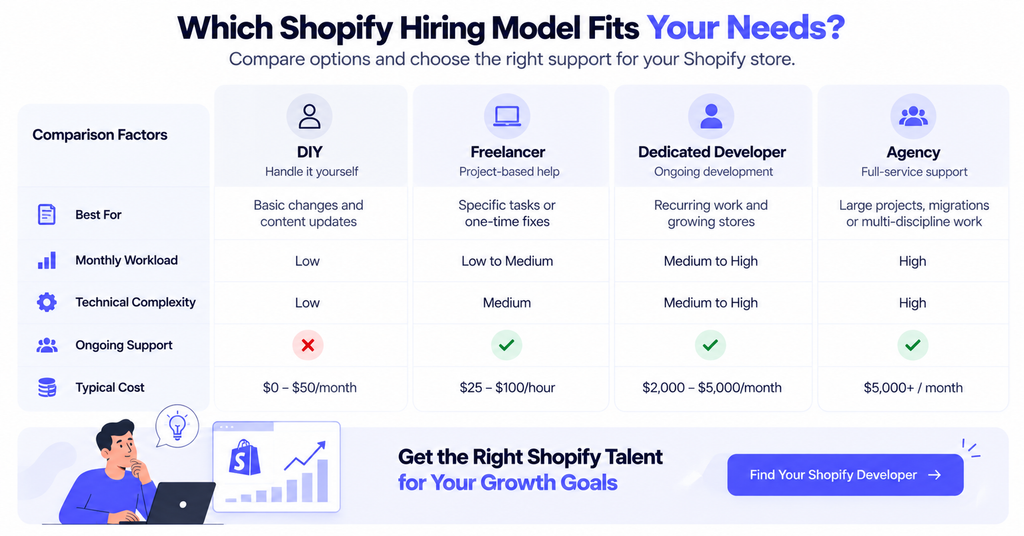
Which Hiring Model Fits Your Shopify Work?
You do not need the same hiring model for every problem.
| Situation | Better Fit | Why |
| One defined theme fix or bug | Project freelancer | Clear scope and limited ongoing need |
| Regular monthly development backlog | Dedicated Shopify developer | Keeps context and provides consistent capacity |
| Large redesign, migration, or multi-discipline build | Agency or managed team | Combines development, QA, design, and project management |
| Small store with occasional admin changes | Keep it in-house | Developer cost may not be justified yet |
If you have steady development work, a dedicated Shopify developer can offer more continuity than repeatedly sourcing short-term help.
Compare total cost, not only the hourly rate. Include onboarding time, communication overhead, rework, availability, and how often a new person must relearn your store. NextHire’s pricing options can also help you compare hiring models against the workload you actually have.
What to Define Before You Hire
Start with the outcome.
“Improve the product page” is vague. “Create a reusable product section that supports bundles and mobile sticky add-to-cart” gives a developer something concrete to assess.
Document your current setup, including the theme, important apps, custom code, integrations, analytics tools, payment setup, and known technical issues.
Define success in measurable terms. That might be a performance target, a completed migration with redirect validation, a working ERP sync, or a feature your merchandising team can manage without code after launch.
Also agree on access, ownership, testing, documentation, and post-launch support. You should know who owns the code, where changes are tracked, and what happens if an issue appears after deployment.
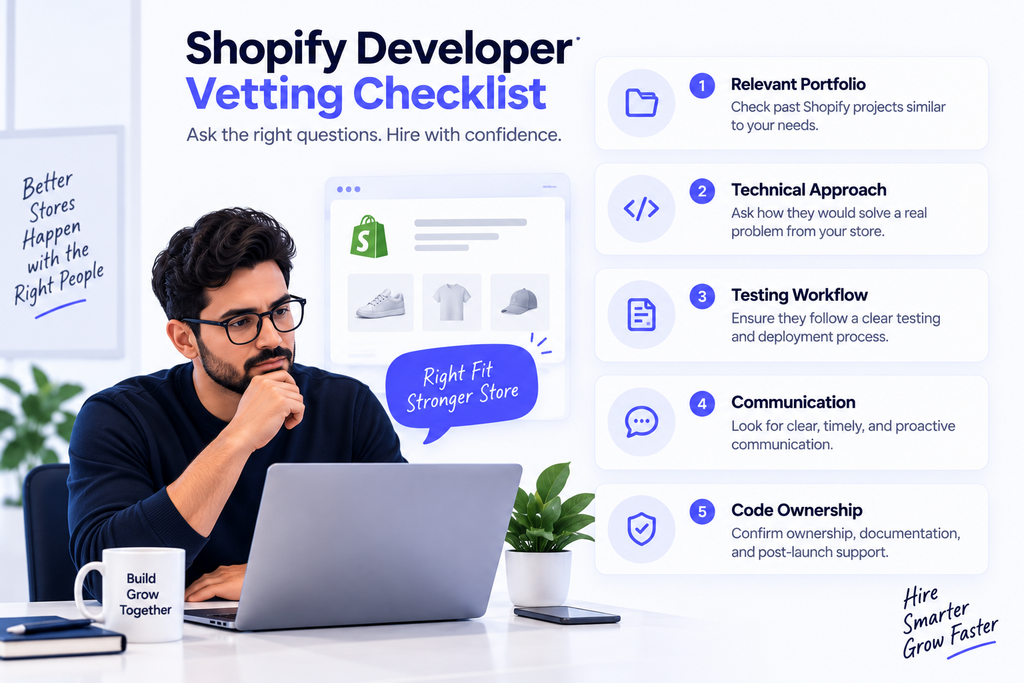
How to Vet a Shopify Developer Without Overcomplicating It
Ask for two or three relevant examples, not a giant portfolio.
If you need a subscription rebuild, a beautiful store with no subscription logic is not strong proof.
Ask the developer to explain how they would approach one real problem from your store. Listen for clarifying questions, trade-offs, a testing plan, and whether they can explain technical choices in business terms.
Check for current Shopify skills relevant to your project, such as Liquid, theme architecture, version control, GraphQL APIs, performance, and safe deployment.
Also test communication. A technically strong developer who disappears for days can still become an expensive hire.
Frequently Asked Questions
How early is too early to hire a Shopify developer?
If your store only needs standard theme setup, product uploads, and basic apps, hiring may be premature. Hire when code, integrations, performance, migrations, or recurring technical work become a meaningful business bottleneck.
Should I hire a Shopify freelancer or a dedicated developer?
Use a freelancer for a defined, short project. A dedicated developer is usually a better fit when you have recurring monthly work, frequent launches, ongoing optimization, or a growing technical backlog.
Can a Shopify developer improve conversion rates?
A developer can remove technical conversion barriers such as slow pages, broken mobile experiences, poor cart behavior, and implementation limits. They cannot guarantee better conversion if the offer, traffic quality, pricing, or merchandising is weak.
What should I prepare before hiring a Shopify developer?
Prepare your desired outcome, theme and app stack, technical issues, integrations, timeline, budget range, access requirements, and acceptance criteria. Clear inputs reduce quoting errors and help developers propose the right solution.
Hire When the Technical Bottleneck Becomes a Business Bottleneck
The right time to hire is not when your Shopify store becomes “big enough.” It is when technical limitations start costing you time, speed, reliability, or revenue opportunities.
If custom development, recurring fixes, integrations, or a serious rebuild are now part of normal operations, bring in technical support before the backlog becomes technical debt.
NextHire can help you hire Shopify developers for ongoing development, store improvements, and technical support. If you already know the problems you need solved, discuss your requirements with NextHire and identify the type of developer your store actually needs.