

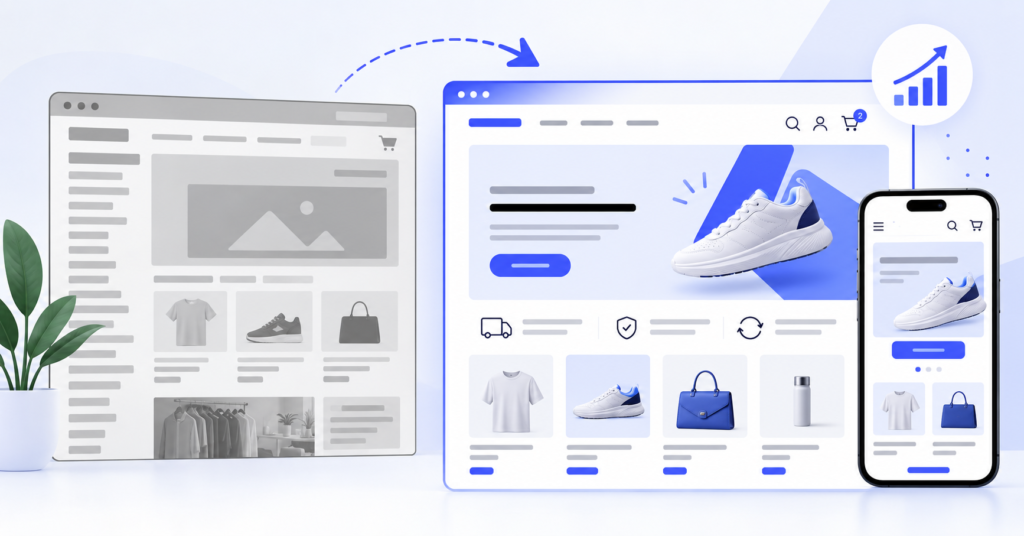
A Shopify store can look acceptable and still make buying harder than it should be. Slow pages, dated layouts, weak mobile UX, and years of app additions can turn a functional storefront into a growth constraint.
A Shopify store redesign should fix those constraints, not just change fonts and banners. This guide helps you decide what level of change you need and how to launch without creating new SEO or conversion problems.
Key Takeaways
- Redesign when structural problems affect navigation, mobile shopping, merchandising, speed, or your team’s ability to manage the storefront. Minor visual problems usually need a refresh, not a rebuild.
- Audit conversion data, customer behavior, SEO landing pages, apps, and theme limitations before choosing a new design. Otherwise you risk rebuilding the same problems in a cleaner layout.
- Protect URLs, redirects, analytics, product content, integrations, and performance during launch. A redesign is successful only if the new store works better after real customers start using it.
What a Shopify Store Redesign Actually Changes
A Shopify store redesign is a structured improvement to how an existing storefront looks, works, and supports the buying journey. It can include navigation, collection structure, product templates, mobile layouts, cart behavior, branding, theme architecture, apps, and performance.
That is different from a cosmetic refresh. Colors, typography, imagery, and spacing may improve presentation, but they do not fix poor filtering, rigid templates, slow theme code, or awkward mobile product pages.
A Shopify website redesign can also be narrower than a full rebuild. You may keep products, URLs, and integrations while replacing the theme layer and reorganizing the customer experience.
The key question is simple: is the problem visual, or is the current storefront limiting how customers shop and how your team operates?
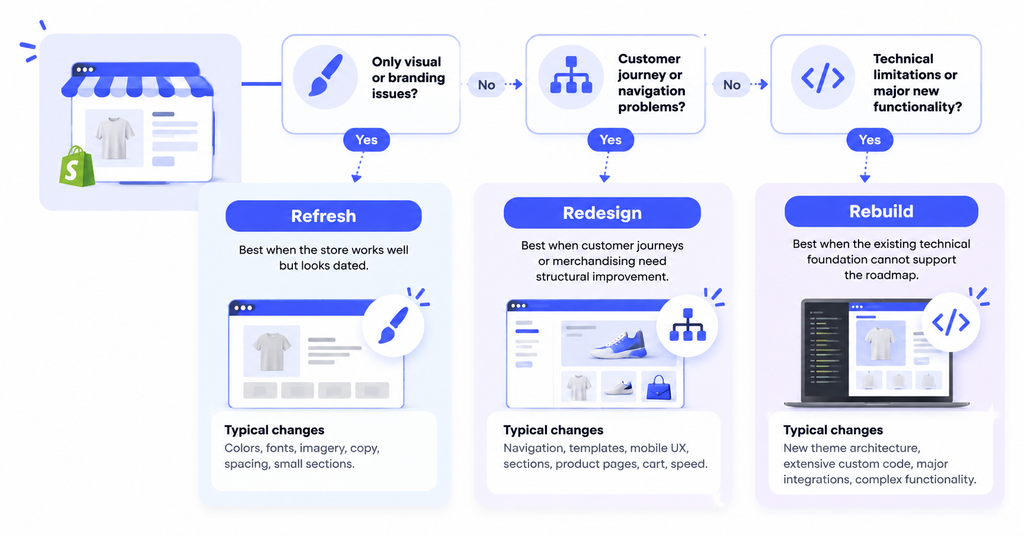
Do You Need a Refresh, Redesign, or Full Rebuild?
Do not start with a new theme. Start by identifying the level of change required.
| Option | Best when | Typical changes | Risk level |
| Refresh | The store works well but looks dated | Colors, fonts, imagery, copy, spacing, small sections | Low |
| Redesign | Customer journeys or merchandising need structural improvement | Navigation, templates, mobile UX, sections, product pages, cart, speed | Medium |
| Rebuild | The existing technical foundation cannot support the roadmap | New theme architecture, extensive custom code, major integrations, complex functionality | Higher |
A refresh is usually enough for inconsistent branding or outdated visuals. A redesign makes more sense when shoppers struggle to find products, mobile creates friction, or the theme cannot support the sections you need.
Use a rebuild when the theme architecture itself has become the constraint, not simply because a new design would look better.
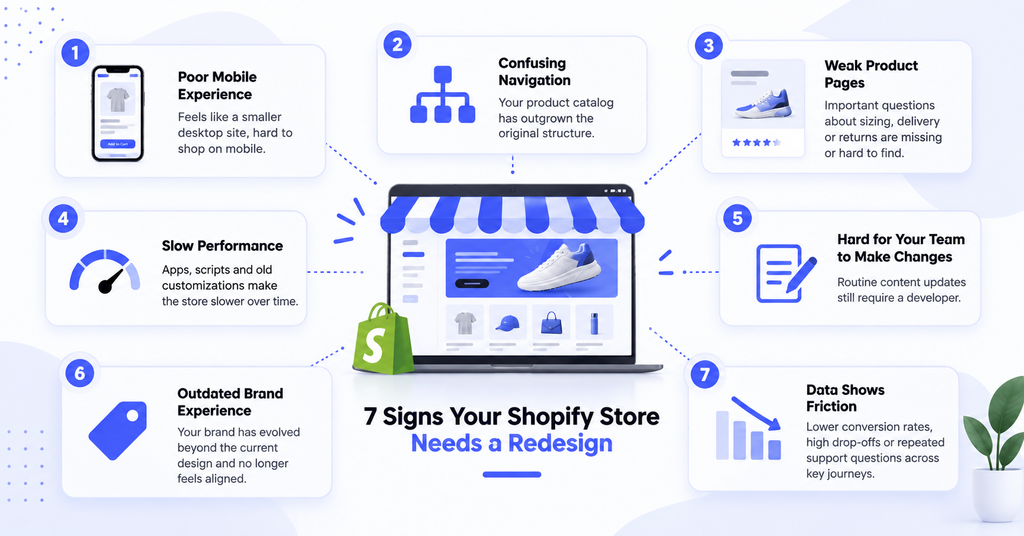
7 Signs Your Shopify Store Needs a Redesign
1. Your Mobile Experience Feels Like a Smaller Desktop Site
Mobile shoppers should not have to pinch, zoom, hunt for filters, or scroll through oversized content before reaching the buying controls that matter.
Test product discovery, variants, Add to Cart placement, shipping information, cart editing, and checkout entry on real phones. If core actions feel awkward, the problem is bigger than visual polish.
2. Your Catalog Has Outgrown the Original Navigation
Stores often launch with a small product range and simple menus. Two years later, the same structure is supporting new collections, bundles, subscriptions, seasonal products, and multiple customer segments.
When customers need too many clicks to reach the right product, restructure navigation around how they shop. That may mean clearer collections, filters, search, or a simpler mega menu.
3. Product Pages Answer the Wrong Questions
A product page is not just a place to display images and a description. It must reduce uncertainty at the point where a shopper decides whether to buy.
Check whether customers can quickly understand benefits, variants, sizing, delivery, returns, reviews, or compatibility. If the page buries those answers, redesign the hierarchy before adding more content.
4. Your Theme Has Accumulated Technical Debt
App installs, custom snippets, tracking scripts, and old fixes can make a Shopify theme harder to maintain and slower to render.
Shopify’s theme guidance recommends building for performance and reducing unnecessary JavaScript. If speed is already a known issue, review the Shopify speed optimization cost before assuming a full redesign is the only fix.
5. Your Team Needs a Developer for Routine Content Changes
Modern Shopify themes can use reusable sections and blocks so nontechnical teams can change layouts and merchandising without editing code.
If your marketing team cannot launch a landing page or update campaign content without developer support, the theme may no longer fit the way the business operates.
6. Your Brand Has Moved Beyond the Current Storefront
A growing brand may change positioning, pricing, products, photography, or audience. A Shopify redesign is justified when the old storefront now hurts trust, clarity, or merchandising. Otherwise, a visual refresh may be enough.
7. Your Data Shows Friction Across Important Journeys
Look at conversion by device, add-to-cart rate, checkout starts, collection exits, product-page engagement, search, and support questions. One weak page does not justify a redesign. Repeated friction across several journeys does.
How to Plan a Shopify Website Redesign Without Guesswork
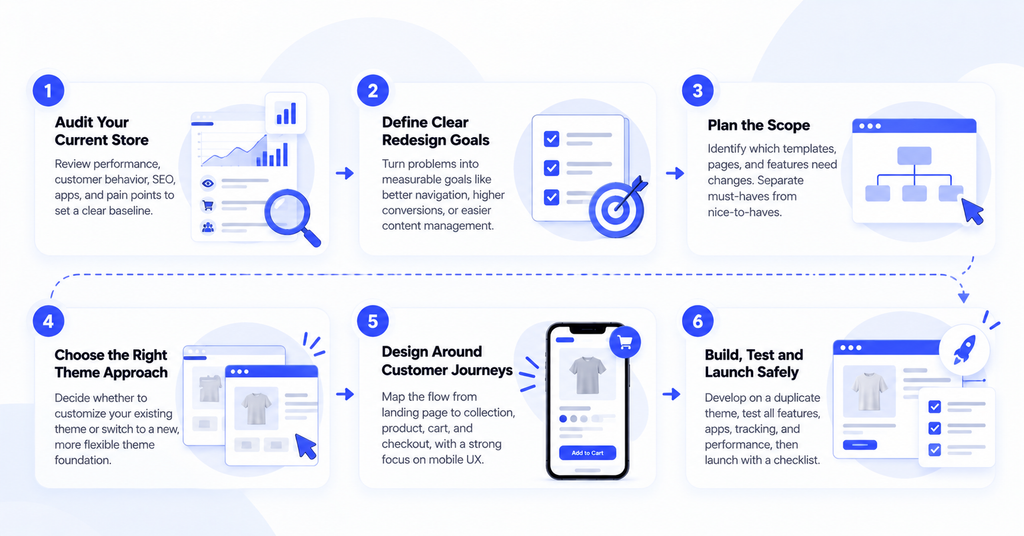
Step 1: Capture a Baseline Before Changing Anything
Record conversion rate, revenue by device, top landing pages, organic traffic, product-page performance, page speed, app dependencies, and common support questions. This gives you a baseline for judging the launch.
Step 2: Turn Problems Into Redesign Goals
Avoid goals such as “make it modern.” Define what should change in measurable business terms.
Examples include reducing mobile friction, improving product discovery, adding reusable sections, simplifying product-page decisions, or removing slow app-driven functionality.
Step 3: Define the Scope Before Design Starts
List the templates and systems that need work: homepage, collections, product pages, navigation, search, cart, reusable sections, app integrations, analytics, and SEO requirements. Separate must-haves from nice-to-haves before development starts.
Step 4: Decide Whether to Customize or Change the Theme
If the current theme is flexible and technically healthy, targeted template changes may be enough. If it is rigid, overloaded with legacy code, or incompatible with your roadmap, a cleaner theme foundation may be more efficient.
Step 5: Design Around Customer Journeys, Not Isolated Screens
Wireframe the flow from landing page to collection, product, cart, and checkout entry. Design mobile views early instead of shrinking desktop layouts after approval.
Every major design decision should have a reason tied to clarity, product discovery, trust, merchandising, or conversion.
Step 6: Build on a Duplicate Theme and Test Continuously
Do not redesign the live storefront. Build and review changes in a duplicate or development theme while the existing store keeps selling.
Test apps, forms, search, filters, variants, tracking, discounts, cart behavior, and responsive layouts as development progresses. Late testing makes fixes more expensive.
Protect SEO During a Shopify Store Redesign
Redesign projects can create SEO problems when teams remove useful content, change URLs unnecessarily, break internal links, or publish redirects too late.
Preserve important product, collection, blog, and landing-page URLs whenever possible. If a URL must change, Shopify provides built-in URL redirect management so traffic can be sent from the old page to the relevant replacement.
Before launch, document important URLs, titles, headings, indexable content, internal links, structured data, and high-traffic organic landing pages.
Do not delete useful product or collection copy simply because the new design favors minimal layouts. Reposition content if necessary, but treat existing organic performance as an asset that needs to survive the redesign.
After launch, check redirects, indexing, analytics, search visibility, and 404 errors against your baseline.
Do Not Let the Redesign Make Your Store Slower
A visually richer storefront can become slower if it introduces oversized media, unnecessary animation, more third-party scripts, or complex JavaScript.
Shopify’s theme performance guidance emphasizes efficient Liquid, image loading, JavaScript restraint, and performance testing. Treat performance as a design requirement, not a cleanup task after launch.
Review each app and script. Keep what supports revenue or operations. Remove duplicate or low-value tools that add frontend weight without earning their cost.
If several apps are stacked to approximate one business-specific feature, custom development may be cleaner. Not every redesign needs custom functionality, but unnecessary complexity should be challenged.
Who Should Handle the Redesign?
DIY can work for a small store using a flexible theme and limited customization. It becomes riskier when the project touches custom Liquid, complex product templates, app integrations, performance, tracking, or SEO-sensitive structural changes.
A Shopify store redesign agency may suit businesses that want strategy, UX, design, development, and project management bundled together.
A dedicated developer can make more sense when you already have design or ecommerce direction in-house and mainly need technical execution.
Shopify store redesign services vary widely. Before comparing quotes, confirm whether they include UX, design, theme development, app migration, speed work, QA, SEO migration, analytics, and post-launch support.
For development-heavy projects, it also helps to understand Shopify developer cost before deciding whether to use project pricing or ongoing development capacity.
Shopify Store Redesign Checklist Before Launch
Use this Shopify store redesign checklist as a final gate before publishing:
- Important URLs are unchanged or correctly redirected.
- Navigation, search, filters, and collection paths work on mobile and desktop.
- Product variants, inventory behavior, Add to Cart, cart editing, discounts, and checkout entry are tested.
- Reviews, subscriptions, wishlists, personalization, and other app features work as expected.
- Analytics, advertising pixels, consent tools, and conversion events are firing correctly.
- Images are optimized and the new theme has been performance-tested.
- Metadata, headings, indexability, structured data, internal links, and canonical tags have been reviewed.
- Customer service, marketing, and merchandising teams know how to use the new sections and templates.
- The previous theme remains available as a rollback option until the launch is stable.
A launch checklist helps you find issues during QA instead of after customers start abandoning orders.
FAQs About Shopify Store Redesign
How Often Should You Redesign a Shopify Store?
There is no fixed schedule. Redesign when the current experience, theme, or architecture limits customers or the business. A store that still performs well may need incremental improvements instead of a scheduled rebuild.
Will Changing My Shopify Theme Hurt SEO?
Not automatically. Risk comes from lost content, changed URLs, broken links, slower performance, missing metadata, or indexing mistakes. Preserve valuable pages and test SEO requirements before launch.
How Long Does a Shopify Store Redesign Take?
It depends on scope. A focused theme refresh may take weeks, while a custom redesign with multiple templates, integrations, content migration, and QA can take considerably longer. Define scope before committing to a deadline.
Should I Hire a Developer for a Shopify Redesign?
Hire technical help when the work includes custom Liquid, reusable sections, app integrations, performance fixes, complex templates, tracking, or migration risk.
Build the Redesign Around What Needs to Improve
The best Shopify store redesign starts with evidence, not a theme demo. Identify where customers struggle, where your team loses time, and where the current technical setup blocks the next stage of growth.
Then choose the smallest level of change that solves those problems properly. That may be a refresh, a structured redesign, or a deeper theme rebuild.
If your redesign already has clear business and design requirements but needs stronger technical execution, you can hire Shopify developers through NextHire for theme development, custom sections, integrations, performance work, testing, and ongoing improvements.