

Key Takeaways
Strong mobile app development project management connects product priorities, technical execution, testing, release readiness, and client decisions in one visible workflow.
QA works best inside every sprint, with clear acceptance criteria, appropriate device coverage, regression checks, and agreed rules for what qualifies as done.
Release management needs a dedicated process with its own checklist, accountable owner, approval gates, rollback plan, and post-release monitoring instead of being treated as a final upload step.
A founder approves an app feature on Monday, sees a promising demo on Friday, and then learns two weeks later that the release is delayed by integration bugs, store requirements, and unclear feedback. The team has been busy, but nobody can explain what is truly complete. This is the problem mobile app development project management is meant to prevent.
A mobile product combines design, frontend code, backend services, integrations, analytics, security, QA, store preparation, and stakeholder approval. When these streams are managed separately, small misunderstandings become delays and rework. A realistic mobile app development timeline must account for each of these stages rather than treating development as one continuous coding task.
This guide explains how to structure mobile app development project management around sprint planning, mobile app QA testing, software release management, practical dashboards, and client control. It also shows what founders and marketing managers should expect from the team day to day.
What Is Software Project Management for Mobile Apps?
What is software project management in a mobile context? It is the coordinated process of defining scope, organizing people and work, controlling changes, verifying quality, managing risks, and delivering usable app releases against business goals.
For mobile products, that process covers more than code completion. A merged feature may still need design review, API validation, analytics, accessibility checks, device testing, approval, and release preparation.
The process also needs to account for the product’s technical foundation. Decisions related to components, data flow, integrations, scalability, and platform structure are part of mobile app architecture, and they can influence estimates, dependencies, testing requirements, and future releases.
In mobile app development project management, the delivery lead connects outcomes, dependencies, owners, timing, quality expectations, and approvals without making every technical decision.
Why Mobile App Development Project Management Matters More Now
Mobile teams work across locations, platforms, and specialist roles. One feature may involve product, design, mobile, backend, QA, and stakeholder review, so vague ownership creates immediate coordination cost.
Platform requirements also make mobile delivery less forgiving than many web projects. Apple and Google control distribution, review, testing, and rollout mechanisms. Apple supports beta distribution through TestFlight, while Google Play provides internal, closed, open, and production tracks for different release stages.
This makes mobile app development project management a risk-control function, not an administrative layer. It reduces the chance that the team builds the wrong feature, discovers quality issues late, misses a store requirement, or ships without a clear response plan.
For a startup, the return is practical: less rework, smaller release risk, faster decisions, and clearer control of cash without micromanaging every ticket.
Software Project Management Through Sprint Planning
Sprint planning is where product priorities become a realistic short-term delivery commitment. In Scrum, the Sprint Goal explains why the sprint matters, while the Sprint Backlog captures the selected work and the plan for delivering it. The official Scrum Guide also places responsibility on the team to adapt the plan toward that goal and maintain a Definition of Done.
That structure is useful even when a team does not follow Scrum strictly. Mobile app development project management still needs a short planning cycle, a defined outcome, visible capacity, and an agreed standard for completion.
Start With a Sprint Outcome
A weak sprint goal sounds like “work on onboarding, notifications, and settings.” A stronger goal sounds like “new users can create an account, complete verification, and reach the personalized home screen without support.”
The stronger version creates a testable outcome and helps the team reject unrelated work. A request that does not support the goal or address a critical risk returns to the backlog.
Break Features Into Testable Stories
Large feature labels hide complexity. “Build payments” may include cards, failures, refunds, receipts, authentication, analytics, and support workflows. Split the work into items that can be estimated, built, reviewed, and tested inside the sprint.
Write acceptance criteria in observable terms. Instead of “payment screen works,” specify methods, validation, loading states, errors, retries, analytics, and weak-connectivity behavior.
Plan for Dependencies, Not Just Effort
A two-day development task can block a sprint for a week when it depends on API credentials, legal copy, design assets, or client approval. The sprint plan should identify each dependency, its owner, and the date it must be resolved.
Backend dependencies deserve particular attention because authentication, databases, APIs, cloud infrastructure, and third-party services often determine when mobile development can move forward. Understanding the planned mobile app backend architecture helps the project manager identify these dependencies before they block a sprint.
Mobile app development project management improves when teams separate effort risk from waiting risk. A task may be technically small but operationally dangerous because an outside decision controls its start or completion.
Reserve Capacity for Quality and Fixes
Teams create false confidence when they allocate all available time to new development. Reviews, test fixes, integration problems, and release preparation need capacity too.
Commit only part of theoretical capacity to new stories. The rest supports review, QA fixes, documentation, meetings, and unexpected technical work. A full calendar is not a reliable plan.
Define Done Before Development Starts
The software QA process becomes faster when “done” is agreed before implementation. A useful Definition of Done can include:
- Code is reviewed, merged, and deployed to the agreed test environment, with no unresolved critical issues.
- Acceptance criteria pass across the required devices and operating system versions, and relevant regression checks are complete.
- Analytics, documentation, release notes, and stakeholder approval are complete when the story requires them.
This prevents the common gap between “development complete” and “ready to release.” It also gives clients a consistent basis for reviewing progress.
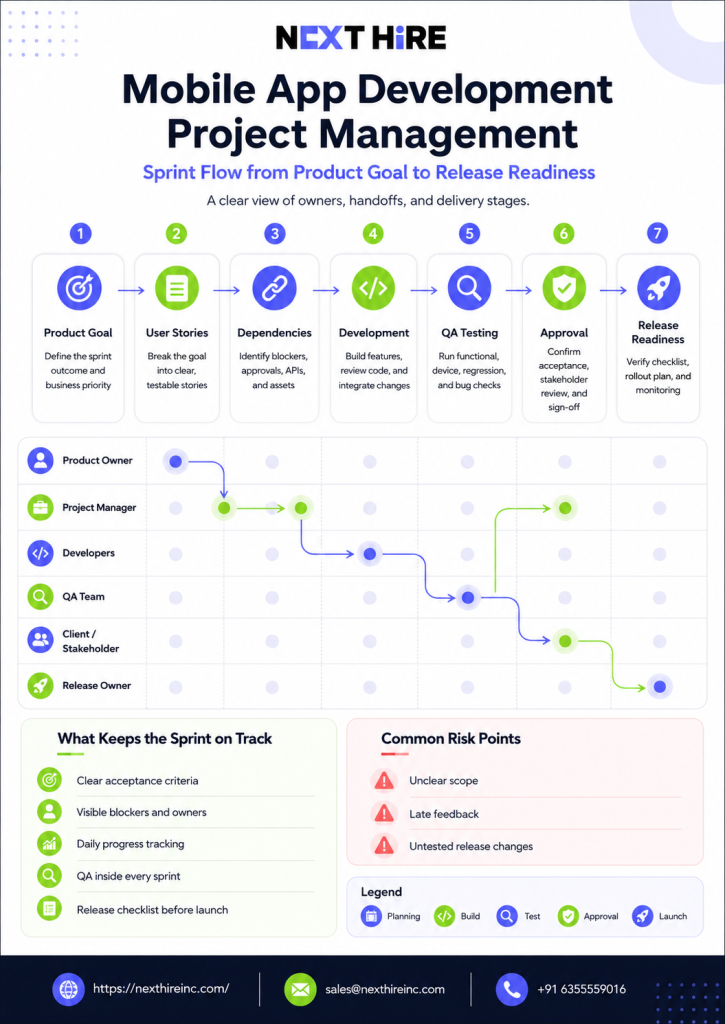
Mobile App QA Testing and the Software QA Process
Mobile app QA testing should begin when requirements are written. Early QA involvement exposes missing edge cases, unclear acceptance criteria, and test-data needs before they become defects.
Android’s official testing guidance describes testing as an integral part of app development and recommends a strategy that combines different test types to catch regressions and verify compatibility. Google’s quality guidance also separates user experience, functionality, performance and stability, privacy, and security as core quality areas.
Build a Risk-Based Test Plan
Not every screen carries equal risk. Login, payment, data sync, account deletion, permissions, location, notifications, and offline behavior deserve more attention than a static information screen.
Rank flows by user impact, business impact, complexity, and likelihood of failure. The result guides device coverage, manual depth, automation, and release-blocking rules.
Security-sensitive apps also need explicit coverage for authentication, data storage, permissions, API access, session handling, and third-party libraries. A structured mobile app security testing checklist can help teams identify security checks that may otherwise be missed during functional QA.
Test Across Layers
A complete software QA process checks more than the interface. Unit tests validate logic, integration tests check connected components, UI tests verify critical flows, and exploratory testing finds unexpected combinations.
Mobile app QA testing also needs real-device checks. Emulators are useful and fast, but they do not fully represent camera behavior, biometric authentication, battery constraints, push notifications, network changes, memory pressure, and manufacturer-specific Android differences.
Automation is most useful for stable, repetitive, and release-critical workflows. Teams with frequent releases may use dedicated automation testers to build regression suites that check important flows whenever the code changes.
Keep a Traceable Bug Workflow
A useful bug report records the build, device, operating system, environment, test data, reproduction steps, expected and actual results, severity, evidence, and owner. Missing context wastes developer time.
Severity and priority should remain separate. A cosmetic issue may have low severity but high priority before a major campaign. A rare crash may have high severity but lower immediate priority if it affects an unsupported legacy device. Mobile app development project management should make that tradeoff visible instead of hiding it inside QA.
Run Regression at the Right Depth
Full regression before every small internal build can slow the team. No regression before release creates obvious risk. The answer is a tiered approach.
Test the changed feature deeply, retest connected areas, run automated checks on every build, and reserve broader manual regression for release candidates. Expand scope when a change touches authentication, navigation, payments, storage, or API contracts.
Performance regression also matters as features accumulate. Load time, memory usage, API response time, startup speed, battery use, and crash frequency should be reviewed over multiple releases. The guide to mobile app performance optimization explains the technical areas teams should monitor when an app becomes slower or less stable.
When a project needs delivery support across development and QA, Next Hire Inc can help assemble remote specialists around the existing workflow. Its mobile app development talent page covers iOS, Android, Flutter, backend connections, and app store readiness, while its QA and testing service supports manual testing, automation, regression, cross-device testing, and performance checks.
For teams that need to move quickly, Next Hire Inc can deliver a candidate shortlist within 24 hours, begin onboarding within 24 to 48 hours, and offer a three-day free trial. Pricing starts at $5 per hour, monthly plans start at $799, and clients receive account management and backup resource support without hidden recruitment or onboarding fees.
Software Release Management for Mobile Apps
Software release management turns a tested build into a controlled rollout. It covers version selection, approvals, signing, store setup, compliance information, release notes, monitoring, and incident response.
In mobile app development project management, every release needs one accountable owner, such as the project manager, engineering lead, or release manager.
Create a Release Candidate
Identify one build as the release candidate and stop adding nonessential changes. QA, stakeholders, and store submissions must all use that build.
Changing code after approval invalidates part of the evidence. Even a small “safe” fix can create a new regression. Mobile app development project management needs a clear rule for when a candidate is rejected, replaced, and retested.
Use Beta and Testing Tracks
Apple’s TestFlight lets teams distribute prerelease builds to testers and collect feedback before an App Store release. Google Play supports internal, closed, and open testing tracks before production.
Give each environment a purpose. Internal testing checks basic readiness, stakeholder testing confirms business expectations, and external beta testing gathers broader device and behavior feedback when justified.
Control Production Rollout
A staged rollout reduces exposure when releasing an update. Google Play allows teams to send an update to a percentage of users and increase that percentage over time, while monitoring crash reports and feedback. Apple also supports phased release for version updates.
Define success and stop conditions before rollout begins, such as crash-free usage, API errors, login success, payment completion, support volume, or a key funnel metric. Someone must watch the signals and have authority to pause.
Prepare Rollback and Hotfix Paths
Mobile rollback is not always instant because users may already have the update and store review can add delay. Know whether the team can disable a feature, revert backend changes, restore API compatibility, or submit a hotfix.
Feature flags, backward-compatible APIs, database migration planning, and tested emergency procedures reduce release risk. These technical choices belong in project planning because they affect schedule, QA scope, and business continuity.
API controls are especially important when a mobile release depends on authentication tokens, user data, external services, and backend permissions. The team should review its mobile app API security approach before making changes that could expose data or break compatibility between app versions.
Release management should also continue after deployment. Monitoring, bug triage, security patches, operating system compatibility, and incremental improvements are all part of ongoing mobile app maintenance services, not separate concerns that begin only when users complain.
Project Management Software With Client Portal Access
Within mobile app development project management, project management software with client portal access should give stakeholders useful control without exposing every internal conversation.
Clients usually need five things: what is complete, what is in progress, what is blocked, which decisions are waiting on them, and whether scope or timing has changed. They do not need a constant stream of raw developer comments.
A good portal separates internal working detail from the client view. Clients should see milestones, approved scope, demos, risks, decisions, release dates, and budget impact.
The portal should preserve an approval trail for designs, requirement changes, releases, and schedule adjustments. Record each decision with a date and context.
Project Management Dashboard Software: What Should It Show?
Project management dashboard software should help people decide, not simply display activity. A dashboard full of ticket counts can look impressive while hiding the fact that the release goal is at risk.
For mobile app development project management, the most useful dashboard combines outcome progress, quality, release readiness, and decision status. GitHub milestones, for example, can group issues and pull requests and show progress against a defined milestone, but the business dashboard still needs context around risk and client action.
| Dashboard Area | What to Show | Question It Answers |
| Sprint goal | Goal, confidence level, completed outcomes | Are we likely to achieve the sprint result? |
| Scope | Approved stories, added work, removed work | Has the commitment changed? |
| Delivery flow | In progress, review, QA, blocked, done | Where is work slowing down? |
| Quality | Open critical bugs, regression status, test coverage | Is the build becoming safer? |
| Release | Candidate build, approvals, store status, rollout stage | What remains before users receive it? |
| Risks | Risk, impact, owner, mitigation date | What could change cost or timing? |
| Client decisions | Decision needed, options, deadline, impact | What must the client answer next? |
| Budget | Used, forecast, approved changes | Are we still within the agreed commercial plan? |
Show trends where possible. Rising bugs, repeated carryover, or growing blocked time matter more than one snapshot. Link the dashboard to demos, test reports, approved designs, and release notes.
What Good Delivery Looks Like Day to Day
Good delivery feels predictable even when the work is complex. The team knows the current goal, the next release, the top risk, and the decisions needed from the client.
Daily coordination should focus on movement and blockers. A short team sync asks what changed, what is stuck, and whether the sprint goal is threatened. Detailed problem-solving happens with the relevant people afterward.
Mobile app development project management keeps the backlog ready, dependencies owned, decisions moving, and completed work flowing into review and QA. The product owner protects priority and clarifies acceptance criteria.
Clients need a regular outcome-based update covering what became usable, what comes next, what changed, active risks, and decision deadlines. A demo is stronger than a percentage-complete claim.
Mobile app development project management also needs disciplined change control. A new request should include the reason, urgency, affected work, estimated effort, and impact on the release. The client can then choose to swap scope, extend timing, approve cost, or defer the request.
A Practical Framework for Startups and Small Teams
Small teams often say, “I do not have time to manage developers.” The real requirement is not constant supervision. It is a lightweight operating system that makes exceptions visible.
Start with one accountable product decision-maker, one delivery owner, one prioritized backlog, one weekly demo, one decision log, and one release checklist. Add process only when a recurring failure proves it is needed.
Cost control should focus on unfinished work and rework, not only hourly rates. Unclear requirements, slow approvals, late QA, and repeated carryover make any team expensive. Founders setting an initial budget can use a detailed mobile app development cost guide to understand how scope, platform choice, backend complexity, design, testing, and team structure affect the overall investment.
In mobile app development project management, startups can apply stronger planning to architecture, security, payments, and launch-critical flows, while lower-risk enhancements move through a flexible queue.
How to Choose a Mobile App Development Project Management Approach
Choose the lightest approach that still controls your biggest risks. Use these questions as a practical decision framework:
- Is the product goal clear enough that the team can explain the next usable outcome in one sentence?
- Are scope, acceptance criteria, dependencies, and client decisions visible before work enters a sprint?
- Does the software QA process provide evidence across functionality, devices, integrations, performance, privacy, and security?
- Can the team identify one release candidate, one release owner, defined rollout checks, and a response plan?
- Does the client view show outcomes, risks, decisions, timing, and budget impact without requiring daily ticket management?
If several answers are no, adding more project management software will not solve the problem by itself. Fix ownership, decision flow, quality rules, and release discipline first. The tool should support the operating model, not substitute for it.
Conclusion
Mobile app development project management works when planning, execution, QA, release control, and stakeholder decisions operate as one system. Sprint goals keep teams focused. Clear acceptance criteria reduce interpretation. Continuous QA creates evidence. Release controls reduce user exposure. Dashboards make the important decisions visible.
The best process helps the team deliver small usable increments, surface risks early, and give clients enough control to make informed choices without slowing daily work.
If your roadmap is clear but the team capacity is not, Next Hire Inc can help you book a call to discuss the development, QA, and delivery roles needed for the next stage. The conversation can start with your current workflow and release goals rather than a generic hiring package.
Frequently Asked Questions
What does a mobile app project manager do?
A mobile app project manager connects product scope, design, engineering, QA, releases, risks, and stakeholder decisions. The role keeps work ready, dependencies visible, approvals timely, and delivery aligned with the business outcome.
How long should a mobile app development sprint be?
Many teams use one-week or two-week sprints because they create frequent planning, review, and adjustment points. The right length depends on team maturity, release risk, and how quickly stakeholders can review working software.
When should mobile app QA testing begin?
Mobile app QA testing should begin during requirement and acceptance-criteria review. Test execution continues throughout development, with deeper regression and release checks applied to the release candidate.
What should be included in a mobile app release checklist?
Include the approved build, test status, unresolved issues, release notes, analytics, privacy and store information, signing, stakeholder approval, rollout plan, monitoring metrics, and hotfix or rollback steps. Assign an owner and record completion for each item.
How much client involvement is needed during app development?
Clients should own business priorities, timely decisions, acceptance, and major scope changes. They should not need to manage every developer task when the project has a clear product owner, delivery lead, weekly demo, decision log, and client-facing dashboard.